• ×
    Information
    Need Windows 11 help?
    Check documents on compatibility, FAQs, upgrade information and available fixes.
    Windows 11 Support Center.
  • post a message
  • ×
    Information
    Need Windows 11 help?
    Check documents on compatibility, FAQs, upgrade information and available fixes.
    Windows 11 Support Center.
  • post a message
Guidelines
Webcam Not Working? Advanced Fixes for HP Notebooks! Click here to view the instructions!
Common problems for Battery
We would like to share some of the most frequently asked questions about: Battery Reports, Hold a charge, Test and Calibrating Battery . Check out this link: Is your notebook plugged in and not charging?
HP Recommended

My hp laptop isn't charging.

When I plug it in it remains at the same charge it was when I plugged it in instead of increasing. What is the problem or what can I do to try and resolve the issue of my laptop not charging.

The laptop model is: 15s-fq5016ni

2 REPLIES 2
HP Recommended

Please run the battery report and post the summery
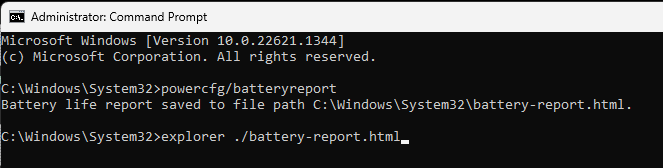
you run the battery report by bringing up the administrator command window and running

powercfg/batteryreport


as shown below


After entering that explorer line you should see something like the following. You will have to click on it as it is long
http://stateson.net/docs/SP4_battery-report.html
You can use the WindowsKey + shift + S to copy and paste a small image if you want.
Battery should last about 5 years but less for gaming systems.


Have you done a battery calibration?

Possibly this will fix the problem as the battery may actual be fully charged but the laptop does not know it.


I looked at your BIOS revision history and did not see any "fix" for a battery so I cannot recommend a BIOS update.


Have you run diagnostics?

Tap the ESC key after powering on and press F2 to run diagnostics.
Do not allow any updates if disk or memory fail, especially a BIOS update.


Thank you for using HP products and posting to the community.
I am a community volunteer and do not work for HP. If you find
this post useful click the Yes button. If I helped solve your
problem please mark this as a solution so others can find it
HP Recommended

From what I see in the manuals, your laptop is from around the 2019 market year.


With that in mind, consider that laptop batteries do not last forever.  Most people get about two to three years of service life from a laptop battery.


If your laptop still powers on with the power adapter connected, that shows that your charging/power circuit is operating normally.


It is time to replace the battery with a new compatible unit.


The Maintenance & Service guide for your laptop. (for parts reference)

https://h10032.www1.hp.com/ctg/Manual/c08289069.pdf

The replacement battery  description and HP Part Number

(3 cell, 41 Wh)                              L11119-855


You can replace it yourself or have it done at a laptop shop.


There are videos online describing the replacement procedure on YouTube.


I am a volunteer forum member. If my suggestion helped you solve your issue, help others by marking that post as the accepted solution. Say thanks by clicking on the Yes button next to the "was this reply helpful?"


† The opinions expressed above are the personal opinions of the authors, not of HP. By using this site, you accept the <a href="https://www8.hp.com/us/en/terms-of-use.html" class="udrlinesmall">Terms of Use</a> and <a href="/t5/custom/page/page-id/hp.rulespage" class="udrlinesmall"> Rules of Participation</a>.