-
×InformationNeed Windows 11 help?Check documents on compatibility, FAQs, upgrade information and available fixes.
Windows 11 Support Center. -

-
×InformationNeed Windows 11 help?Check documents on compatibility, FAQs, upgrade information and available fixes.
Windows 11 Support Center. -
- HP Community
- Notebooks
- Notebook Hardware and Upgrade Questions
- Laptop won't run with battery installed.

Create an account on the HP Community to personalize your profile and ask a question
08-12-2022 10:52 AM
My notebook runs on AC but won't run with the battery installed. I thought it was because the battery was no longer charged. I replaced it and though I could tell the notebook was running, there was no display. I booted it on AC without the battery and once fully booted, I inserted the new battery. It immediately went dark and it shut down. What's going on here?
08-15-2022 01:54 PM - edited 08-15-2022 01:58 PM
Hi @Andersm0,
Welcome to the HP Support Community
I understand you are facing an issue with your HP Notebook - 17-Bs010ca. Not to worry I will help you to get a resolution to resolve the issue.
To assist better:
- Did you install an Original HP Battery?
- Was there any update on the product?
While you respond to that, Let's perform a Crisis Bios Recovery:
Crisis BIOS Recovery
- Turn off the computer, and then connect the power cord.
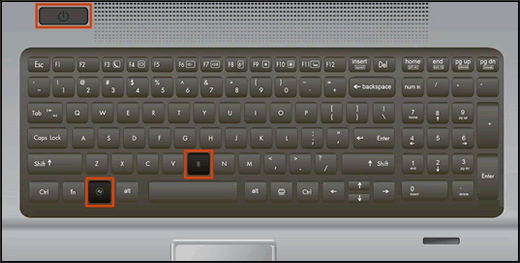
- Press and hold the Windows key and the B key at the same time, and then press and hold the Power button for 2 to 3 seconds.

- Release the Power button but continue pressing the Windows and B keys. You might hear a series of beeps.
- If the HP BIOS Update screen does not display, repeat the previous steps but press the Windows key and the V key. If the screen still does not display, your computer might not support the feature or there is a hard drive issue. Continue to the next section to Recover the BIOS using a USB recovery drive.
- If the Power light turns off, the Power button was held too long. Repeat the previous steps, making sure to hold the Power button for only 2 to 3 seconds.
- If a BIOS recovery message repeatedly displays, continue to the next section to Recover the BIOS using a USB recovery drive.
- If a message that the computer improperly shut down or a boot problem is detected displays, follow the on-screen instructions to resolve the error.
- If Windows starts, update to the latest BIOS version. Go to HP Notebook PCs - Updating the BIOS for more information.
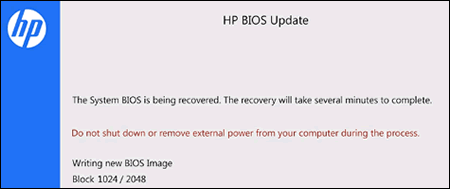
The HP BIOS Update screen displays and the recovery begins automatically.

Please refer to the below document as well:
- HP Notebook PCs - Battery does not power the notebook or hold a charge
- HP PCs - Computer does not start (Windows 10)
- HP Notebook PCs - Computer Starts but Screen Remains Blank (Windows 10, 😎
If the issue still persists, I'm sending out a private message to assist you with the next course of action.
Please check your Private message icon on the upper right corner of your HP Community profile Next, to your profile Name, you should see a little blue envelope, please click on it or simply click on this link.
Hope this helps! Keep me posted.
Please click “Accepted Solution” if you feel my post solved your issue, it will help others find the solution. Click the “Kudos/Thumbs Up" on the bottom right to say “Thanks” for helping!
ANAND_ANDY
I am an HP Employee
08-15-2022 02:25 PM
Thank-you, I'll check the Bios in a bit. I should have mentioned that when the laptop is on AC, there's a steady white light beside the power jack. As soon as the battery is in, whether the old one or the new, this light turns orange.