• ×
    Information
    Need Windows 11 help?
    Check documents on compatibility, FAQs, upgrade information and available fixes.
    Windows 11 Support Center.
  • post a message
  • ×
    Information
    Need Windows 11 help?
    Check documents on compatibility, FAQs, upgrade information and available fixes.
    Windows 11 Support Center.
  • post a message
Guidelines
Join the HP Community Solve‑a‑thon | Help Others & Share Your Solutions | Live on Zoom | 2:30 PM to 2:30 AM IST | Every Wednesday Click here to know more
Common problems for Battery
We would like to share some of the most frequently asked questions about: Battery Reports, Hold a charge, Test and Calibrating Battery . Check out this link: Is your notebook plugged in and not charging?
HP Recommended
Microsoft Windows 10 (64-bit)

Hi,


The laptop came pre-installed with a HDD. I want to add a SSD in parallel on the M2 slot provided.


1  Want to check if the slot supports Sata or PCIe or NVMe?

2. What is the form factor?

3. What is the maximum capacity of SSD I can put (250GB/500Gv)

1 ACCEPTED SOLUTION

Accepted Solutions
HP Recommended

Hi:


Below is the link to the service manual for your notebook's model series.


http://h10032.www1.hp.com/ctg/Manual/c06325755


The supported drive types can be found in chapter 1 on pages 4 & 5.


While it does not list a NVMe SSD as being supported, it does list that Intel Optane NVMe memory is supported, so if that is the case, a standard NVMe SSD would have to work.


You would be able to install a 250 GB or 500 GB NVMe SSD with no problem.  Probably even a 1 TB one as well.


It would be the M.2 2280 size.

View solution in original post

3 REPLIES 3
HP Recommended

Hi:


Below is the link to the service manual for your notebook's model series.


http://h10032.www1.hp.com/ctg/Manual/c06325755


The supported drive types can be found in chapter 1 on pages 4 & 5.


While it does not list a NVMe SSD as being supported, it does list that Intel Optane NVMe memory is supported, so if that is the case, a standard NVMe SSD would have to work.


You would be able to install a 250 GB or 500 GB NVMe SSD with no problem.  Probably even a 1 TB one as well.


It would be the M.2 2280 size.

HP Recommended

Thanks a lot @Paul_Tikkanen.


I have one more question. I read about different keys (B, M, B+M). As per the literature, B has 6 pins and notch on the left side while M has 5 pins and notch on the right side.I Ialso read that B key supports only Sata.


Where I am confused is that when I checked the M2 slot on my laptop, it had notch on left end but had 5 pins. Not sure what to make of it. I also read that B key supports only Sata.


Since i will have to order the SSD online and won't be able to return it if it's not compatible, just want to be sure before I buy.


Attaching a picture of the slot here

IMG_20200830_124310.jpg


HP Recommended

Hi:


The M.2 slot your notebook has would support a NVMe drive since the Intel Optane memory has to use a NVMe slot to work.


That is the best info I can provide to you.


A SATA M.2 drive would fit in the same slot, but it would not use some of the contacts.


However not all slots like yours are configured to have both a SATA or NVMe drive work.


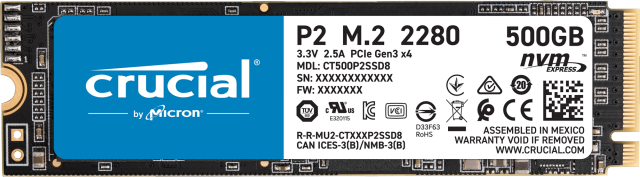
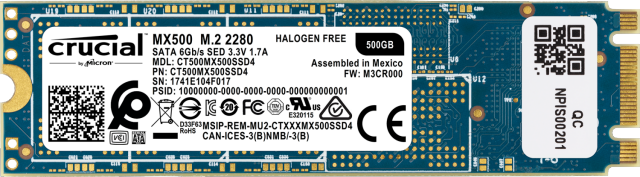
The difference between the drives are that a NVMe drive has one notch cut in it, and a SATA drive has two notches.


One that fits between the same place the NVMe drive does.


This is what a NVMe drive looks like...notice the notch will go between the left area of your M.2 slot's screenshot where there are no pins.


Crucial P2 500GB PCIe M.2 2280 SSD


This is what a SATA M.2 drive looks like...notice it has two notches and it would also fit, but I don't know if it would work.

Crucial MX500 500GB 3D NAND M.2 Type 2280 Internal SSD


† The opinions expressed above are the personal opinions of the authors, not of HP. By using this site, you accept the <a href="https://www8.hp.com/us/en/terms-of-use.html" class="udrlinesmall">Terms of Use</a> and <a href="/t5/custom/page/page-id/hp.rulespage" class="udrlinesmall"> Rules of Participation</a>.