-
×InformationNeed Windows 11 help?Check documents on compatibility, FAQs, upgrade information and available fixes.
Windows 11 Support Center. -

-
×InformationNeed Windows 11 help?Check documents on compatibility, FAQs, upgrade information and available fixes.
Windows 11 Support Center. -
- HP Community
- Notebooks
- Notebook Hardware and Upgrade Questions
- M2 SSD supported by BC406TX

Create an account on the HP Community to personalize your profile and ask a question
08-30-2020 11:28 AM
Hi,
The laptop came pre-installed with a HDD. I want to add a SSD in parallel on the M2 slot provided.
1 Want to check if the slot supports Sata or PCIe or NVMe?
2. What is the form factor?
3. What is the maximum capacity of SSD I can put (250GB/500Gv)
Solved! Go to Solution.
Accepted Solutions
08-30-2020 01:18 PM - edited 08-30-2020 01:20 PM
Hi:
Below is the link to the service manual for your notebook's model series.
http://h10032.www1.hp.com/ctg/Manual/c06325755
The supported drive types can be found in chapter 1 on pages 4 & 5.
While it does not list a NVMe SSD as being supported, it does list that Intel Optane NVMe memory is supported, so if that is the case, a standard NVMe SSD would have to work.
You would be able to install a 250 GB or 500 GB NVMe SSD with no problem. Probably even a 1 TB one as well.
It would be the M.2 2280 size.
08-30-2020 01:18 PM - edited 08-30-2020 01:20 PM
Hi:
Below is the link to the service manual for your notebook's model series.
http://h10032.www1.hp.com/ctg/Manual/c06325755
The supported drive types can be found in chapter 1 on pages 4 & 5.
While it does not list a NVMe SSD as being supported, it does list that Intel Optane NVMe memory is supported, so if that is the case, a standard NVMe SSD would have to work.
You would be able to install a 250 GB or 500 GB NVMe SSD with no problem. Probably even a 1 TB one as well.
It would be the M.2 2280 size.
09-01-2020 05:39 AM
Thanks a lot @Paul_Tikkanen.
I have one more question. I read about different keys (B, M, B+M). As per the literature, B has 6 pins and notch on the left side while M has 5 pins and notch on the right side.I Ialso read that B key supports only Sata.
Where I am confused is that when I checked the M2 slot on my laptop, it had notch on left end but had 5 pins. Not sure what to make of it. I also read that B key supports only Sata.
Since i will have to order the SSD online and won't be able to return it if it's not compatible, just want to be sure before I buy.
Attaching a picture of the slot here
09-01-2020 07:11 AM
Hi:
The M.2 slot your notebook has would support a NVMe drive since the Intel Optane memory has to use a NVMe slot to work.
That is the best info I can provide to you.
A SATA M.2 drive would fit in the same slot, but it would not use some of the contacts.
However not all slots like yours are configured to have both a SATA or NVMe drive work.
The difference between the drives are that a NVMe drive has one notch cut in it, and a SATA drive has two notches.
One that fits between the same place the NVMe drive does.
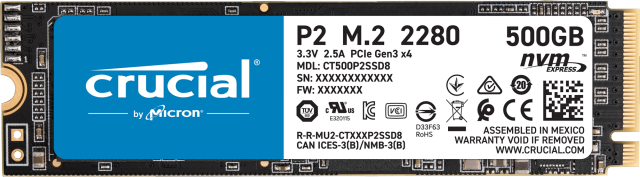
This is what a NVMe drive looks like...notice the notch will go between the left area of your M.2 slot's screenshot where there are no pins.

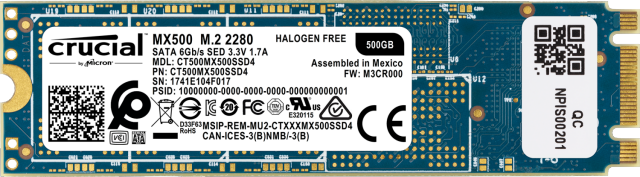
This is what a SATA M.2 drive looks like...notice it has two notches and it would also fit, but I don't know if it would work.