-
×InformationNeed Windows 11 help?Check documents on compatibility, FAQs, upgrade information and available fixes.
Windows 11 Support Center. -

-
×InformationNeed Windows 11 help?Check documents on compatibility, FAQs, upgrade information and available fixes.
Windows 11 Support Center. -
- HP Community
- Notebooks
- Notebook Hardware and Upgrade Questions
- Re: Max Supported RAM

Create an account on the HP Community to personalize your profile and ask a question
03-17-2024 02:33 AM
Can I update the RAM to 16 GB from 8 GB, in this HP Model - HP 14 EF1002TU?
Solved! Go to Solution.
Accepted Solutions
03-17-2024 03:33 AM
You can max it out at 32 if you want according to Crucial
https://www.crucial.com/compatible-upgrade-for/hp-compaq/hp-14s-ef1002tu
It is also possible the memory they have is newer than and has a different chip manufacture and is no longer compatible. Always make sure the vendor allows returns.
I recommend you obtain a matching stick of memory. If you have 8 then and another 8
If you have a pair of 4 then both need to be replaced and that is when a problem can arise
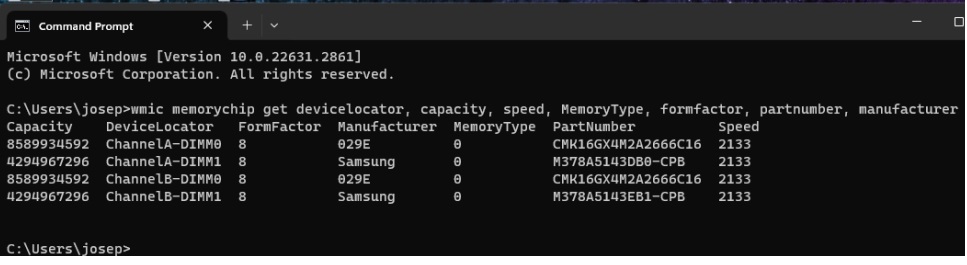
Using the windows command prompt, please run the following command and report back what it reveals if you want.
wmic memorychip get devicelocator, capacity, speed, MemoryType, formfactor, partnumber, manufacturer |
for example
Using any search engine lookup the part number for the memory and find a vendor near you that is in your budget. It is more difficult to replace the existing memory with larger ones and even professional memory finders from Kingston or Crucial can result in returned memory that did not work.
If you have a single 8gb stick then search for a used one on eBay or use the HP store
Thank you for using HP products and posting to the community.
I am a community volunteer and do not work for HP. If you find
this post useful click the Yes button. If I helped solve your
problem please mark this as a solution so others can find it
03-17-2024 03:33 AM
You can max it out at 32 if you want according to Crucial
https://www.crucial.com/compatible-upgrade-for/hp-compaq/hp-14s-ef1002tu
It is also possible the memory they have is newer than and has a different chip manufacture and is no longer compatible. Always make sure the vendor allows returns.
I recommend you obtain a matching stick of memory. If you have 8 then and another 8
If you have a pair of 4 then both need to be replaced and that is when a problem can arise
Using the windows command prompt, please run the following command and report back what it reveals if you want.
wmic memorychip get devicelocator, capacity, speed, MemoryType, formfactor, partnumber, manufacturer |
for example
Using any search engine lookup the part number for the memory and find a vendor near you that is in your budget. It is more difficult to replace the existing memory with larger ones and even professional memory finders from Kingston or Crucial can result in returned memory that did not work.
If you have a single 8gb stick then search for a used one on eBay or use the HP store
Thank you for using HP products and posting to the community.
I am a community volunteer and do not work for HP. If you find
this post useful click the Yes button. If I helped solve your
problem please mark this as a solution so others can find it