• ×
    Information
    Need Windows 11 help?
    Check documents on compatibility, FAQs, upgrade information and available fixes.
    Windows 11 Support Center.
  • post a message
  • ×
    Information
    Need Windows 11 help?
    Check documents on compatibility, FAQs, upgrade information and available fixes.
    Windows 11 Support Center.
  • post a message
Guidelines
Webcam Not Working? Advanced Fixes for HP Notebooks! Click here to view the instructions!
Common problems for Battery
We would like to share some of the most frequently asked questions about: Battery Reports, Hold a charge, Test and Calibrating Battery . Check out this link: Is your notebook plugged in and not charging?
HP Recommended
HP 15-bs186nz
Microsoft Windows 10 IOT

Hi there,


I have a HP 15-bs186nz laptop. Suddenly, the battery is not charging anymore (it shows 1%, so as soon as I unplug it, it shuts down instantly.


I ran the diagnostics and got the following error code: 9C423S-92WA6C-XD7UQK-C6AE03; burned fuse (42). Since the warranty has recently expired, I could not get any help from HP.


Could you please advise how to find the fuse partnumber and order it online?


Many thanks and kind regards!

1 ACCEPTED SOLUTION

Accepted Solutions
HP Recommended

Yes. As per the Diagnostic Test it is an issue with the Battery and it needs to be replaced


You can contact HP Support in your Region for Service Options


1) Click on this link - www.hp.com/contacthp/ 
2) Select your product type below.
3) Enter the serial of your device. 
4) Select the country from the drop-down. 
5) Select the chat or get phone number options based on your preferences. 
6) Fill the web-form and proceed further.


Thank you


KrazyToad
I Am An HP Employee

View solution in original post

3 REPLIES 3
HP Recommended

@EMZA-CH


Welcome to HP Community


I have gone through your Post and would like to help


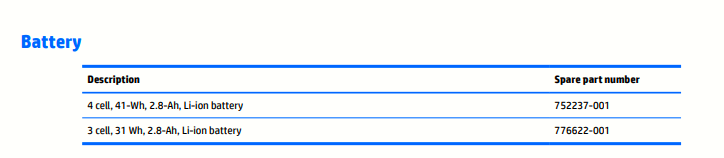
As per the Service Guide: http://h10032.www1.hp.com/ctg/Manual/c04763947, the Notebook is compatible with the following Battery


You can also contact HP Support in your region for Battery Replacement


1) Click on this link - www.hp.com/contacthp/ 
2) Select your product type below.
3) Enter the serial of your device. 
4) Select the country from the drop-down. 
5) Select the chat or get phone number options based on your preferences. 
6) Fill the web-form and proceed further.
 

Thank you


If the information I've provided was helpful, give us some reinforcement by clicking the "Solution Accepted" on this Post and it will also help other community members with similar issue.
 

KrazyToad
I Am An HP Employee

HP Recommended

Hi,


Thank you for your reply.

Does this mean that the complete battery needs to be replaced? At my previous laptop, I had the same issue, bought a new battery, but it still could not be charged.


Kindest regards,

EMZA

HP Recommended

Yes. As per the Diagnostic Test it is an issue with the Battery and it needs to be replaced


You can contact HP Support in your Region for Service Options


1) Click on this link - www.hp.com/contacthp/ 
2) Select your product type below.
3) Enter the serial of your device. 
4) Select the country from the drop-down. 
5) Select the chat or get phone number options based on your preferences. 
6) Fill the web-form and proceed further.


Thank you


KrazyToad
I Am An HP Employee

† The opinions expressed above are the personal opinions of the authors, not of HP. By using this site, you accept the <a href="https://www8.hp.com/us/en/terms-of-use.html" class="udrlinesmall">Terms of Use</a> and <a href="/t5/custom/page/page-id/hp.rulespage" class="udrlinesmall"> Rules of Participation</a>.