• ×
    Information
    Need Windows 11 help?
    Check documents on compatibility, FAQs, upgrade information and available fixes.
    Windows 11 Support Center.
  • post a message
  • ×
    Information
    Need Windows 11 help?
    Check documents on compatibility, FAQs, upgrade information and available fixes.
    Windows 11 Support Center.
  • post a message
Guidelines
Webcam Not Working? Advanced Fixes for HP Notebooks! Click here to view the instructions!
Common problems for Battery
We would like to share some of the most frequently asked questions about: Battery Reports, Hold a charge, Test and Calibrating Battery . Check out this link: Is your notebook plugged in and not charging?
HP Recommended
HP Notebook 14-cf0006ne (4UF13EA)
Microsoft Windows 10 (64-bit)

Hi all,


My new laptop came with 4GB RAM, and I need to add another 4GB. I checked the memory module specs in my laptop’s Maintenance and Service Guide and this is an excerpt:

“DDR4-2666 bridge to DDR4-2400 dual channel support (i7-8565U, i5-8265U processors)

DDR4-2400 dual channel support (i7-8500U, i5-8250U, i3-8130U processors)”


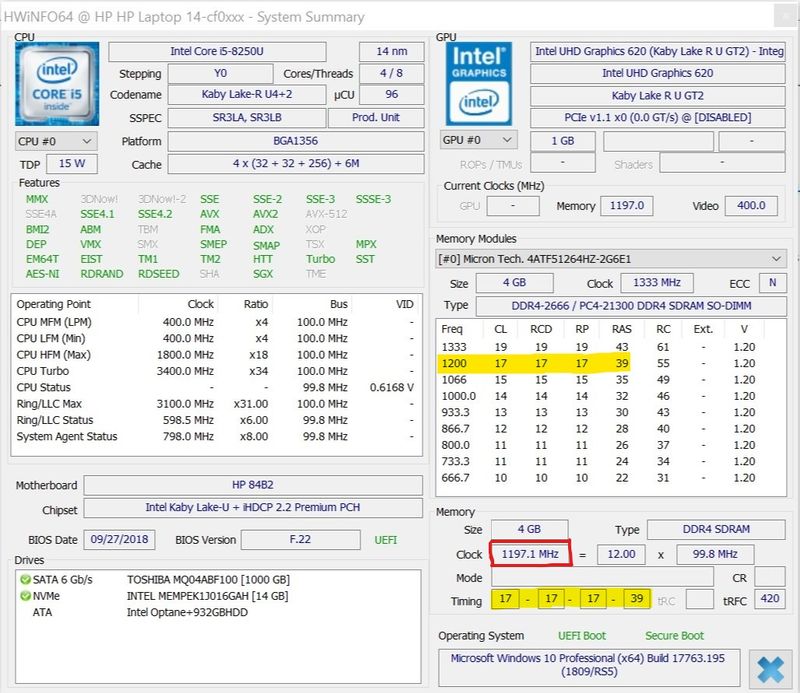
So in a perfect world, since my CPU is i5-8250U I should get a 4GB DDR4-2400 module, and end of story. I thought it would be better to match with the existing module so I looked it up using HWiNFO and CPU-Z, but was surprised to find it DDR4-2666 not 2400 as supposed to be, although actually running at 2400MHz as shown in the screen shot!


HWInfo2.jpg

 So now I’ve become confused and have 3 questions:


1. Does this mean that my laptop has a DDR4-2666 bridge to DDR4-2400 instead of just DDR4-2400 as shown in the manual? Or maybe HP just simply ran out of DDR4-2400, so they used a higher compatible module?


2. What is this DDR4-2666 bridge to DDR4-2400 anyway, and what’s the use of it if it will be running at the lower speed of 2400MHz? Moreover, I looked up i7-8565U and i5-8265U CPUs on Intel website and it specifies DDR4-2400 for both not 2666! So why is HP using this bridge for them?


3. Which speed should I get for my laptop, 2666 or 2400? Even though it’s a bit more expensive and it doesn’t really make much sense to me since it will be running at 2400 only, I feel more inclined to getting 2666 in order to match with existing. Should I do this, or follow the manual?


Appreciate your replies.

1 ACCEPTED SOLUTION

Accepted Solutions
HP Recommended

Hi:


Since your notebook has the 8250U processor, the 'bridge' term does not apply, according to the manual.


I don't even know what the term means since the other processors mentioned in the 'bridge spec' also run at 2400 Mhz.


I cannot find a definition for bridge as to how it pertains to the subject at hand.


Your processor runs at 2400 Mhz, so the 2600 MHz memory downclocks to 2400 Mhz.


I don't believe that HP ran out of the PC2400 memory.


They probably install it for the entire model series.


What should you do?


If it were me, I would buy a chip with matching specs as the one in there now.

View solution in original post

3 REPLIES 3
HP Recommended

Hi:


Since your notebook has the 8250U processor, the 'bridge' term does not apply, according to the manual.


I don't even know what the term means since the other processors mentioned in the 'bridge spec' also run at 2400 Mhz.


I cannot find a definition for bridge as to how it pertains to the subject at hand.


Your processor runs at 2400 Mhz, so the 2600 MHz memory downclocks to 2400 Mhz.


I don't believe that HP ran out of the PC2400 memory.


They probably install it for the entire model series.


What should you do?


If it were me, I would buy a chip with matching specs as the one in there now.

HP Recommended

@Paul_Tikkanen

Thank you very much for your reply.


Since my notebook is still under warranty, I checked with my local HP Support as well. They informed me that it wouldn't make any difference, but I decided to follow your advice and go for matching specs. I was able to get an identical RAM chip online, and now I'm happily running a PC with 8GB RAM :generic:

HP Recommended

You're very welcome.

† The opinions expressed above are the personal opinions of the authors, not of HP. By using this site, you accept the <a href="https://www8.hp.com/us/en/terms-of-use.html" class="udrlinesmall">Terms of Use</a> and <a href="/t5/custom/page/page-id/hp.rulespage" class="udrlinesmall"> Rules of Participation</a>.