• ×
    Information
    Need Windows 11 help?
    Check documents on compatibility, FAQs, upgrade information and available fixes.
    Windows 11 Support Center.
  • post a message
  • ×
    Information
    Need Windows 11 help?
    Check documents on compatibility, FAQs, upgrade information and available fixes.
    Windows 11 Support Center.
  • post a message
Guidelines
Join the HP Community Solve‑a‑thon | Help Others & Share Your Solutions | Live on Zoom | 2:30 PM to 2:30 AM IST | Every Wednesday Click here to know more
Common problems for Battery
We would like to share some of the most frequently asked questions about: Battery Reports, Hold a charge, Test and Calibrating Battery . Check out this link: Is your notebook plugged in and not charging?
HP Recommended
15-af108ax
Microsoft Windows 10 (64-bit)

Hi there

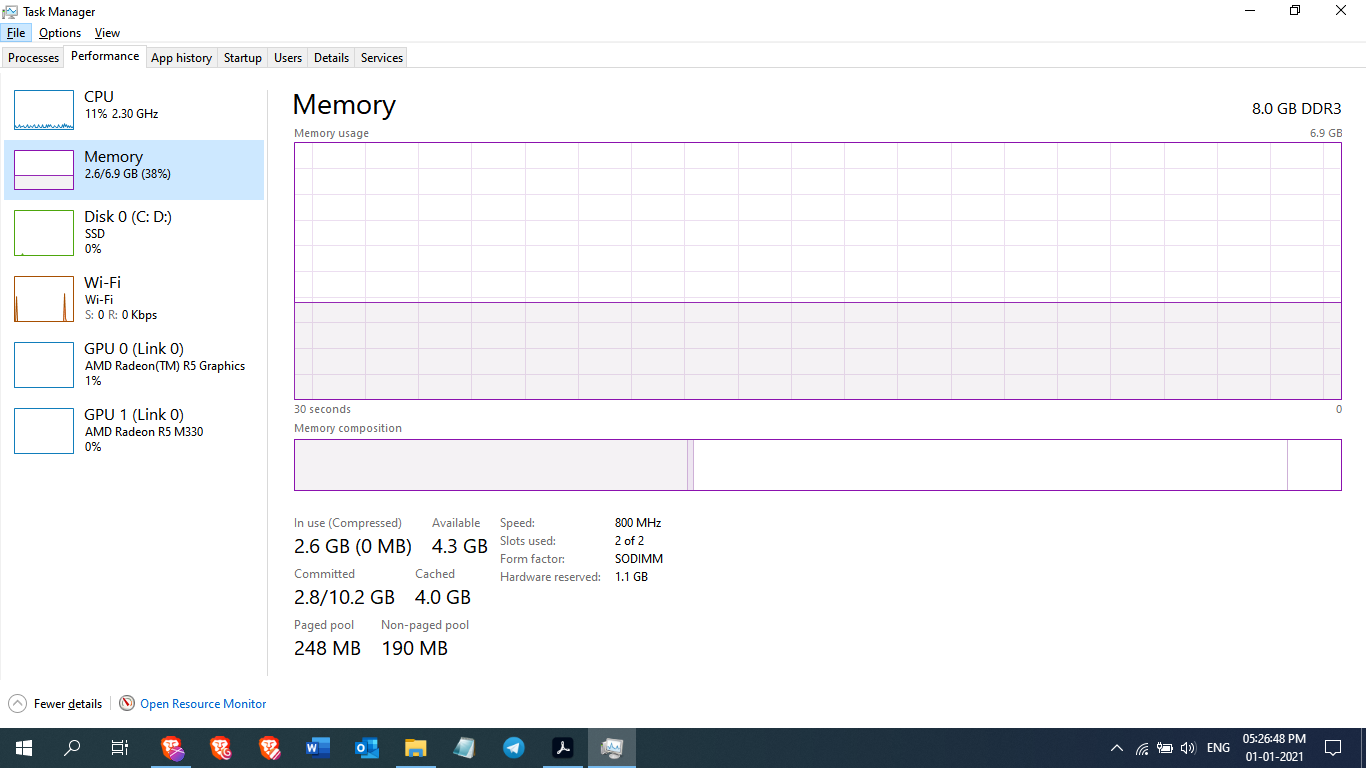
my laptop hp 15 af108ax (specs here : https://support.hp.com/in-en/document/c04946219 )had 4gb of ram and now i have upgraded to 8 gb (4+4 [DDR3L]) My module speeds are 1600 mHz when the memory was 4gb windows task manager showed speed as 800mHz but now after upgrade still the speed is  800 mhz. 

any help is highly appreciated  

1 ACCEPTED SOLUTION

Accepted Solutions
HP Recommended

Hi:


Below is the link to the service manual for your notebook.


HP Notebook PC (AMD)HP 255 G4 Notebook PC Maintenance and Service Guide


Chapter 1, page 1 indicates the memory runs in single channel mode even if you install 2 of the same capacity memory chips.


Memory Two non-customer-accessible/upgradable memory module slots
DDR3L-1600 single channel support (DDR3L-1600 downgrade to DDR3L-1333)
DDR3L-1600 single channel support


So, your notebook's memory report is normal. 


The memory runs at 800 MHz in single channel mode, and you multiply the report x 2 when the memory runs in dual channel mode.

View solution in original post

1 REPLY 1
HP Recommended

Hi:


Below is the link to the service manual for your notebook.


HP Notebook PC (AMD)HP 255 G4 Notebook PC Maintenance and Service Guide


Chapter 1, page 1 indicates the memory runs in single channel mode even if you install 2 of the same capacity memory chips.


Memory Two non-customer-accessible/upgradable memory module slots
DDR3L-1600 single channel support (DDR3L-1600 downgrade to DDR3L-1333)
DDR3L-1600 single channel support


So, your notebook's memory report is normal. 


The memory runs at 800 MHz in single channel mode, and you multiply the report x 2 when the memory runs in dual channel mode.

† The opinions expressed above are the personal opinions of the authors, not of HP. By using this site, you accept the <a href="https://www8.hp.com/us/en/terms-of-use.html" class="udrlinesmall">Terms of Use</a> and <a href="/t5/custom/page/page-id/hp.rulespage" class="udrlinesmall"> Rules of Participation</a>.