• ×
    Information
    Need Windows 11 help?
    Check documents on compatibility, FAQs, upgrade information and available fixes.
    Windows 11 Support Center.
  • post a message
  • ×
    Information
    Need Windows 11 help?
    Check documents on compatibility, FAQs, upgrade information and available fixes.
    Windows 11 Support Center.
  • post a message
Guidelines
Seize the moment! nominate yourself or a tech enthusiast you admire & join the HP Community Experts!
Common problems for Battery
We would like to share some of the most frequently asked questions about: Battery Reports, Hold a charge, Test and Calibrating Battery . Check out this link: Is your notebook plugged in and not charging?
HP Recommended
HP 15 da-0077tx
Microsoft Windows 10 (64-bit)

I Bought HP 15 da-0077tx recently and. I am Not Happy With It's Speed. So I decided For A M.2 Nvme SSD Upgrade. Will I be able To Boot From It. I watched A Couple Of Videos Saying Enable Secure Boot, And Turn On Legacy Support .But The Secure Boot Is Disable In It And I Can Not Change It.

Please Help.

1 ACCEPTED SOLUTION

Accepted Solutions
HP Recommended

@Priyanshu1909 Welcome to HP Community!

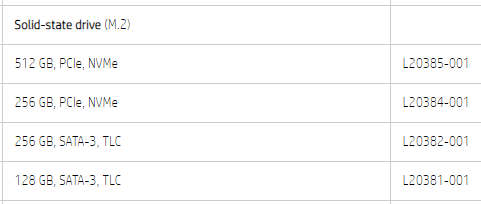
Here's what is supported by your device's M.2 SSD slot: Click here to verify


If the SSD upgrade you've got matches the above storage capacity, it should work, please make sure you turn off legacy support to check if it works, if it isn't detected, update the bios and then, look for the secure boot: click here to find and install the same.


Keep us posted,

If you would like to thank us for our efforts to help you, 

Give us a virtual high-five by clicking the 'Thumbs Up' icon below, followed by clicking on the "Accept as solution" on this post, 

Have a great day!

Riddle_Decipher
I am an HP Employee


Learning is a journey, not a destination.
Let's keep asking questions and growing together.

View solution in original post

1 REPLY 1
HP Recommended

@Priyanshu1909 Welcome to HP Community!

Here's what is supported by your device's M.2 SSD slot: Click here to verify


If the SSD upgrade you've got matches the above storage capacity, it should work, please make sure you turn off legacy support to check if it works, if it isn't detected, update the bios and then, look for the secure boot: click here to find and install the same.


Keep us posted,

If you would like to thank us for our efforts to help you, 

Give us a virtual high-five by clicking the 'Thumbs Up' icon below, followed by clicking on the "Accept as solution" on this post, 

Have a great day!

Riddle_Decipher
I am an HP Employee


Learning is a journey, not a destination.
Let's keep asking questions and growing together.
† The opinions expressed above are the personal opinions of the authors, not of HP. By using this site, you accept the <a href="https://www8.hp.com/us/en/terms-of-use.html" class="udrlinesmall">Terms of Use</a> and <a href="/t5/custom/page/page-id/hp.rulespage" class="udrlinesmall"> Rules of Participation</a>.