
-
×InformationNeed Windows 11 help?Check documents on compatibility, FAQs, upgrade information and available fixes.
Windows 11 Support Center. -
-
×InformationNeed Windows 11 help?Check documents on compatibility, FAQs, upgrade information and available fixes.
Windows 11 Support Center. -
- HP Community
- Notebooks
- Notebook Hardware and Upgrade Questions
- SSD slow on battery power with HP Envy x360 13

Create an account on the HP Community to personalize your profile and ask a question
Your account also allows you to connect with HP support faster, access a personal dashboard to manage all of your devices in one place, view warranty information, case status and more.
Common problems for Battery
We would like to share some of the most frequently asked questions about: Battery Reports, Hold a charge, Test and Calibrating Battery . Check out this link: Is your notebook plugged in and not charging?

It has been a while since anyone has replied. Simply ask a new question if you would like to start the discussion again.

02-10-2020 04:12 PM
 HP Recommended
Product: HP ENVY x360 13
Operating System: Microsoft Windows 10 (64-bit)
Hello,
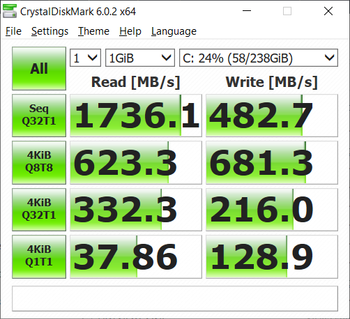
I have this problem with my HP Envy x360 13 -laptop where (NVMe) SSD speeds decrease significantly when in battery power. This is with the original SSD the laptop came with.
This can be seen on these benchmarks:
CrystalDiskMark, first on battery and second when plugged in

HD Tune, first on battery and second when plugged in


(these are run with windows power mode in best performance and HP thermal profile in HP Recommended mode)
As seen sequential read speed is almost four times faster when the laptop is plugged in. This is also apparent in normal usage, just opening programs is noticeably slower when in battery power.
I also did some digging with HWiNFO64 and found that the PCIE link speed for the SSD is 8.0 GT/s when plugged in and 2.5 GT/s on battery power. After this I tried to disable link state power management option in the Windows advanced power options, but this had no effect on either the transfer speeds or the PCIE link speed. So, could this be a BIOS issue?
This issue is quite annoying, since I am often working with transfer speed heavy workloads and I wouldn’t want to have the laptop be constantly plugged in.
6 REPLIES 6


02-13-2020 11:57 AM
HP Recommended
@Aviapolis Welcome to HP Community!
I understand that SSD speed is slow while laptop on the battery.
Do not worry. I will try to fix the issue.
Please be informed that while playing games or heavy-duty programs then it's normal for the computer to go slow a bit without AC Adapter since it needs more power for the CPU graphics etc to perform.
First please update the BIOS and check for the issue.
If the issue still persists, perform the below steps
Step 01. Click on the Start Button
Step 02. Type "Device Manager" in the start search box & open the Device Manager
Step 03. Look for Batteries and expand it by click on the + symbol on the left
Step 04. Right Click on "Microsoft ACPI Compliant Control Method Battery" & uninstall
Note: This Battery driver will get re-installed automatically when you restart the Notebook again
Step 05. Please restart the Notebook
Keep us posted,
If you would like to thank us for our efforts to help you,
Give us a virtual high-five by clicking the 'Thumbs Up' icon below, followed by clicking on the "Accept as solution" on this post,
Have a great day!
02-13-2020 12:43 PM
HP Recommended
Thank you for your response.
I managed to update my bios to version F.19, which was the latest version available to my laptop (13-ar0800no). This didn't seem to help with this issue. I also did what you suggested for re-installing the battery driver. Unfortunately this also did not help, the read-speeds still are almost four times faster when plugged in. The PCIE link speed for the SSD also shows the same behavior, 8GT/s when plugged in and 2.5GT/s when on battery.
I would guess that dropping the pcie link speed is some sort of power-saving method, but it would be nice to at-least have the option to disable it.
02-14-2020 08:51 AM
HP Recommended
04-06-2020 01:08 PM
HP Recommended
Hey,
just found your post through Google and am glad it seems to be a common issue. I guess many people probably don't recognize it with modern SSDs. I own a new Spectre X360 13 and did replace the original Intel Optante 512GB with a Samsung 970 Evo Plus 1TB SSD. The Samsung is amazingly fast (if it's run to its full capabilities) with 3500MByte/sec seq read/write in my Spectre X360 13). Did several tests using crystaldiskmark and that's when I noticed at some point, that my seq speeds regularly drop from 3500 to 850-900 MByte/sec. Though for me it doesn't seem to be the pure fact that the machine runs on battery. After a fresh boot on battery, SSD performs great. My feeling is, that the drop in performance starts after the machine is put into sleep/hibernate mode and then used after it has been woke up. Will keep investigating. But as stated, it's not a general "on battery power" issue, at least not for me. Just did a test right now. Machine was on battery, SSD benchmark max 900 MByte/sec. Plugged in power cable, not change in SSD performance. Reboot on battery power, power cable disconnected, SSD Performance 3500MByte/sec.
04-06-2020 02:01 PM
HP Recommended
Nice to hear that I’m not alone with this problem. Interesting that it also affects other models than the Envy x360. On my laptop the issue is definitely dependent on whether the laptop is plugged in or not. If I plug in the laptop in the middle of running a benchmark, I can see from task manager’s transfer rate graph that the speed jumps immediately and drops vice versa.
I’m fairly certain that it’s some power-saving feature coded in the BIOS or the laptops firmware. I tried running those benchmarks under Ubuntu and the results were the same, which rules out any OS-level power saving features and especially Windows drivers. As I noted in my first post this is quite surely related to the fact that the PCIE link speed drops from 8GT/s to 2.5GT/s. This is also in line with the fact that our speeds drop or increase with a ratio of around 3.5 to 4, which happens to be quite near the ratio of drop in the link speed.
04-06-2020 04:47 PM
HP Recommended
Hey,
well, yes this is really some weird issue. Right now, I am on battery for most of the evening. My last reboot is like 3 hours back. The machine has been in modern standby (S0 mode) for like 1 hour now. Just woke it up, and it still shows full SSD speeds at 3500MB/sec. Might very well be something with the PCIe link being cut outside of the OS on a bios level to save power, I just wonder how HP implemented this and what criteria are underlying to regulate the PCIe link speeds.
Anyway will keep investigating. I am still not ruling out some connection to the new, infamous "modern standby" mode. I'd really appreciate it if this crap would be optional and easy to disable. I tried disabling it in windows registry, which seems to do the job, but after that ... the regular standby (S3) results in the machine never waking up again. Need to hard reset and reboot.
Will keep you posted if I find out anything more on my side ....

Be alert for scammers posting fake support phone numbers and/or email addresses on the community.
If you think you have received a fake HP Support message, please report it to us by clicking on "Flag Post".
† The opinions expressed above are the personal opinions of the authors, not of HP. By using this site, you accept the Terms of Use and Rules of Participation.


Didn't find what you were looking for?
Ask the community
† The opinions expressed above are the personal opinions of the authors, not of HP. By using this site, you accept the <a href="https://www8.hp.com/us/en/terms-of-use.html" class="udrlinesmall">Terms of Use</a> and <a href="/t5/custom/page/page-id/hp.rulespage" class="udrlinesmall"> Rules of Participation</a>.