
-
×InformationNeed Windows 11 help?Check documents on compatibility, FAQs, upgrade information and available fixes.
Windows 11 Support Center. -
-
×InformationNeed Windows 11 help?Check documents on compatibility, FAQs, upgrade information and available fixes.
Windows 11 Support Center. -
- HP Community
- Notebooks
- Notebook Hardware and Upgrade Questions
- Smart Adapter Status 4

Create an account on the HP Community to personalize your profile and ask a question
Your account also allows you to connect with HP support faster, access a personal dashboard to manage all of your devices in one place, view warranty information, case status and more.
Common problems for Battery
We would like to share some of the most frequently asked questions about: Battery Reports, Hold a charge, Test and Calibrating Battery . Check out this link: Is your notebook plugged in and not charging?

It has been a while since anyone has replied. Simply ask a new question if you would like to start the discussion again.

07-30-2022 02:24 AM
 HP Recommended
Operating System: Microsoft Windows 11
Hi I am facing this problem for a week.
I have noticed that my laptops runs games better when not on charge compared to while its charging. This was not the case before, so I ran windows update, updated my driver and also the bios through the HP Support Assistant. This was to no avail as the problem still prevailed. So I ran the Diagnostic tests through the HP Support Assistant, The battery test was fine but the adapter test is giving me the following :

I would be grateful if you could help me with this.
Solved! Go to Solution.
1 ACCEPTED SOLUTION
Accepted Solutions
08-04-2022 07:11 AM
HP Recommended
Hi,
Finnally found the root cause of the issue, the charging port of the laptop seems to have been damaged, as the adapter test seems to pass when I put it the charging pin in some angles.
Thanks for the help
11 REPLIES 11

07-30-2022 03:36 AM
HP Recommended
Hello @KVR_Aditya
Sorry to hear that you are having problems ...
(1) You have to replace the charger:

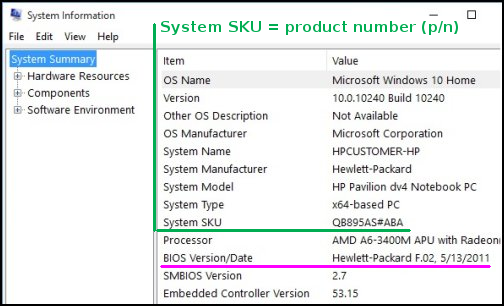
(2) To help you I need to know the product number (p/n) of your notebook !
You will find this information on the back/rear of your notebook in small alphanumeric letters.
The product number (p/n) is legally allowed information about the computer. This is not sensitive data.
It is allowed to publish it in public.
or
press [windows key] + r
( run command )
msinfo32
copy / paste the System SKU value and BIOS Version/Date value
07-30-2022 03:43 AM
HP Recommended
Hi @Ub6424,
(1) The laptop is chraging fine. Are you sure I would need to change the charger? (I double checked the adapter and the brick there are in a perfect fit)
(2) System SKU 498U8PA#ACJ and BIOS Version/Date AMI F.27, 17-03-2022.
Thanks.
07-30-2022 04:00 AM
HP Recommended
Hello @KVR_Aditya
(1) It looks like HP has deleted a newer BIOS version ( F.27 ) from the HP software repository, as there seem to have been problems:
Latest Bios -> F.25 Rev.A
HP prevents BIOS downgrades. You have to wait for the next updated Bios version.
If you are currently having problems contact HP support, an HP technician may be able to help you solve the problem.
(2) HP will suggest, as I did, that you replace the charger. There is no other option.
See HP Partsurfer:
https://partsurfer.hp.com/partsurfer?searchtext=498U8PA

08-03-2022 02:45 AM
HP Recommended
Hi @Ub6424,
As suggested I have gotten a new charger, but it still doesn't seem to work. I still get the same error. The battery test passes, and it also charges properly.

Is there something I might be missing here?
Thanks
08-03-2022 02:55 AM
HP Recommended
Hello @KVR_Aditya
- power off computer
- disconnect charger
- press and hold <power button> for 30 seconds
- connect charger
- power on computer
- Test your hardware Using the HP PC Hardware Diagnostics (UEFI)
https://support.hp.com/us-en/document/c04499777
See how it works:
https://www.youtube.com/watch?v=14GKIpGPNRM
Please report your results

This video shows how to test your HP computer hardware using HP PC Hardware Diagnostics UEFI. If you suspect that your computer has hardware issues, follow the steps in this video to isolate and identify them using the HP PC Diagnostics UEFI. Chapters: 00:00 Introduction 00:18 Download and install
08-03-2022 04:28 AM
HP Recommended
Hello @KVR_Aditya
Good, then we'll stay on the topic.
As I wrote before ...
(1) It looks like HP has deleted a newer BIOS version ( F.27 ) from the HP software repository, as there seem to have been problems:
Latest Bios -> F.25 Rev.A
HP prevents BIOS downgrades. You have to wait for the next updated Bios version.
If you are currently having problems contact HP support, an HP technician may be able to help you solve the problem.
(2) Charger is new, so it could be mainboard related problem -> contact HP support (HP technician)
(3) You could try removing the battery and using only the charger. If you still have the performance problems in this case, it is definitely not the battery.
Please report your results

Be alert for scammers posting fake support phone numbers and/or email addresses on the community.
If you think you have received a fake HP Support message, please report it to us by clicking on "Flag Post".
† The opinions expressed above are the personal opinions of the authors, not of HP. By using this site, you accept the Terms of Use and Rules of Participation.


Didn't find what you were looking for?
Ask the community
† The opinions expressed above are the personal opinions of the authors, not of HP. By using this site, you accept the <a href="https://www8.hp.com/us/en/terms-of-use.html" class="udrlinesmall">Terms of Use</a> and <a href="/t5/custom/page/page-id/hp.rulespage" class="udrlinesmall"> Rules of Participation</a>.