
-
×InformationNeed Windows 11 help?Check documents on compatibility, FAQs, upgrade information and available fixes.
Windows 11 Support Center. -
-
×InformationNeed Windows 11 help?Check documents on compatibility, FAQs, upgrade information and available fixes.
Windows 11 Support Center. -
- HP Community
- Notebooks
- Notebook Hardware and Upgrade Questions
- Re: adjust keyboard backlight timeout hp 15-da0031nr

Create an account on the HP Community to personalize your profile and ask a question
Your account also allows you to connect with HP support faster, access a personal dashboard to manage all of your devices in one place, view warranty information, case status and more.
Common problems for Battery
We would like to share some of the most frequently asked questions about: Battery Reports, Hold a charge, Test and Calibrating Battery . Check out this link: Is your notebook plugged in and not charging?

It has been a while since anyone has replied. Simply ask a new question if you would like to start the discussion again.

153 REPLIES 153


10-24-2018 06:16 PM
 HP Recommended
Welcome to the HP Forums,
We'll be with you until it's all sorted & beyond!
Did you know the backlit settings change from model to mode? which means, your device may have just always on or off setting as well.
That said, if you've had auto-turn off on your backlit, you may change the settings using the below steps:
When the backlight is enabled using the key on the keyboard and the backlight stays on for only a few seconds, the backlight timeout setting might need to be configured in the BIOS.
NOTE:
If there is not a setting for the backlight timing in the BIOS, this behavior may not be supported on the notebook. Check product support documentation to verify.
Your BIOS version and screens might vary.
-
Restart the computer and immediately press the F10 repeatedly until the BIOS opens.
-
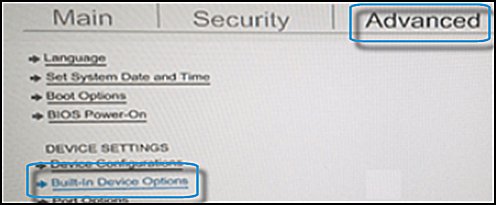
Navigate to the Advanced tab. Use the arrow keys to navigate in the BIOS.
Use the down arrow key to highlight Built-in Device Options, and then press Enter.
-
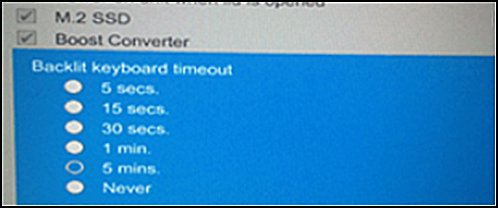
Use the down arrow key in the Built-in Device Options to select Backlit keyboard timeout.
-
Press the spacebar to open the keyboard backlight settings. Select the desired setting for timeout of the backlighting.
NOTE:
Selecting Never makes the backlight stay on constantly unless you turn it off with the function key on the keyboard. If it remains on, your battery power could drain quickly.
FOR DETAILS & FURTHER INSTRUCTIONS, USE THIS LINK: CLICK HERE
(By the end of this article all the issues should be resolved)
Keep me posted, as I (Or a trusted colleague) shall follow-up on this case to ensure the concern has been addressed,
And your device is up and running again, only in case you don't get back to us, first!
That said, If the information I've provided was helpful, give us some reinforcement by clicking the solution and kudos buttons,
That'll help us, and others see that we've got the answers!
Good Luck.
Riddle_Decipher
I am an HP Employee
Learning is a journey, not a destination.
Let's keep asking questions and growing together.
10-26-2018 02:53 PM
HP Recommended
Thank you for responding,
This is the Riddle_Decipher, again!
I understand the options may not exist on a newer version of BIOS, depending on the model series, that said, I was hoping you would answer my questions so that I could give you a more precise answer!
Since you've not responded to the same, I was wondering if you've clicked on the link I shared in the end, going by your comment I'm guessing you've missed out on that too, so here's what you need to know:
If your notebook computer has a backlit keyboard, there is a special key on the keyboard to turn the light on and off.
Use the backlight in dim lighting situations.
NOTE:
Not all HP notebooks have a backlit keyboard. Check the product specifications for your notebook model to verify whether it is equipped with a backlit keyboard.
To turn the keyboard backlight on or off, press the F5 key. If the backlight icon  is not on the F5 key, look for the backlit keyboard key on the row of function keys. It might be necessary to press the Fn (function) key at the same time to activate the backlight key.

Keep us posted,
(We shall troubleshoot as a team, fight till the end and emerge - "victorious")
If you would like to thank us for our efforts to help you,
Feel free to give us a virtual high-five by clicking the 'Thumbs Up' icon below,
Followed by clicking on the "Accept as solution" button.
Have a great day!
Riddle_Decipher
I am an HP Employee
Learning is a journey, not a destination.
Let's keep asking questions and growing together.

10-31-2019 12:09 PM
HP Recommended
I have purchased the "HP Pavilion Gaming Laptop 15-dk0xxx".
The keyboard is lit while it is being used. However, after a few seconds, it turns off.
It is REALLY annoying. I have already gone to the BIOS, and there is no advanced option to let me change the timer of the keyboard lighting.
Is there anything I can do?
11-11-2019 11:04 AM
HP Recommended
I am also experiencing the same backlight issue. It goes off after about 15 seconds as well.
I have tried both suggestions above and have no setting in BIOS to fix this and the Fn key suggestion does not work either.
It does come on automatically when I touch the keyboard but I want it on constantly.
It is very annoying to go off all the time.
Please help with a fix for this as this is about the only thing I do not like about my new laptop.
It's got me wanting to send it back because it's just that annoying!!
11-17-2019 12:56 AM
HP Recommended
I really wish that this question wasn't marked as "solved" bc I am having the exact same problem as every one else on my brand new 2019 HP Spectre notebook. I am absolutely in love with my new windows laptop. I was a long time macbook pro user/supporter but my Spectre has changed my mind completely about windows computers. But the keyboard back light going off after only 15 secs of non use is getting really old really fast. Please, if anyone has a real solution to this let me know!!

Be alert for scammers posting fake support phone numbers and/or email addresses on the community.
If you think you have received a fake HP Support message, please report it to us by clicking on "Flag Post".
† The opinions expressed above are the personal opinions of the authors, not of HP. By using this site, you accept the Terms of Use and Rules of Participation.


Didn't find what you were looking for?
Ask the community
† The opinions expressed above are the personal opinions of the authors, not of HP. By using this site, you accept the <a href="https://www8.hp.com/us/en/terms-of-use.html" class="udrlinesmall">Terms of Use</a> and <a href="/t5/custom/page/page-id/hp.rulespage" class="udrlinesmall"> Rules of Participation</a>.