-
×InformationNeed Windows 11 help?Check documents on compatibility, FAQs, upgrade information and available fixes.
Windows 11 Support Center. -

-
×InformationNeed Windows 11 help?Check documents on compatibility, FAQs, upgrade information and available fixes.
Windows 11 Support Center. -
- HP Community
- Notebooks
- Notebook Hardware and Upgrade Questions
- Re: empty slots for HDD and memory

Create an account on the HP Community to personalize your profile and ask a question
12-05-2018 01:32 PM
Hello
4AQ91EA notebook
Does it have empthy slot for second HDD? I want to add SSD
Does it have empthy slot for second memory plate? For 16 Gb in total
Solved! Go to Solution.
Accepted Solutions
12-06-2018 06:44 PM
Welcome to HP forums, I see that you want to upgrade HDD and memory.
You can expand upto 512gb ssd. more details in page no:- 58 in this service manual
There are two slots for memory in the notebook.
You can use 2 x 8gb memory. refer page no. 2 in service manual.
Let me know if that helps.
To thank me for my efforts to help you, please mark my post as an accepted solution so that it benefits several others.
Cheers.
Sandytechy20
I am an HP Employee
12-06-2018 06:44 PM
Welcome to HP forums, I see that you want to upgrade HDD and memory.
You can expand upto 512gb ssd. more details in page no:- 58 in this service manual
There are two slots for memory in the notebook.
You can use 2 x 8gb memory. refer page no. 2 in service manual.
Let me know if that helps.
To thank me for my efforts to help you, please mark my post as an accepted solution so that it benefits several others.
Cheers.
Sandytechy20
I am an HP Employee
12-07-2018 02:16 AM
Hi,
If we look at service manual it states max RAM is 16GB of DDR4 2400Mhz (2x8GB)
However HP DDR4 systems will run with 32GB of RAM, so that would be your actual max. At the moment you have one stick of 8GB and one empty slot. So you can insert a 8GB stick in the empty slot for a total of 16GB. You can buy from your preferred brand such as Crucial, Samsung....
On page 43 of service manual you can see the steps to upgrade RAM:
http://h10032.www1.hp.com/ctg/Manual/c06147959
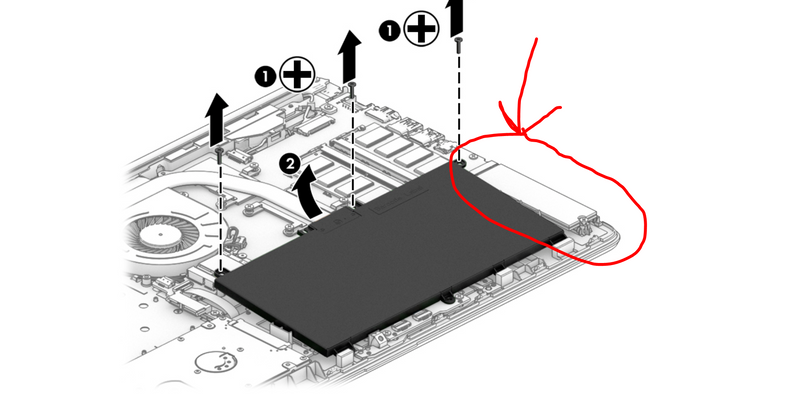
You can add an M2 SSD in your system. It will support M2 SATA3 SSD such as the M2 Samsung 860evo or much faster M2 PCIe NVMe SSD such as the Samsung 970evo. There is no limit to capacity. You should check before buying drive if the slot is present on the motherboard. I believe it is, however sometimes notebooks that did not come with M2 SSD are missing the physical slot on the motherboard.
On page 39 of service manual, you can see how to remove bottom cover to take a look.
m2 slotYou will then need to transfer the OS to the SSD for performance gain.
Hope it helps,
David
Please click on thumbs up for thanks
Please click on accept as solution if answered your question
12-07-2018 02:32 AM
Dear all
thank you for fast reply
I understand that there is second slot for RAM and I can add extra RAM
I didn't get about harddrive
Does this notebook have HDD slot AND M2SSD slot?
Or i need to replace HDD with SSD?
I want to add SSD as system drive and keep 1tb HDD as storage