• ×
    Information
    Need Windows 11 help?
    Check documents on compatibility, FAQs, upgrade information and available fixes.
    Windows 11 Support Center.
  • post a message
  • ×
    Information
    Need Windows 11 help?
    Check documents on compatibility, FAQs, upgrade information and available fixes.
    Windows 11 Support Center.
  • post a message
Guidelines
Join the HP Community Solve‑a‑thon | Help Others & Share Your Solutions | Live on Zoom | 2:30 PM to 2:30 AM IST | Every Wednesday Click here to know more
Common problems for Battery
We would like to share some of the most frequently asked questions about: Battery Reports, Hold a charge, Test and Calibrating Battery . Check out this link: Is your notebook plugged in and not charging?
HP Recommended
15-ay120nl
Microsoft Windows 10 (64-bit)

My notebook is only 3 years old and already has problems. The middle keys of the keyboard do not work. I tried to enter the bios to try to solve the problem by resetting but it asks me for the password that I don't know. I am very disappointed with HP.

3 REPLIES 3
HP Recommended

@Lasko29
Thank you for posting on the HP Support Community.


Don't worry as I'll be glad to help, however, to provide an accurate resolution, I need a few more details:

  • Did this happen after a recent window or software update?
  • Have you made any hardware/software changes?
  • Have you tried with an external Keyboard?

Use HP PC Hardware Diagnostics to complete functional test of the keyboard and identify any problems with the hardware.

  1. Download the latest version of HP PC Hardware Diagnostics.

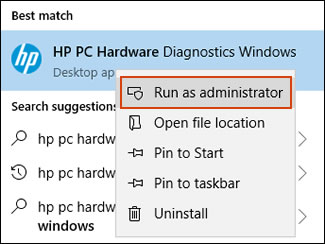
  2. In Windows, search for and right-click HP PC Hardware Diagnostics for Windows, and then select Run as administrator.

    Run HP PC Hardware Diagnostics Windows as an administrator

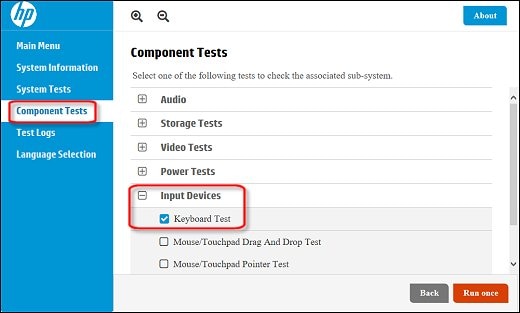
  3. Click Component Tests, click Input Devices and then select the Keyboard Test.

    Running the Keyboard Test

  4. Click Run once to begin the test.

Hope this helps! Keep me posted for further assistance.
Please click “
Accept as Solution” if you feel my post solved your issue, it will help others find the solution.

ECHO_LAKE
I am an HP Employee

HP Recommended

I have already tried but it doesn't work. I wanted to enter the bios but it asks me for a password that I don't have. I never set bios passwords. PC bought new at "Mediaworld" store in Italy.

HP Recommended

@Lasko29

Thank you for posting back. 


I would request you to reach out to our Support and our Support Engineers should be able to sort this out. HP Support can be reached by clicking on the following link: www.hp.com/contacthp/


Please feel free to contact us here anytime you need any further assistance. Please click “Accept as Solution” if you feel my post solved your issue, it will help others find the solution.

ECHO_LAKE
I am an HP Employee

† The opinions expressed above are the personal opinions of the authors, not of HP. By using this site, you accept the <a href="https://www8.hp.com/us/en/terms-of-use.html" class="udrlinesmall">Terms of Use</a> and <a href="/t5/custom/page/page-id/hp.rulespage" class="udrlinesmall"> Rules of Participation</a>.