
-
×InformationNeed Windows 11 help?Check documents on compatibility, FAQs, upgrade information and available fixes.
Windows 11 Support Center. -
-
×InformationNeed Windows 11 help?Check documents on compatibility, FAQs, upgrade information and available fixes.
Windows 11 Support Center. -
- HP Community
- Notebooks
- Notebook Hardware and Upgrade Questions
- Re: replace crashed HD by full SSD on Probook 470g2

Create an account on the HP Community to personalize your profile and ask a question
Your account also allows you to connect with HP support faster, access a personal dashboard to manage all of your devices in one place, view warranty information, case status and more.
Common problems for Battery
We would like to share some of the most frequently asked questions about: Battery Reports, Hold a charge, Test and Calibrating Battery . Check out this link: Is your notebook plugged in and not charging?

It has been a while since anyone has replied. Simply ask a new question if you would like to start the discussion again.

05-15-2020 10:14 AM
 HP Recommended
Product: probook470G2
Operating System: Microsoft Windows 10 (64-bit)
after a HD crash i succeeded a new W10 installation, but not being sure how long the HD will survive , thinks to replace by full SSD 500Gb any suggestion about compatibles , hp has a 256 gb. is this supported?
Solved! Go to Solution.
1 ACCEPTED SOLUTION
Accepted Solutions

05-15-2020 11:32 AM - edited 05-15-2020 11:33 AM
HP Recommended
I'm not understanding your comments.
IF the PC has a 500GB HDD, then you certainly CAN replace that with a 500GB SSD -- as I already did that on an older HP laptop and it works just fine, 5 years later. And any SATA 500GB SSD will work just fine, as I have used Kingston, Crucial, and SanDisk SSDs of that capacity without any issues.
So, I don't understand the comment about the 246GB SSD -- is THIS what you are wanting to replace?
I am a volunteer and I do not work for, nor represent, HP

5 REPLIES 5
05-15-2020 11:32 AM - edited 05-15-2020 11:33 AM
HP Recommended
I'm not understanding your comments.
IF the PC has a 500GB HDD, then you certainly CAN replace that with a 500GB SSD -- as I already did that on an older HP laptop and it works just fine, 5 years later. And any SATA 500GB SSD will work just fine, as I have used Kingston, Crucial, and SanDisk SSDs of that capacity without any issues.
So, I don't understand the comment about the 246GB SSD -- is THIS what you are wanting to replace?
I am a volunteer and I do not work for, nor represent, HP
05-15-2020 01:42 PM
HP Recommended
OK, so you want to replace the 750GB HDD with a 500GB SSD? That is doable -- presuming you are using less than 500GB on the HDD.
IF you want to "clone" the HDD to an SSD, then read the following ...
1) Download and install Macrium Reflect (MR) from here: https://www.macrium.com/reflectfree
2) Connect the new drive to the PC using a USB-to-SSD drive adapter (like the one illustrated below)
3) Follow the instructions in this link: http://knowledgebase.macrium.com/display/KNOW/Cloning+a+disk
4) Shutdown the PC when done
5) Swap the drives and reboot the PC.
NOTE: To do this easily, the SDD has to be the same capacity as the HDD. IF you get an SDD that is a lot smaller, then before you do the cloning, you have to shrink the largest partition on the HDD (usually the OS partition), to the size such that it, and the other partitions, fit easily on the SSD.
You should boot from the new drive without any problems.
Typical USB-to-SSD adapter:
Good Luck
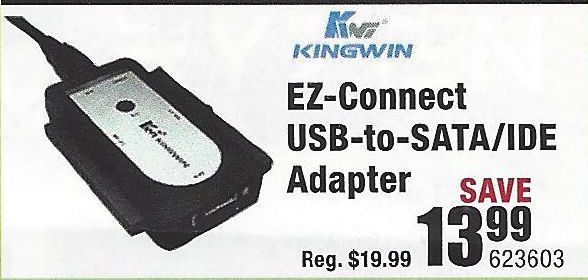
I am a volunteer and I do not work for, nor represent, HP
05-21-2020 03:55 AM
HP Recommended
Hello, concerns HP Probook 470 G2 Win10, btw thanks for your reply.
My Win 10 recovery, started giving trouble again . Did not replace yet the HDD by SSD. Finally i ran HP PC Hardware diagnostics, diag install did not succeed from within HP Support Assistent (links to not working installation), installed 1,6,4,0 from HP site support but selected the Win 7;8;8,1;10 version as the Win10 for HP option did not install!! strange.
Now the diag disk self test result was a Hard disk short and Long test failure. Error code RU2F8C-7GAA4E-XD7WMG-60SA13.
As i did not reformat the C : windows partition before the Win 10 recovery i consider to do that before a new OS install.
Does this make sense? Do i take a risk to also affect the HP-Recovery(E drive) or HP tools (F drive)?
Or is the error code indicating a REAL disk replacement advise??
Regards,
Edward
05-21-2020 09:31 AM
HP Recommended
That error code indicates the drive is failing or has already failed -- and needs to be replaced.
I am a volunteer and I do not work for, nor represent, HP

Be alert for scammers posting fake support phone numbers and/or email addresses on the community.
If you think you have received a fake HP Support message, please report it to us by clicking on "Flag Post".
† The opinions expressed above are the personal opinions of the authors, not of HP. By using this site, you accept the Terms of Use and Rules of Participation.


Didn't find what you were looking for?
Ask the community
† The opinions expressed above are the personal opinions of the authors, not of HP. By using this site, you accept the <a href="https://www8.hp.com/us/en/terms-of-use.html" class="udrlinesmall">Terms of Use</a> and <a href="/t5/custom/page/page-id/hp.rulespage" class="udrlinesmall"> Rules of Participation</a>.