
-
×InformationNeed Windows 11 help?Check documents on compatibility, FAQs, upgrade information and available fixes.
Windows 11 Support Center. -
-
×InformationNeed Windows 11 help?Check documents on compatibility, FAQs, upgrade information and available fixes.
Windows 11 Support Center. -
- HP Community
- Notebooks
- Notebook Video, Display and Touch
- Problem with video drivers 17-ak015ur

Create an account on the HP Community to personalize your profile and ask a question
Your account also allows you to connect with HP support faster, access a personal dashboard to manage all of your devices in one place, view warranty information, case status and more.

It has been a while since anyone has replied. Simply ask a new question if you would like to start the discussion again.

09-24-2019 09:55 PM
 HP Recommended
Product: 17-ak015ur
Operating System: Microsoft Windows 10 (64-bit)
When i try to recover my laptop, it has to install windows 10 again. Later i install driverpack solution and when it install all drivers i find out, that i have video driver R7 M340, then i go to hp website and install offisial latest driver. Nothing new. Then install previous video driver and the name change to 535DX. The problem is in that i have Radeon 530 on board. So i need your help to solve these problem. And when i lounch game i i have just 500mb video memory, and i think that it connected with this. All games lag in high performance settings in driver.
8 REPLIES 8


09-27-2019 02:11 PM
HP Recommended
Welcome to HP support community.
Follow these steps to view video memory information:
-
Right-click an open area of the desktop, then click Screen resolution.
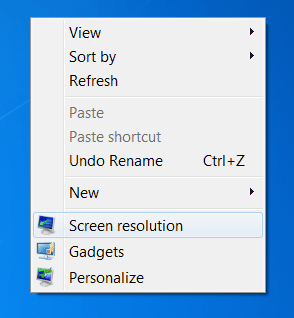
The Screen Resolution window opens.
-
Click Advanced settings.
Figure : Screen Resolution

-
Click the Adapter tab.
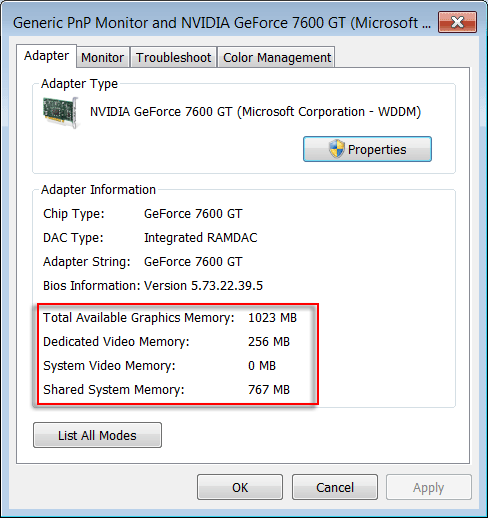
The video memory information is displayed under Adapter Information:
-
Total Available Graphics Memory: A combination of all memory available for graphics. The system may not actually be using all of this memory, but it is available when requested.
-
Dedicated Video Memory: Memory set aside for the exclusive use of the graphics adapter.
For Integrated Graphics Cards, this memory is set aside by the BIOS and is subtracted from system memory before Windows 7 is loaded. Windows 7 does not report this as part of total system memory.
For Discrete Graphics Cards, this is the memory that is on the graphics card. It is not subtracted from system memory.
-
System Video Memory: A fixed memory allocation that is subtracted from system memory after Windows 7 loads. Windows 7 reports this as part of total system memory. It is available to software programs.
-
Shared System Memory: An additional pool of memory that may be dynamically allocated and released as needed. This memory is available to programs and may be used for graphics if required.
-
You can't increase the video memory per-se, but you can allocate more virtual memory for your computer to use.
Let me know how to goes.
To thank me for my efforts to help you, please mark my post as an accepted solution so that it benefits several others.
Cheers.
Sandytechy20
I am an HP Employee
10-12-2019 02:38 AM
HP Recommended
It doesn't help me! I have the same problem like in this post https://h30434.www3.hp.com/t5/Notebook-Hardware-and-Upgrade-Questions/Graphics-card-AMD-Radeon-530-m...
I need the solution from the engineers!!!
10-12-2019 03:17 PM
HP Recommended
This might require remote access of your computer to fix the issue.
I request you to talk to HP support.
They might have multiple options to help you with this.
- Click on this link - https://support.hp.com/us-en/contact-hp?openCLC=true
- Select the country.
- Enter the serial of your device.
- Select the country from the drop-down.
- Click on "Show Options".
- Fill the web-form. A case number and phone number will now populate for you.
To thank me for my efforts to help you, please mark my post as an accepted solution so that it benefits several others.
Cheers.
Sandytechy20
I am an HP Employee


10-14-2019 09:55 AM
HP Recommended
As suggested earlier, I recommend you contact support and they will assist you in this regard.
Cheers!
The_Fossette
I am an HP Employee
10-15-2019 10:26 AM
HP Recommended
I have brought your issue to the attention of an appropriate team within HP. They will likely request information from you in order to look up your case details or product serial number. Please look for a private message from an identified HP contact. Additionally, keep in mind not to publicly post personal information (serial numbers and case details).
If you are unfamiliar with how the Community's private message capability works, you can learn about that here.
Thank you for visiting the HP Support Community.
Sandytechy20
I am an HP Employee
12-04-2019 08:58 AM
HP Recommended
So i think it's time to write my letter.
The support didn't help me, they just deside to connect to the support in my region and give this problem to they. HP support didn't connect me and i understand, that they think, that i am an idiot.
Thanks for the help! I will never buy your product any more, and will tell about this in YouTube.
Thank you again 🤬

Be alert for scammers posting fake support phone numbers and/or email addresses on the community.
If you think you have received a fake HP Support message, please report it to us by clicking on "Flag Post".
† The opinions expressed above are the personal opinions of the authors, not of HP. By using this site, you accept the Terms of Use and Rules of Participation.


Didn't find what you were looking for?
Ask the community
† The opinions expressed above are the personal opinions of the authors, not of HP. By using this site, you accept the <a href="https://www8.hp.com/us/en/terms-of-use.html" class="udrlinesmall">Terms of Use</a> and <a href="/t5/custom/page/page-id/hp.rulespage" class="udrlinesmall"> Rules of Participation</a>.