
-
×InformationNeed Windows 11 help?Check documents on compatibility, FAQs, upgrade information and available fixes.
Windows 11 Support Center. -
-
×InformationNeed Windows 11 help?Check documents on compatibility, FAQs, upgrade information and available fixes.
Windows 11 Support Center. -
- HP Community
- Notebooks
- Notebook Video, Display and Touch
- Re: USB-C to HDMI out adapter not working (Envy 13'')

Create an account on the HP Community to personalize your profile and ask a question
Your account also allows you to connect with HP support faster, access a personal dashboard to manage all of your devices in one place, view warranty information, case status and more.

It has been a while since anyone has replied. Simply ask a new question if you would like to start the discussion again.

04-14-2020 03:40 AM - edited 04-14-2020 03:42 AM
 HP Recommended
Product: ENVY 13-ah0503na
Operating System: Microsoft Windows 10 (64-bit)
Hi all, a few months ago I bought an ENVY 13-ah0503na (specs: https://support.hp.com/gb-en/document/c06058339) and I have so far been impressed and happy with it.
The main issue is that the hdmi-out doesn't seem to be working, I'm using the USBC-to-HDMI adapter that came in the box with the laptop and all that happens is that my main screen flickers and the sounds for "new device plugged / device unplugged" keep going on. This is happening both on Windows (10 pro, 64bit) and Ubuntu (18.04 LTS, 64bit).
Why can that be? I haven't used any 3rd party hardware, how comes the adapter this laptop comes shipped with doesn't work?
6 REPLIES 6


04-16-2020 06:40 PM
HP Recommended
@samuele-m Here's the best way to resolve this issue:
Turn off USB selective suspend after installing windows & HP updates:
- Press Windows Key + S and enter control panel.
- Select Control Panel from the list of results.

- When Control Panel opens, go to Power Options.
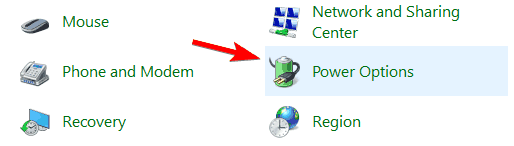
- Power Options window will now open.
- Locate your power plan and click on Change plan settings.
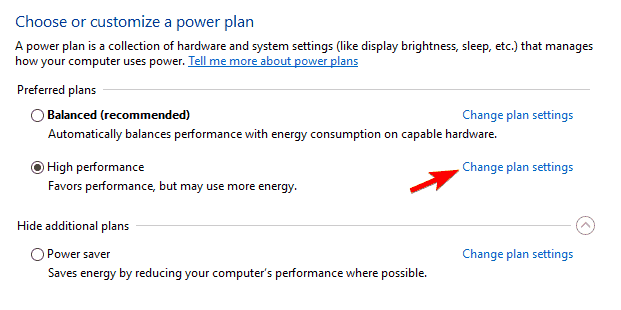
- Click on Change advanced power settings.
- Go to USB settings > USB selective suspend setting and set it to Disabled.
- Click on Apply and OK to save changes.
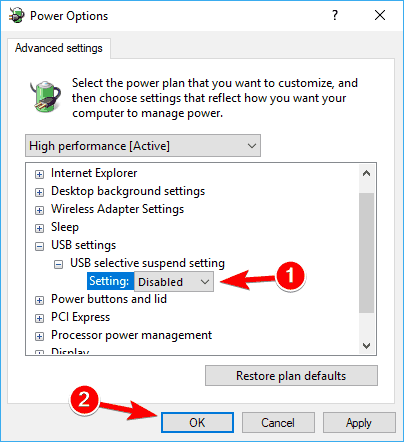
P.S: Welcome to HP Community 😉
Let me know how that pans out,
If you feel I was helpful, simply click on Accept as Solution to help the community grow,
That said, I will have someone follow-up on this to ensure you've been helped,
Just in case you don't get back to us,
have a good day, ahead.
Riddle_Decipher
I am an HP Employee
Learning is a journey, not a destination.
Let's keep asking questions and growing together.
05-01-2020 01:31 AM - edited 05-01-2020 01:32 AM
HP Recommended
Hi, thanks for the answer and sorry for the belated reply.
The option you suggest couldn't work unfortunately, as I had already disabled the selective suspend. My machine's Windows is already up to date with the most recent versions, I doubt it's a software problem.
Before sending my laptop back, I wanted to figure out if it's the display adapter that could be at fault and if I had to try a different one, what should I look for to make sure it's HP compatible
05-07-2020 07:12 PM
HP Recommended
@samuele-m It's not usually brand dependent, but a better thing to do, would be to take the computer over to the local tech store, have him check a few cables that work and then buy the right one that is compatible or works with your device.
I hope that helps!
If you wish to thank me for my efforts, you could click on "Accept as solution" on my post as the solution should help others too.
Riddle_Decipher
I am an HP Employee
Learning is a journey, not a destination.
Let's keep asking questions and growing together.
05-12-2020 09:21 AM
HP Recommended
@samuele-m I suggest you talk to HP support and discuss your options, follow the below steps to get started:
And @rinobino91 If you've followed all the steps mentioned above, please do the same as listed below:
1) Click on this link - http://www.hp.com/contacthp/
2) Click on Sign-in or select the product using the below step:
3) Enter the serial of your device.
4) Select the country from the drop-down.
5) Click on "Show Options".
Fill the web-form, to populate a case number and phone number for yourself!
Also, if you are having trouble navigating through the above options, it's most likely because the device is out of warranty, if yes? please send me a private message with the region you are contacting us from,
here's how private messages work: Click here for details.
If you wish to thank me for my efforts, you could click on "Accept as solution" on my post as the solution should help others too.
Riddle_Decipher
I am an HP Employee
Learning is a journey, not a destination.
Let's keep asking questions and growing together.

Be alert for scammers posting fake support phone numbers and/or email addresses on the community.
If you think you have received a fake HP Support message, please report it to us by clicking on "Flag Post".
† The opinions expressed above are the personal opinions of the authors, not of HP. By using this site, you accept the Terms of Use and Rules of Participation.


Didn't find what you were looking for?
Ask the community
† The opinions expressed above are the personal opinions of the authors, not of HP. By using this site, you accept the <a href="https://www8.hp.com/us/en/terms-of-use.html" class="udrlinesmall">Terms of Use</a> and <a href="/t5/custom/page/page-id/hp.rulespage" class="udrlinesmall"> Rules of Participation</a>.