-
×InformationNeed Windows 11 help?Check documents on compatibility, FAQs, upgrade information and available fixes.
Windows 11 Support Center. -

-
×InformationNeed Windows 11 help?Check documents on compatibility, FAQs, upgrade information and available fixes.
Windows 11 Support Center. -
- HP Community
- Apps, Services & Software
- Poly Services
- Poly Lens Desktop App open on startup

Create an account on the HP Community to personalize your profile and ask a question
05-26-2021 02:41 AM
Why isn't there an option for the Lens Desktop att to open at login of Windows? Even open in the background so that the user can be notified of device updates?
This functionality is present in Plantronics Manager Pro and is quite important for ensuring the devices are up to date with minimal intervention from the end-user. The lack of this feature also means that the data for when the devices were last seen is meaningless as this is just when the user last opened the desktop app.
05-26-2021 03:41 AM
Hello @Beyond_Conferen and @andyell
I will provide this feedback to product management.
replied via a mobile device
Notice: I am an HP Poly employee but all replies within the community are done as a volunteer outside of my day role. This community forum is not an official HP Poly support resource, thus responses from HP Poly employees, partners, and customers alike are best-effort in attempts to share learned knowledge.
If you need immediate and/or official assistance for former Poly\Plantronics\Polycom please open a service ticket through your support channels
For HP products please check HP Support.
Please also ensure you always check the General VoIP , Video Endpoint , UC Platform (Microsoft) , PSTN
07-06-2021 12:13 PM
Do as I did:
start, run and type shell:startup
copy poly link from here: "%appdata%\Microsoft\Windows\Start Menu\Programs\Poly Lens.lnk"
and paste it into the shell:startup folder.
Can be powershell scripted for mass deploy.
Now the problem is another one:
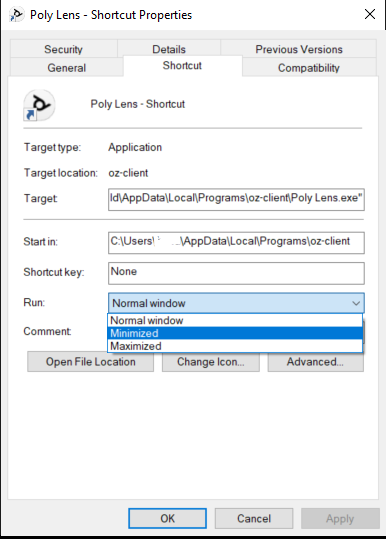
How do you start this app minimized?
Thanks,
Stef