• ×
    Information
    Need Windows 11 help?
    Check documents on compatibility, FAQs, upgrade information and available fixes.
    Windows 11 Support Center.
  • post a message
  • ×
    Information
    Need Windows 11 help?
    Check documents on compatibility, FAQs, upgrade information and available fixes.
    Windows 11 Support Center.
  • post a message
Guidelines
Join the HP Community Solve‑a‑thon | Help Others & Share Your Solutions | Live on Zoom | 2:30 PM to 2:30 AM IST | Every Wednesday Click here to know more
Check some of the most frequent questions about Instant Ink: HP INSTANT INK, HP+ PLANS: INK AND TONER.


Check out our Black or Color Ink Not Printing, Other Print Quality Issues info about: Print quality and Cartridge Issues.
HP Recommended

Good afternoon. In November I bought original HP cartridges in Russian store, but for some reason they did not fit my printer. Although the printer model is listed on the cartridge packaging, everything has been checked and everything should work. Printer model HP DeskJet 2130 All-in-One Serial number: [Personal Information Removed] Product number: F5S40B At the moment, I am not in Russia to visit the service center. How can this problem be solved? Thanks in advance for your reply,
Best regards,
Alina
 

3 REPLIES 3
HP Recommended

Hi @Alina28,


I'd like to help!


I understand that the cartridge does not fit in the printer.


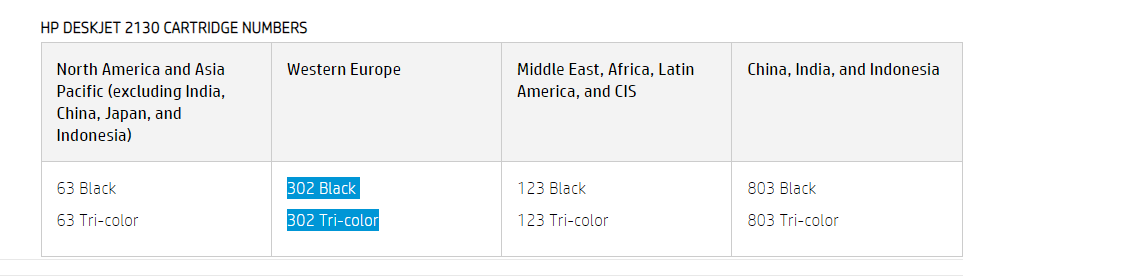
The cartridge number for your printer for your region is 

302 Black

302 Tri-color


Hope this helps! Keep me posted. 


And, Welcome to the HP Support Community


Please click “Accept as Solution” if you feel my post solved your issue, it will help others find the solution.

Click the “Yes" on the bottom right to say “Thanks” for helping!


HP Recommended

Hello! Thank you for your answer. But I was in a store without my printer, and I had no opportunity to check it there (that cartridge 302 only suits my printer) That is why I opened your webpage, entered my printer name and found the cartridge 123.

Now I can not change them or give them back to the store, and I lost my money and time, I really upset about it. 

HP Recommended

I’d recommend you contact HP Phone Support in your region for replacement options.


Follow the instructions below to reach them:


1) Click on this link - https://support.hp.com/us-en/contact-hp

2) Select your product type below.

3) Enter the serial of your device. 

4) Select the country from the drop-down. 

5) Select the chat or get phone number options based on your preferences. 

6)Fill the web form and proceed further.


If you are having trouble navigating through the above options, it's most likely because the device is out of warranty. If yes? please send me a private message with the region you are contacting us from. Check next to your profile name, you should see a little blue envelope, please click on it.  


Have a great day! 

† The opinions expressed above are the personal opinions of the authors, not of HP. By using this site, you accept the <a href="https://www8.hp.com/us/en/terms-of-use.html" class="udrlinesmall">Terms of Use</a> and <a href="/t5/custom/page/page-id/hp.rulespage" class="udrlinesmall"> Rules of Participation</a>.