• ×
    Information
    Need Windows 11 help?
    Check documents on compatibility, FAQs, upgrade information and available fixes.
    Windows 11 Support Center.
  • post a message
  • ×
    Information
    Need Windows 11 help?
    Check documents on compatibility, FAQs, upgrade information and available fixes.
    Windows 11 Support Center.
  • post a message
Guidelines
Seize the moment! nominate yourself or a tech enthusiast you admire & join the HP Community Experts!
Check some of the most frequent questions about Instant Ink: HP INSTANT INK, HP+ PLANS: INK AND TONER.


Check out our Black or Color Ink Not Printing, Other Print Quality Issues info about: Print quality and Cartridge Issues.
HP Recommended
HP ENVY 6055 All-In-One Printer
macOS 12.0 Monterey

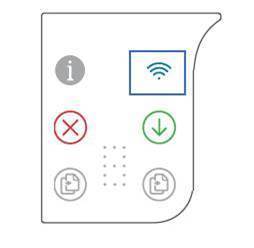
Hello, how do I bypass the error that's asking me to use the Setup Ink Cartridges for my HP Envy 6055 printer? I received this printer from a friend, great condition, lightly used. I did a factory reset to original settings, but as soon as device turns back on the Information button blinks as well number counter indicator. 

I've seen on other posts that you must perform an OOBE reset, Although I am unsure what this means.

Can I please have the instructions for this?

Thank you.

1 REPLY 1
HP Recommended

Hi @GT6000_user,
Welcome to HP Support Community. This is a great place to post questions and find answers.
Thank you for posting your query, I will be glad to help you.


I see that your HP ENVY 6055 All-In-One Printer is asking for setup cartridges.


Please follow the steps listed below.
1. Open the ink cartridge access door.
2. Press and hold the Wireless button for at least three seconds.
3. Close the ink cartridge access door. An alignment page prints, indicating that the printer has initialized.
4. If the printer does not initialize, repeat these steps until it does.


Let me know if this works.
Take care and have a good day.


Please click “Accepted Solution” if you feel my post solved your issue, it will help others find the solution. Click the “Kudos/Thumbs Up" on the bottom right to say “Thanks” for helping!
 

Rainbow23 - HP Support.
† The opinions expressed above are the personal opinions of the authors, not of HP. By using this site, you accept the <a href="https://www8.hp.com/us/en/terms-of-use.html" class="udrlinesmall">Terms of Use</a> and <a href="/t5/custom/page/page-id/hp.rulespage" class="udrlinesmall"> Rules of Participation</a>.