• ×
    Information
    Need Windows 11 help?
    Check documents on compatibility, FAQs, upgrade information and available fixes.
    Windows 11 Support Center.
  • post a message
  • ×
    Information
    Need Windows 11 help?
    Check documents on compatibility, FAQs, upgrade information and available fixes.
    Windows 11 Support Center.
  • post a message
Guidelines
Seize the moment! nominate yourself or a tech enthusiast you admire & join the HP Community Experts!
Check some of the most frequent questions about Instant Ink: HP INSTANT INK, HP+ PLANS: INK AND TONER.


Check out our Black or Color Ink Not Printing, Other Print Quality Issues info about: Print quality and Cartridge Issues.
HP Recommended
HP Office Jet 4650
Microsoft Windows 10 (64-bit)

HP Office Jet 4650 all of a sudden won't print in color - from every computer in the house. It prints fine in black and white. 

I have:

- Confirmed all updates are installed

- Changed both the color & black cartridges

- Done a factory reset on the printer

- Restarted it twice

Please help!!

1 REPLY 1
HP Recommended

@edd7


Welcome to the HP support community.


Did you make a copy and check if that prints fine?


Meanwhile:- 

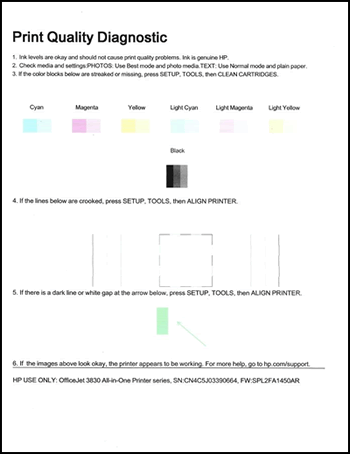
Print a Print Quality Diagnostic report

  1. Make sure to load the input tray with plain, white paper.

  2. On the printer control panel, swipe the display to the left, and then touch Setup.

  3. Touch Tools.

  4. Swipe up on the display, and then touch Print Quality Report.

    A Print Quality Diagnostic report prints.

    Image: Example of the Print Quality Diagnostic Page

  5. Keep the Print Quality Diagnostic report for easy reference later in this document.

If that does not print fine, follow the steps mentioned in this HP document to fix the issue:- Click here


I hope that helps.

To thank me for my efforts to help you, please mark my post as an accepted solution so that it benefits several others.

Cheers.

Sandytechy20
I am an HP Employee

† The opinions expressed above are the personal opinions of the authors, not of HP. By using this site, you accept the <a href="https://www8.hp.com/us/en/terms-of-use.html" class="udrlinesmall">Terms of Use</a> and <a href="/t5/custom/page/page-id/hp.rulespage" class="udrlinesmall"> Rules of Participation</a>.