• ×
    Information
    Need Windows 11 help?
    Check documents on compatibility, FAQs, upgrade information and available fixes.
    Windows 11 Support Center.
  • post a message
  • ×
    Information
    Need Windows 11 help?
    Check documents on compatibility, FAQs, upgrade information and available fixes.
    Windows 11 Support Center.
  • post a message
Guidelines
Seize the moment! nominate yourself or a tech enthusiast you admire & join the HP Community Experts!
Check some of the most frequent questions about Instant Ink: HP INSTANT INK, HP+ PLANS: INK AND TONER.


Check out our Black or Color Ink Not Printing, Other Print Quality Issues info about: Print quality and Cartridge Issues.
HP Recommended
HP ENVY Photo 7855 All-in-One Printer

 So frustrated - - just installed a third tricolor printer cartridge (HP brand) and it says cartridge cannot communicate with printer. I’ve done all the troubleshooting with virtual HP assistant - resetting, firmware is up to date, cleaned cartridge and printer connections. This is third NEW cartridge. Nothing is working. It looks like the copper spots on the cartridge are rusted. 

IMG_7329.jpeg

3 REPLIES 3
HP Recommended

Hi @KHill4 ,


Welcome to The HP Support Community.  


Thank you for posting your query, I will be glad to help you.


I understand its very frustrating that your HP ENVY Photo 7855 isn't recognizing the new tricolor cartridge. Even after three attempts with genuine HP cartridges, the issue persists. Let's troubleshoot further:


Rusted Cartridge Contacts: Rust on the cartridge's copper contacts could indeed be the culprit. Carefully clean the contacts with a dry, lint-free cloth. Avoid using any liquids or abrasive materials.

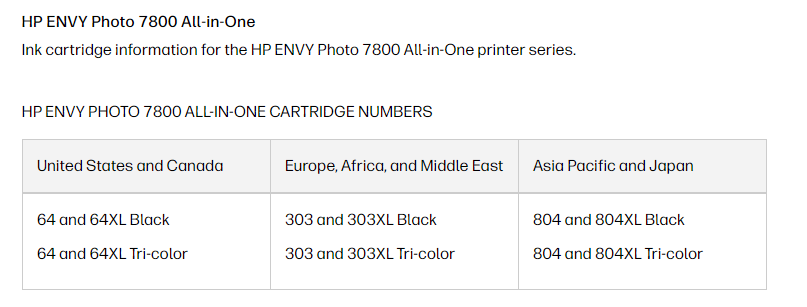
Check Compatibility: Double-confirm the cartridge model number is compatible with your HP ENVY Photo 7855. You can find this information on the HP website or on the printer itself.
 

Remove and Reinstall: Sometimes a simple reseat can solve the problem. Turn off the printer, remove the cartridge, and then carefully reinstall it. Ensure it clicks into place securely.

Clean Printhead Contacts: Lightly clean the printer's printhead contacts with a dry, lint-free cloth. You can find instructions for this process in your printer's user manual or HP's support website


Refer to this document:  HP ENVY Photo 7855 All-in-One Printer


I hope this helps. 


Take care and have a good day.


Please click “Accepted Solution” if you feel my post solved your issue, it will help others find the solution. Click the “Kudos/Thumbs Up" on the bottom right to say “Thanks” for helping!


A_Gayathri
HP Support Community Administrator.
HP Recommended

I have done all of those things already. I spent over an hour with the virtual assistant. It’s frustrating no one from support will contact me since these are genuine HP cartridges. The cartridge itself appears to be rusted,  not the printer connection - I have cleaned both of them as recommended. I have tried to call and there’s no way to get in touch with anyone because it says our serial number has expired - even though the cartridges are new, coming straight out of the packaging and appear rusted. What suggestions do you have now since none of those are working? 

HP Recommended

Hi @KHill4,


Thank you for your response, I appreciate your efforts. As the issue persists, I am sorry to hear that  This needs one-on-one interaction  I'm sending out a private message to assist you with the next course of action. 


Please check your Private message icon on the upper right corner of your HP Community profile Next, to your profile Name, you should see a little blue envelope, please click on it or simply click on this link.


I hope this helps! Keep me posted for further assistance.


Please click “Accept as Solution” if you feel my post solved your issue, it will help others find the solution. Click the “Kudos, Thumbs Up" on the bottom right to say “Thanks” for helping!


A_Gayathri
HP Support Community Administrator.
† The opinions expressed above are the personal opinions of the authors, not of HP. By using this site, you accept the <a href="https://www8.hp.com/us/en/terms-of-use.html" class="udrlinesmall">Terms of Use</a> and <a href="/t5/custom/page/page-id/hp.rulespage" class="udrlinesmall"> Rules of Participation</a>.