• ×
    Information
    Need Windows 11 help?
    Check documents on compatibility, FAQs, upgrade information and available fixes.
    Windows 11 Support Center.
  • post a message
  • ×
    Information
    Need Windows 11 help?
    Check documents on compatibility, FAQs, upgrade information and available fixes.
    Windows 11 Support Center.
  • post a message
Guidelines
Seize the moment! nominate yourself or a tech enthusiast you admire & join the HP Community Experts!
Check some of the most frequent questions about Instant Ink: HP INSTANT INK, HP+ PLANS: INK AND TONER.


Check out our Black or Color Ink Not Printing, Other Print Quality Issues info about: Print quality and Cartridge Issues.
HP Recommended
Microsoft Windows 8.1 (64-bit)

McAfee anti-virus software blocks access to the InstaInk website because InstaInk.com does not update their website credentials. 

Why does HP not fix this issue? HP must be loosing hundreds of potential InstaInk customers.

5 REPLIES 5
HP Recommended

@JefferyT1

Thank you for posting on the HP Support Community.
 

Don't worry as I'll be glad to help,

Let's try disabling the firewall and check: 

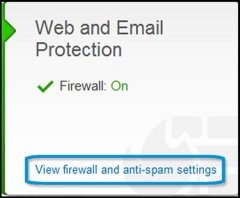
  1. On the McAfee LiveSafe Home screen, click View firewall and anti-spam settings.

    Figure : View firewall and anti-spam settings

    View firewall and anti-spam settings highlighted

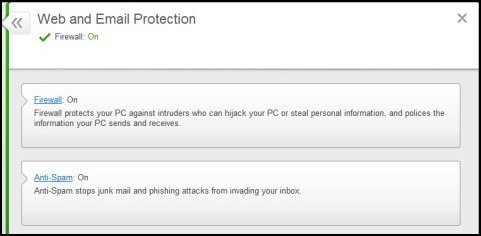
    The Web and Email Protection menu displays.

    Figure : Web and Email Protection menu

    Web and Email Protection menu
  2. Click Firewall to set your Firewall preferences.

    Figure : Firewall selection

    Firewall selection highlighted

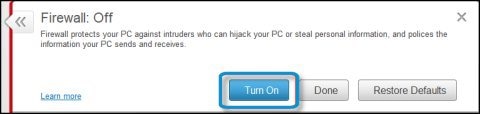
    Firewall is enabled by default. If Firewall is disabled, click Turn On.

    Figure : Firewall Off

    Firewall with Turn On highlighted

    To restore Firewall to its initial configuration, click Restore Defaults.

    Figure : Restore Defaults button

    Restore Defaults highlighted
  3. Set the strength of protection for Internet browsing using the Firewall menu. For example, you can increase or decrease your protection depending on if you are using your home network or a different network.

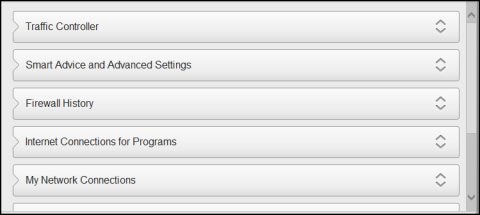
    To view the options of one of the Firewall menus, click the arrows button to expand the menu.

    Figure : Firewall menus

    Firewall menus

Hope this helps! Keep me posted for further assistance.
Please click “Accept as Solution” if you feel my post solved your issue, it will help others find the solution. Click the “Kudos, Thumbs Up" on the bottom right to say “Thanks” for helping!

ECHO_LAKE
I am an HP Employee

HP Recommended

Yes, disabling the McAfee firewall allows me to access the InstaInk website. But I will not be using the InstaInk service if I need to disable my firewall every time I go there. Why not just update the website license so every  one can access the InstaInk website without disabling a firewall?

HP Recommended

@JefferyT1

Thank you for posting back.


Update the printer firmware if possible:

  • Click here to download and install the latest printer firmware from your PC.
  • Click here to know different methods of updating printer firmware.

Keep me posted! 

ECHO_LAKE
I am an HP Employee

HP Recommended

My printer firmware does not need an update, it was just installed one week ago.


It is your InstaInk website that needs to be updated, McAfee is telling me that the website license has expired.

HP Recommended

@JefferyT1

Thank you for posting back. 


This requires remote assistance, please reach out to HP Support in your region for further troubleshooting steps.

I'm sending out a private message to assist you with the next course of action. Please check your Private message icon on the upper right corner of your HP Community profile Next, to your profile Name, you should see a little blue envelope, please click on it or simply click on this link: https://h30434.www3.hp.com/t5/notes/privatenotespage
 

Hope this helps! Keep me posted for further assistance.
Please click “Accept as Solution” if you feel my post solved your issue, it will help others find the solution. Click the “Kudos, Thumbs Up" on the bottom right to say “Thanks” for helping!

ECHO_LAKE
I am an HP Employee

† The opinions expressed above are the personal opinions of the authors, not of HP. By using this site, you accept the <a href="https://www8.hp.com/us/en/terms-of-use.html" class="udrlinesmall">Terms of Use</a> and <a href="/t5/custom/page/page-id/hp.rulespage" class="udrlinesmall"> Rules of Participation</a>.