• ×
    Information
    Need Windows 11 help?
    Check documents on compatibility, FAQs, upgrade information and available fixes.
    Windows 11 Support Center.
  • post a message
  • ×
    Information
    Need Windows 11 help?
    Check documents on compatibility, FAQs, upgrade information and available fixes.
    Windows 11 Support Center.
  • post a message
Guidelines
Join the HP Community Solve‑a‑thon | Help Others & Share Your Solutions | Live on Zoom | 2:30 PM to 2:30 AM IST | Every Wednesday Click here to know more
Check some of the most frequent questions about Instant Ink: HP INSTANT INK, HP+ PLANS: INK AND TONER.


Check out our Black or Color Ink Not Printing, Other Print Quality Issues info about: Print quality and Cartridge Issues.
HP Recommended
HP OfficeJet Pro 8720 All-in-One Printer
Microsoft Windows 10 (64-bit)

My printer is stuck on initializing with new cartridges after oobe reset.

After sometime displaying "Supply system problem"

See the pictures

WhatsApp Image 2023-05-10 at 8.45.40 AM (1).jpegWhatsApp Image 2023-05-10 at 8.45.40 AM.jpeg


Please help.

4 REPLIES 4
HP Recommended

@Riddle_Decipher need help

HP Recommended

still waiting for support

HP Recommended

Hi @Amoeba7 


Welcome to the HP Support Community!


I understand that you are getting supply system error  I am glad to assist you today.


Clean the cartridge contacts

Turn the printer on.

Open the door to access to the cartridges.

Wait until the carriage stops moving before you continue.

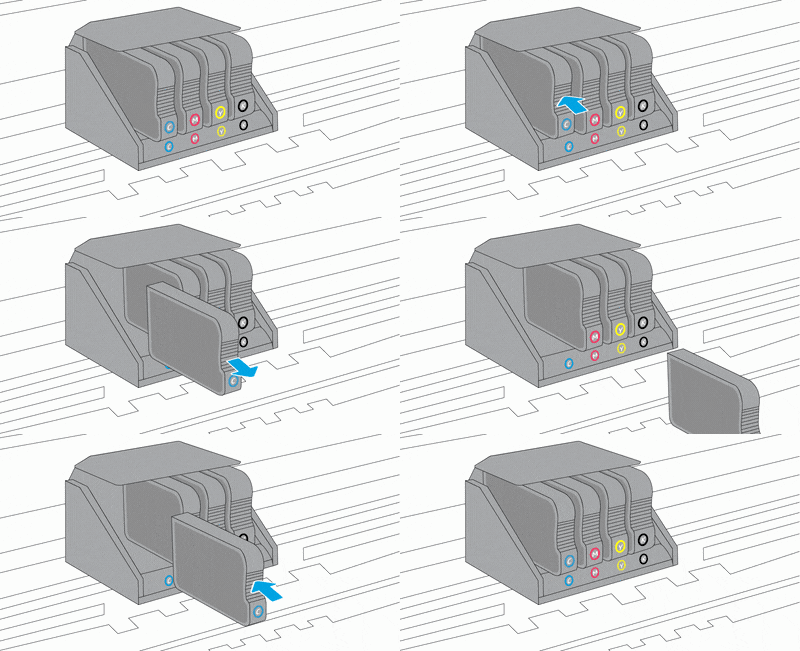
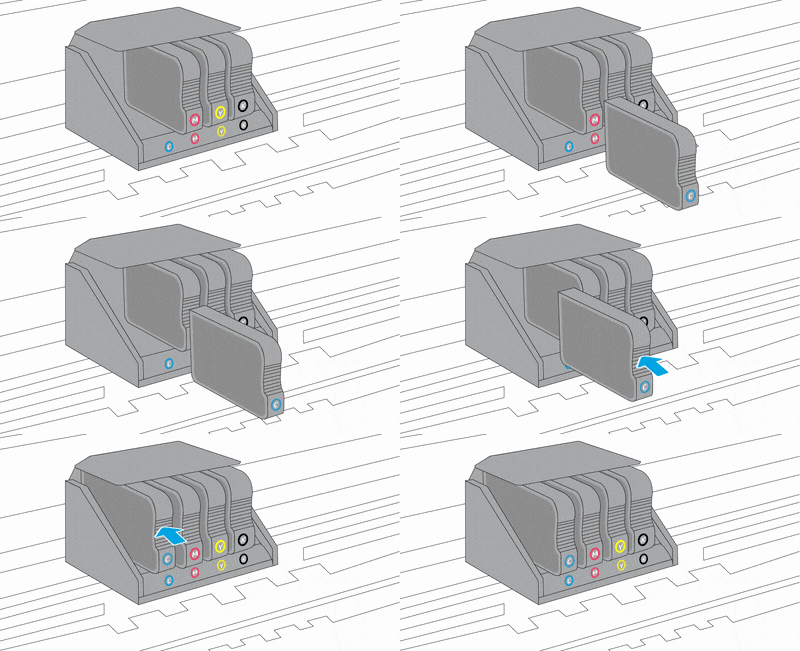
Push in on the front of the cartridge indicated in the error message, and then remove it.

Animation of replacing the cartridges

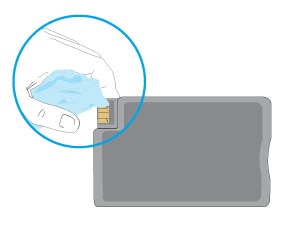
Wipe the electrical contact on the cartridge with a lint-free cloth.

Insert the cartridge into its color-coded slot until it snaps into place.

Repeat these steps for any other cartridges indicated in the error message.

Close the cartridge access door.


Next step update the printer firmware from here and restart the printer and check. 


refer to this document : An 'Ink System Failure' or 'System Supply Problem' Error Displays


Hope this helps!


Please perform these steps and Feel free to reply to your public post for any further assistance.


Thank you for being a Valuable Member of our HP Family.


Please click “Accepted Solution” if you feel my post solved your issue, it will help others find the solution.


-Regards, 

Raj2111
I am an HP Employee

HP Recommended

I have already contacted the contact center, and tried all the suggestions that have been given. but it didnt solved. Can i get old version of firmware?

† The opinions expressed above are the personal opinions of the authors, not of HP. By using this site, you accept the <a href="https://www8.hp.com/us/en/terms-of-use.html" class="udrlinesmall">Terms of Use</a> and <a href="/t5/custom/page/page-id/hp.rulespage" class="udrlinesmall"> Rules of Participation</a>.