-
×InformationNeed Windows 11 help?Check documents on compatibility, FAQs, upgrade information and available fixes.
Windows 11 Support Center. -

-
×InformationNeed Windows 11 help?Check documents on compatibility, FAQs, upgrade information and available fixes.
Windows 11 Support Center. -
- HP Community
- Printers
- Printer Ink Cartridges & Print Quality
- Printer 4x6 prints only

Create an account on the HP Community to personalize your profile and ask a question
01-06-2024 12:29 PM
Welcome to the HP Community --
Every standard size printer prints more than one size paper.
That said, there is a lot of variation -- there are thousands of HP printer models.
Without any context or information beyond "4x6",
A guess:
>> Your printer Tray and Paper is set to detect a certain paper size (4x6) and your current print job settings are not set for the same size.
=================================
Printer - Tray and Paper
Depending on the printer model, the information might be checked on the touch-screen Printer Control Panel.
EWS > HP Document / How-to
Use the HP printer Embedded Web Server (EWS)
NOTE: Find printer IP address
Section Open the EWS over a local network orientation
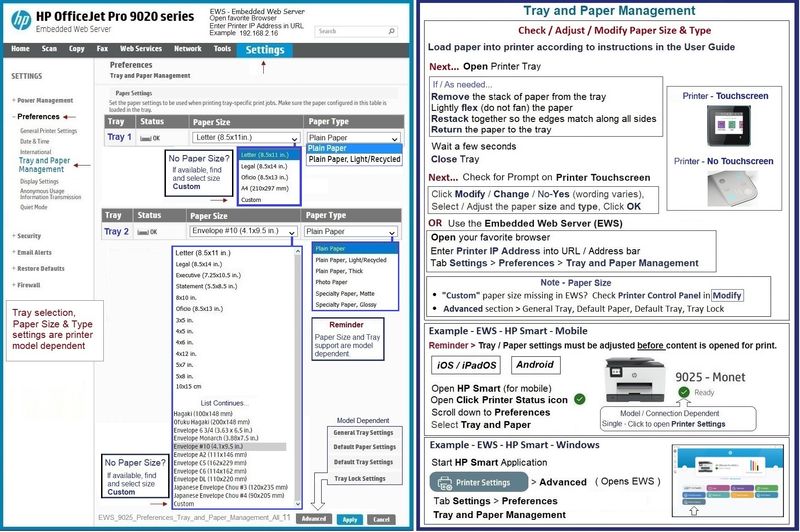
EWS – Tray and Paper Management
Open your Browser > Type / enter the Printer IP address into URL / Address bar
Tab Settings > Preferences > Tray and Paper (Management)
Select / Adjust settings for Paper Size / Type
Model Dependent: Advanced section
Click Apply to save changes
Tray and Paper – Paper Size / Paper Type / Paper Weight
Reminder
HP Smart Mobile might require that paper size / type is rechecked / adjusted before the content is opened for print.
Paper Size, Type, and Weight loaded in the printer tray must be supported for use in that tray.
EWS provides access and control to check / adjust Tray and Paper Settings.
Notes
Depending on the printer model, the Printer Control Panel might provide access to Paper Size / Type settings immediately after the paper is (re)loaded into the appropriate printer intake tray.
Trays
- If the printer lacks a second tray, all paper / types are supported in the single available tray.
- Printers that include a Photo Tray generally restrict the paper sizes and paper type supported in that tray.
Custom size?
If EWS does not allow setting the paper size or size “Custom”,
If the printer includes a touch display printer control panel,
Look for the setting for “Custom” in the Printer Control Panel after (re)loading the paper to be used
NOTE: Not available for all printers
What?
Paper Size, Type, and Weight must be appropriate for the tray in which that paper is to be used.
General Example - EWS - Tray and Paper
NOTE Sample does not include DeskJet printer setup nor does it include a Photo Tray
EWS_9025_Preferences_Tray_and_Paper_Management_All_11
=+=+=+=+=+=+=+=+=+=+=+=+=+=+=+=+=+=+=+=+=+=
References / Resources
HP Printer Home Page - References and Resources
Learn about your Printer - Solve Problems
“Things that are your printer”
When the website support page opens, Select (as available) a Category > Topic > Subtopic
NOTE: Content depends on device type and Operating System
Categories: Alerts, Troubleshooting, Ink & Paper, HP Software / Drivers / Firmware Updates , Setup & User Guides, Product Specifications, Account & Registration, Warranty & Repair
Open
Enter the device type and model name of your HP product
Thank you for participating in the HP Community --
People who own, use, and support HP devices.
Click Yes to say Thank You
Question / Concern Answered, Click my Post "Accept as Solution"