-
×InformationNeed Windows 11 help?Check documents on compatibility, FAQs, upgrade information and available fixes.
Windows 11 Support Center. -

-
×InformationNeed Windows 11 help?Check documents on compatibility, FAQs, upgrade information and available fixes.
Windows 11 Support Center. -
- HP Community
- Printers
- Printer Ink Cartridges & Print Quality
- Printer Region Reset Code

Create an account on the HP Community to personalize your profile and ask a question
01-11-2021 02:44 AM - edited 01-11-2021 09:43 AM
Hello and greeting.
I recently bought a new ink HP680(Black) for my DeskJet2130, before I use HP63
when I put the cartridge into the printer, the black ink led started flashing (Incompatible-Ink)
after that, I watched some videos.
finally, I decided to reset my printer region to use my new Ink Cartridge.
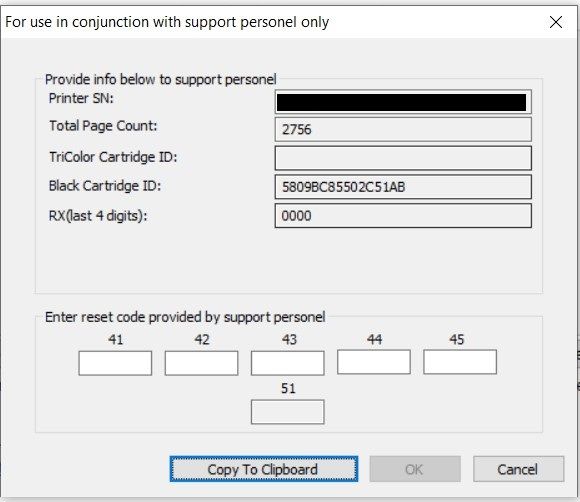
please send me 5 codes (41-42-43-44-45)
Printer SN: [XXXXXXXXXXXXXXXXX]
Total Page Count: 2756
TriColor Cartridge ID:
Black Cartridge ID: 5809BC85502C51AB
RX(last 4 digits): 0000
Solved! Go to Solution.
Accepted Solutions
01-15-2021 06:13 AM
@MohammadRezA80, Welcome to HP Support Community!
The reset instructions are specific for your printer and performing those steps on a different printer may brick the device.
I've sent you a private message with reset instructions, follow the reset instruction to perform a full reset, and re-initialize the printer.
In order to access your private messages, click the private message icon on the upper right corner of your HP Forums profile, next to your profile Name or simply click on this link.
Keep me posted.
Please click “Accepted Solution” if you feel my post solved your issue, it will help others find the solution. Click the “Kudos/Thumbs Up" on the bottom right to say “Thanks” for helping!
TEJ1602
I am an HP Employee
01-15-2021 06:13 AM
@MohammadRezA80, Welcome to HP Support Community!
The reset instructions are specific for your printer and performing those steps on a different printer may brick the device.
I've sent you a private message with reset instructions, follow the reset instruction to perform a full reset, and re-initialize the printer.
In order to access your private messages, click the private message icon on the upper right corner of your HP Forums profile, next to your profile Name or simply click on this link.
Keep me posted.
Please click “Accepted Solution” if you feel my post solved your issue, it will help others find the solution. Click the “Kudos/Thumbs Up" on the bottom right to say “Thanks” for helping!
TEJ1602
I am an HP Employee