
-
×InformationNeed Windows 11 help?Check documents on compatibility, FAQs, upgrade information and available fixes.
Windows 11 Support Center. -
-
×InformationNeed Windows 11 help?Check documents on compatibility, FAQs, upgrade information and available fixes.
Windows 11 Support Center. -
- HP Community
- Printers
- Printer Ink Cartridges & Print Quality
- Re: Printer prints PDF text with shadows

Create an account on the HP Community to personalize your profile and ask a question
Your account also allows you to connect with HP support faster, access a personal dashboard to manage all of your devices in one place, view warranty information, case status and more.
Check some of the most frequent questions about Instant Ink: HP INSTANT INK, HP+ PLANS: INK AND TONER.
Check out our Black or Color Ink Not Printing, Other Print Quality Issues info about: Print quality and Cartridge Issues.

It has been a while since anyone has replied. Simply ask a new question if you would like to start the discussion again.

09-18-2020 06:38 AM
 HP Recommended
Product: HP Deskjet F4210
Operating System: Microsoft Windows 10 (64-bit)
Hello, my printer prints PDF files that contain text with shadows. It happens only with PDF, other apps like Word works normally. Any solutions?
9 REPLIES 9


09-20-2020 12:20 PM
HP Recommended
Hi @Miro0102-SVK-,
I'd like to help!
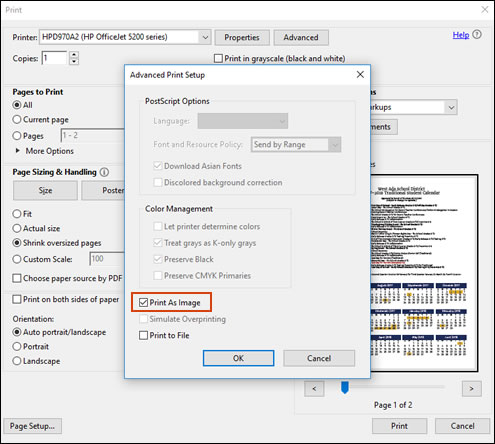
Print the PDF as an image
You can print a PDF file as an image.
NOTE:Printing a PDF file as an image can result in blurry images or fonts, especially along the edges of the print.
-
Open the original PDF file.
-
Click File, and then select Print from the list.
The Print window opens.
-
Click Advanced.
The Advanced Print Setup window opens.
-
Click the Print As Image checkbox, change any other settings as desired, and then click OK.
If the issue persists, continue to the next step.
Try the steps in the document -Faded, Missing, or Dull Colors in Printouts
Also, try updating the printer's firmware - HP Printers - Updating or Upgrading Printer Firmware
Hope this helps! Keep me posted.
And, Welcome to the HP Support Community.
Please click “Accept as Solution” if you feel my post solved your issue, it will help others find the solution.
Click the “Kudos, Thumbs Up" on the bottom right to say “Thanks” for helping
09-20-2020 12:46 PM
HP Recommended
Print As Image does not help.
I have already installed the newest Firmware.
There are no errors in extended self test report (even the text does not have a shadow), but problem still occurs, when printing PDF.
09-20-2020 01:19 PM
HP Recommended
Try installing the printer using windows driver.
For instructions, refer to Installing and Using the Windows Built-in Print Driver
Keep me posted!
09-21-2020 04:30 PM
HP Recommended
Seems like an Adobe issue,Uninstall and then reinstall the software-
Uninstall and reinstall the Adobe software to get the latest version of Adobe Reader.
-
In Windows, search for and open Add or remove programs.
-
In the list of installed programs, click Adobe Reader, and then click Uninstall or Yes.
-
If a User Account Control message displays, click Yes.
-
Follow the on-screen instructions to complete the software removal. If the software uninstall process does not start or an error displays while uninstalling, download Fix problems that block programs from being installed or removed (in English) from the Microsoft website, and then try uninstalling again.
-
After Adobe Reader uninstalls, close all programs and web browsers, and then restart the computer.
-
Open a web browser, go to Adobe Acrobat Reader DC (in English), and then follow the on-screen instructions to install the software.
-
Try printing the original PDF file again.
Let t me know!

Be alert for scammers posting fake support phone numbers and/or email addresses on the community.
If you think you have received a fake HP Support message, please report it to us by clicking on "Flag Post".
† The opinions expressed above are the personal opinions of the authors, not of HP. By using this site, you accept the Terms of Use and Rules of Participation.


Didn't find what you were looking for?
Ask the community
† The opinions expressed above are the personal opinions of the authors, not of HP. By using this site, you accept the <a href="https://www8.hp.com/us/en/terms-of-use.html" class="udrlinesmall">Terms of Use</a> and <a href="/t5/custom/page/page-id/hp.rulespage" class="udrlinesmall"> Rules of Participation</a>.