
-
×InformationNeed Windows 11 help?Check documents on compatibility, FAQs, upgrade information and available fixes.
Windows 11 Support Center. -
-
×InformationNeed Windows 11 help?Check documents on compatibility, FAQs, upgrade information and available fixes.
Windows 11 Support Center. -
- HP Community
- Printers
- Printer Ink Cartridges & Print Quality
- Printer regionalization reset

Create an account on the HP Community to personalize your profile and ask a question
Your account also allows you to connect with HP support faster, access a personal dashboard to manage all of your devices in one place, view warranty information, case status and more.
Check some of the most frequent questions about Instant Ink: HP INSTANT INK, HP+ PLANS: INK AND TONER.
Check out our Black or Color Ink Not Printing, Other Print Quality Issues info about: Print quality and Cartridge Issues.

It has been a while since anyone has replied. Simply ask a new question if you would like to start the discussion again.

04-25-2024 09:02 AM
 HP Recommended
Product: HP OfficeJet 3830 All-in-One Printer
Hi,
I purchased HP OfficeJet 3830 All-in-One Printer in US and then moved to India. I ran out of ink and purchased ink 680. Read somewhere this might work but it is giving error. I called support and they said that because its a US printer, they cannot do anything.
I searched on the internet and read that a regionalization is probably needed to make the printer work in a different region. Could I get some help how can I do it. Do I call support and ask them to do it or need to take the printer to a nearest HP service center ? Some help is appreciated. Thanks.
Solved! Go to Solution.
1 ACCEPTED SOLUTION
Accepted Solutions
05-01-2024 09:56 AM
HP Recommended
Hello Irwin,
I have sent you a private message with the screen shot of region reset screen. Hope you get it.
Thank you.
8 REPLIES 8


04-25-2024 03:07 PM
HP Recommended
Hi @writetonsharma,
Welcome to the HP Support Community.
Thank you for posting your query, I will be glad to assist you.
I see that you are looking for help with a regional reset on your Printer.
To perform a printer region reset you need to meet the following conditions:
Do you have the ink cartridges for both regions?
Do you have a printer USB cable or is it connected wirelessly?
Do you have the printer full feature software or the HP smart app and drivers installed on your PC?
If you meet the above conditions then let me know the following details:
1) The operating system of your PC, is it Windows or Mac?
2) Confirm the printer model.
Note: Do not share any of your personal information such as serial, phone number, email ID, etc.
Take care and have a great day ahead!
Irwin6
HP Support
Irfan_06-Moderator
I am an HP Employee
04-29-2024 06:07 AM
HP Recommended
Hello,
Thank you for the reply. At least something is moving because I tried both - US and India support and they seem to be no at all helpful.
Here are the answer's to your questions.
Do you have the ink cartridges for both regions?
No. I disposed the US cartridges when I ordered the new one here in India. US cartridge was ink 63XL which I was using. And I ordered ink 680 here in India which is not working.
Do you have a printer USB cable or is it connected wirelessly?
Connected wirelessly.
Do you have the printer full feature software or the HP smart app and drivers installed on your PC?
Yes, I have the software installed on the laptop as well as on Apple iPad.
So I have a no to the first question. Not sure if that would help be I would still reply to rest of the questions.
If you meet the above conditions then let me know the following details:
1) The operating system of your PC, is it Windows or Mac?
laptop with Windows 10.
2) Confirm the printer model.
HP OfficeJet 3830 All-in-One Printer
Thanks.
04-29-2024 04:48 PM
HP Recommended
Hi @writetonsharma,
Thank you for sharing the above information.
Please install the previous country ink cartridges and perform the steps given below.
If your computer is connected to the printer with a USB or wireless connection, you can open the Set New Regions window with HP Smart by following these steps.
1) Open the HP Smart app.
2) On the Home screen, click gear icon.
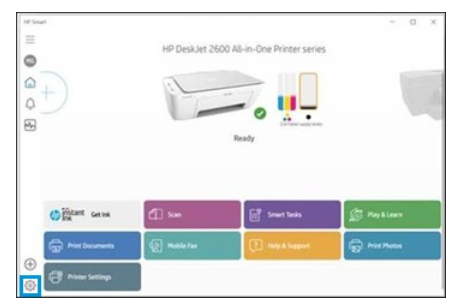
3) Click About, press and hold Ctrl + Shift, and then right-click on the HP Smart logo.
The region reset screen opens.
4) Take a screenshot of the screen and send it to me in a private message.
To access your private messages, click the Private message icon on the upper right corner of your HP Community profile Next, to your profile Name, you should see a little blue envelope, please click on it or simply click on this link
Take care and have a great day ahead!
Irwin6
HP Support
Irfan_06-Moderator
I am an HP Employee
05-01-2024 04:31 AM
HP Recommended
Hi @writetonsharma,
As you do not have the old ink cartridges, please perform the above shared steps by installing the new ink cartridges.
Take care and have a great day ahead!
Irwin6
HP Support
Irfan_06-Moderator
I am an HP Employee
06-14-2024 06:46 AM
HP Recommended
Hi @writetonsharma,
That's great! Happy to hear that the issue has been resolved. I appreciate your efforts in performing the steps to fix it and If you need further assistance feel free to reach out to us.
Take care and have a great day ahead!
Irwin6
HP Support
Irfan_06-Moderator
I am an HP Employee
06-14-2024 06:48 AM
HP Recommended
Finally the printer ink worked. Thanks Irwin! This is awesome!
I guess the support people should be given training. I had called and email support people and they told me that the printer is not sold in India and so they cant help. What to tell them.
Thanks again!

Be alert for scammers posting fake support phone numbers and/or email addresses on the community.
If you think you have received a fake HP Support message, please report it to us by clicking on "Flag Post".
† The opinions expressed above are the personal opinions of the authors, not of HP. By using this site, you accept the Terms of Use and Rules of Participation.


Didn't find what you were looking for?
Ask the community
† The opinions expressed above are the personal opinions of the authors, not of HP. By using this site, you accept the <a href="https://www8.hp.com/us/en/terms-of-use.html" class="udrlinesmall">Terms of Use</a> and <a href="/t5/custom/page/page-id/hp.rulespage" class="udrlinesmall"> Rules of Participation</a>.