• ×
    Information
    Need Windows 11 help?
    Check documents on compatibility, FAQs, upgrade information and available fixes.
    Windows 11 Support Center.
  • post a message
  • ×
    Information
    Need Windows 11 help?
    Check documents on compatibility, FAQs, upgrade information and available fixes.
    Windows 11 Support Center.
  • post a message
Guidelines
Seize the moment! nominate yourself or a tech enthusiast you admire & join the HP Community Experts!
Check some of the most frequent questions about Instant Ink: HP INSTANT INK, HP+ PLANS: INK AND TONER.


Check out our Black or Color Ink Not Printing, Other Print Quality Issues info about: Print quality and Cartridge Issues.
HP Recommended
HP DeskJet Plus 4130 All-in-One Printer
macOS 10.13 High Sierra

I'm trying to print a page with different colours on it but it will not print the colour red.

1 REPLY 1
HP Recommended

@EmpressYoSo

Thank you for posting on the HP Support Community.
 

Don't worry as I'll be glad to help, to provide an accurate resolution, I need a few more details:

  • Does the copy print out the same way?
  • What's the application you are trying to print from?
  • Have you tried printing from a different application or device?

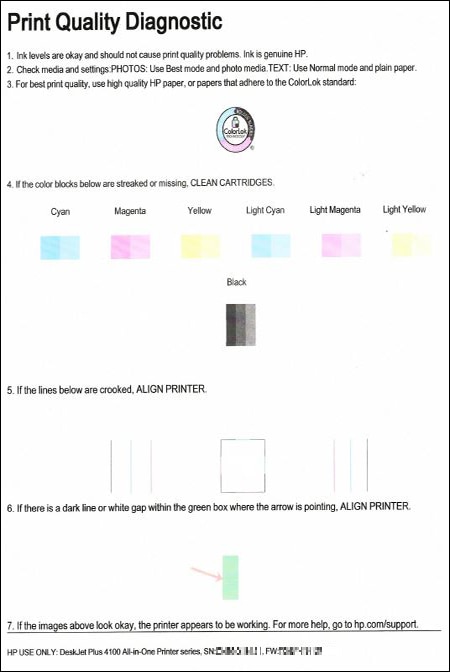
While you respond to that, let's print a Print Quality Diagnostic page –

Open the HP Smart app, and then print the Print Quality Diagnostic page.

  1. Open HP Smart and select your printer.

  2. Click Printer Reports, or click Tools and then click Printer Reports.

    The list of reports is displayed.

  3. Select Print Quality Report.

    The printer prints the Print Quality Diagnostic page.

    Example of a Print Quality Diagnostic page without defects

Post the Print Quality Diagnostic page here so we can help you further.

Hope this helps! Keep me posted for further assistance.
Please click “Accept as Solution” if you feel my post solved your issue, it will help others find the solution. Click the “Kudos, Thumbs Up" on the bottom right to say “Thanks” for helping!

ECHO_LAKE
I am an HP Employee

† The opinions expressed above are the personal opinions of the authors, not of HP. By using this site, you accept the <a href="https://www8.hp.com/us/en/terms-of-use.html" class="udrlinesmall">Terms of Use</a> and <a href="/t5/custom/page/page-id/hp.rulespage" class="udrlinesmall"> Rules of Participation</a>.