-
×InformationNeed Windows 11 help?Check documents on compatibility, FAQs, upgrade information and available fixes.
Windows 11 Support Center. -

-
×InformationNeed Windows 11 help?Check documents on compatibility, FAQs, upgrade information and available fixes.
Windows 11 Support Center. -
- HP Community
- Printers
- Printer Ink Cartridges & Print Quality
- Region update

Create an account on the HP Community to personalize your profile and ask a question
05-15-2024 09:30 AM
Hello, I brought my HP officeJet Pro 7740 to the US, and as I understood from the community message I need to perform the region update. I was using 953 Cartridges but now it's 952, and it's now working. Please instruct me what are my next steps. Thank you.
05-15-2024 02:14 PM
Hi @Nushka,
Welcome to the HP Support Community.
Thank you for posting your query, I will be glad to assist you.
I see that you are looking for help with a regional reset on your Printer.
To perform a printer region reset you need to meet the following conditions:
Which country did you move from and to?
Do you have the ink cartridges for both regions?
Do you have a printer USB cable or is it connected wirelessly?
Do you have the printer full feature software or the HP smart app and drivers installed on your PC?
If you meet the above conditions then let me know the following details:
1) The operating system of your PC, is it Windows or Mac?
2) Confirm the printer model.
Note: Do not share any of your personal information such as serial, phone number, email ID, etc.
Take care and have a great day ahead!
Irwin6
HP Support
Irfan_06-Moderator
I am an HP Employee
05-17-2024 09:08 AM
Hello, thank you for the reply. I moved from Israel to the US.
I have 953 from Israel, and I bought 952 here , but it didn't fit so I returned it. wireless connection. regarding the software - I don't know. I can fee the printer on my PC. I have Mac OC. my printer model is HP officeJet Pro 7740.
thank you
05-19-2024 05:49 AM
Hi @Nushka,
Thank you for sharing the above information.
Please install the previous country ink cartridges and perform the steps given below.
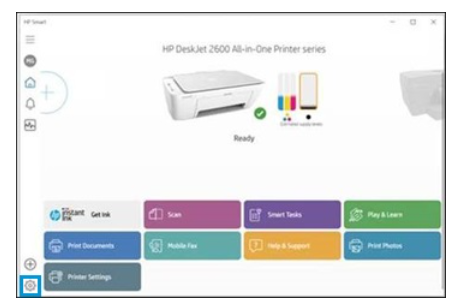
If your computer is connected to the printer with a USB or wireless connection, you can open the Set New Regions window with HP Smart by following these steps.
1) Open the HP Smart app.
2) On the Home screen, click gear icon.

3) Click About, press and hold Ctrl + Shift, and then right-click on the HP Smart logo.
The region reset screen opens.
4) Take a screenshot of the screen and send it to me in a private message.
To access your private messages, click the Private message icon on the upper right corner of your HP Community profile Next, to your profile Name, you should see a little blue envelope, please click on it or simply click on this link
Take care and have a great day ahead!
Irwin6
HP Support
Irfan_06-Moderator
I am an HP Employee