
-
×InformationNeed Windows 11 help?Check documents on compatibility, FAQs, upgrade information and available fixes.
Windows 11 Support Center. -
-
×InformationNeed Windows 11 help?Check documents on compatibility, FAQs, upgrade information and available fixes.
Windows 11 Support Center. -
- HP Community
- Printers
- Printer Ink Cartridges & Print Quality
- Re: Regional Reset Needed

Create an account on the HP Community to personalize your profile and ask a question
Your account also allows you to connect with HP support faster, access a personal dashboard to manage all of your devices in one place, view warranty information, case status and more.
Check some of the most frequent questions about Instant Ink: HP INSTANT INK, HP+ PLANS: INK AND TONER.
Check out our Black or Color Ink Not Printing, Other Print Quality Issues info about: Print quality and Cartridge Issues.

It has been a while since anyone has replied. Simply ask a new question if you would like to start the discussion again.

10-27-2023 11:31 PM
 HP Recommended
Product: HP OfficeJet Pro 9010 All-in-One Printer
Operating System: Microsoft Windows 10 (64-bit)
I moved to the US from the Caribbean. I tried using HP 962 cartridges in my printer and receive an incompatibility error. I previously used HP 964 cartridges and am not able to buy them. Reading through similar issues on the forum, it appears that I require a regional reset. How do I do that?
8 REPLIES 8


10-29-2023 06:20 AM
HP Recommended
HI @bermy65,
Welcome to the HP Support Community.
Thank you for posting your query, I will be glad to assist you.
I see that you are looking for help with a regional reset on your Printer.
To perform a printer region reset you need to meet the following conditions:
Which country did you move from and to?
Do you have the ink cartridges for both regions?
Do you have a printer USB cable?
Do you have the printer full feature software and drivers installed on your PC?
If you meet the above conditions then let me know the following details:
1) The operating system of your PC, is it Windows or Mac?
2) Confirm the printer model.
Note: Do not share any of your personal information such as serial, phone number, email ID, etc.
Take care and have a great day ahead!
Irwin6
HP Support
Irfan_06-Moderator
I am an HP Employee
10-31-2023 05:22 PM
HP Recommended
Sorry for the delayed response....I did not see the email right away.
Which country did you move from and to?
Moved from BERMUDA to US
Do you have the ink cartridges for both regions?
Yes, I have both HP964 and HP962 cartridges. The HP964 cartridges have low ink.
Do you have a printer USB cable?
Yes
Do you have the printer full feature software and drivers installed on your PC?
Yes
If you meet the above conditions then let me know the following details:
1) The operating system of your PC, is it Windows or Mac?
Windows 10
2) Confirm the printer model.
HP OfficeJet Pro 9010 series
11-01-2023 06:38 AM
HP Recommended
Hi @bermy65,
Please install the previous country ink cartridges and perform the steps given below.
1) Launch the printer software from the desktop icon Or, from the Start menu, click Start, All Programs, HP, the Product Name, and then the Product Name again.
2) Double-click the Estimated Ink Levels icon in the printer software. The Estimated Ink Levels window opens.
3) Press and hold the CTRL and SHIFT keys, and then right-click anywhere in the Estimated Ink Levels window, except for a button. The Set New Region window opens.
4) If the Set New Region window fails to open, right-click to the right and left of the Estimated Ink Levels window.
5) Take a screenshot of the screen and send it to me in a private message.
To access your private messages, click the Private message icon on the upper right corner of your HP Community profile Next, to your profile Name, you should see a little blue envelope, please click on it or simply click on this link
Take care and have a great day ahead!
Irwin6
HP Support
Irfan_06-Moderator
I am an HP Employee
11-01-2023 09:14 AM - edited 11-01-2023 09:15 AM
HP Recommended
Good day.
1) Launch the printer software from the desktop icon Or, from the Start menu, click Start, All Programs, HP, the Product Name, and then the Product Name again.
My options are Start>All Programs>HP>HP Officejet Pro Series 9010. When I click this, it takes me to the process for setting up a new printer.
If I use HP Smart and click on the printer ink cartridge level display, it immediately takes me to the HP webpage to order ink cartridge supplies.
Do I need some other HP software installed on my PC??
11-02-2023 07:44 AM
HP Recommended
Hi @bermy65,
Please find the below image to perform the steps to find the values to perform a regional reset.
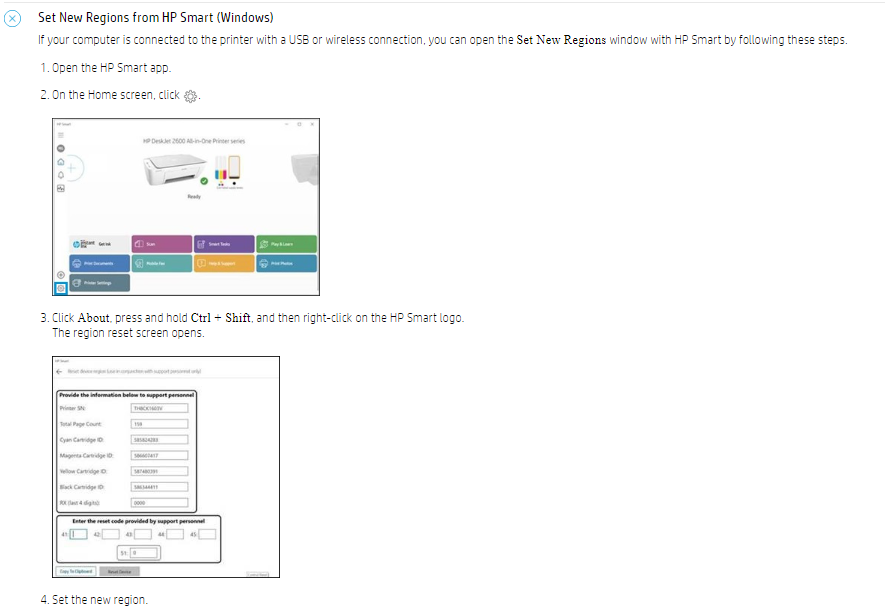
Take a screenshot of the screen and send it to me in a private message.
Take care and have a great day ahead!
Irwin6
HP Support
Irfan_06-Moderator
I am an HP Employee
11-23-2023 08:23 AM
HP Recommended
Hi @bermy65,
I am sorry to inform you that we did not receive your private message.
The support here is limited and this issue might require one-on-one interaction to fix it.
I've sent you a private message with the instructions. In order to access your private messages, Click the Private message icon on the upper right corner of your HP Community profile Next to your profile Name, you should see a little blue envelope, please click on it or simply click on this link
Take care and have a great day ahead!
Irwin6
HP Support
Irfan_06-Moderator
I am an HP Employee

Be alert for scammers posting fake support phone numbers and/or email addresses on the community.
If you think you have received a fake HP Support message, please report it to us by clicking on "Flag Post".
† The opinions expressed above are the personal opinions of the authors, not of HP. By using this site, you accept the Terms of Use and Rules of Participation.


Didn't find what you were looking for?
Ask the community
† The opinions expressed above are the personal opinions of the authors, not of HP. By using this site, you accept the <a href="https://www8.hp.com/us/en/terms-of-use.html" class="udrlinesmall">Terms of Use</a> and <a href="/t5/custom/page/page-id/hp.rulespage" class="udrlinesmall"> Rules of Participation</a>.