• ×
    Information
    Need Windows 11 help?
    Check documents on compatibility, FAQs, upgrade information and available fixes.
    Windows 11 Support Center.
  • post a message
  • ×
    Information
    Need Windows 11 help?
    Check documents on compatibility, FAQs, upgrade information and available fixes.
    Windows 11 Support Center.
  • post a message
Guidelines
Join the HP Community Solve‑a‑thon | Help Others & Share Your Solutions | Live on Zoom | 2:30 PM to 2:30 AM IST | Every Wednesday Click here to know more
Check some of the most frequent questions about Instant Ink: HP INSTANT INK, HP+ PLANS: INK AND TONER.


Check out our WINDOWS 11 Support Center info about: OPTIMIZATION, KNOWN ISSUES, FAQs AND MORE.
HP Recommended
HP Officejet Pro 8620
macOS 10.15 Catalina

I have been using an HP Officejet Pro 8620 for scanning. Suddenly I'm getting a message saying:

"HP Easy Scan.app" will damage your computer. You should move it to the trash.

Is this a valid concern? If not, how do I get rid of it so I can make scans again?

1 ACCEPTED SOLUTION

Accepted Solutions
HP Recommended

@BBArtist, Welcome to the HP Support Community!


HP Easy Scan app is from HP and is legit. macOS includes a technology called Gatekeeper, that's designed to ensure that only trusted software runs on your Mac. For more info, refer to this document - Safely open apps on your Mac


Check for any software updates on MAC

Click the Apple icon > About This Mac > Software Update and install any available update.


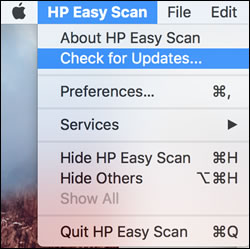
Update HP Easy Scan: Open HP Easy Scan. On the upper bar, click HP Easy Scan, click Check for Updates, and then install any available updates.

Checking for updates in HP Easy Scan

Hope this helps! Keep me posted. 


Please click “Accept as Solution” if you feel my post solved your issue, it will help others find the solution.

Click the “Kudos, Thumbs Up" on the bottom right to say “Thanks” for helping!

Have a great day! 

KUMAR0307
I am an HP Employee

View solution in original post

3 REPLIES 3
HP Recommended

@BBArtist, Welcome to the HP Support Community!


HP Easy Scan app is from HP and is legit. macOS includes a technology called Gatekeeper, that's designed to ensure that only trusted software runs on your Mac. For more info, refer to this document - Safely open apps on your Mac


Check for any software updates on MAC

Click the Apple icon > About This Mac > Software Update and install any available update.


Update HP Easy Scan: Open HP Easy Scan. On the upper bar, click HP Easy Scan, click Check for Updates, and then install any available updates.

Checking for updates in HP Easy Scan

Hope this helps! Keep me posted. 


Please click “Accept as Solution” if you feel my post solved your issue, it will help others find the solution.

Click the “Kudos, Thumbs Up" on the bottom right to say “Thanks” for helping!

Have a great day! 

KUMAR0307
I am an HP Employee

HP Recommended

Thank you, Kumar0307. You're a hero! I spent over an hour last night working with a private tech support person, and we got the scanner working, but then I realized today that the printer still wasn't working. Your solution worked.

HP Recommended

@BBArtist


Glad to know that the issue is now resolved. Feel free to contact us with any concerns related to HP products.

Happy to help!

KUMAR0307
I am an HP Employee

† The opinions expressed above are the personal opinions of the authors, not of HP. By using this site, you accept the <a href="https://www8.hp.com/us/en/terms-of-use.html" class="udrlinesmall">Terms of Use</a> and <a href="/t5/custom/page/page-id/hp.rulespage" class="udrlinesmall"> Rules of Participation</a>.