
-
×InformationNeed Windows 11 help?Check documents on compatibility, FAQs, upgrade information and available fixes.
Windows 11 Support Center. -
-
×InformationNeed Windows 11 help?Check documents on compatibility, FAQs, upgrade information and available fixes.
Windows 11 Support Center. -
- HP Community
- Printers
- Printer Setup, Software & Drivers
- Re: Firware changed the printer's model

Create an account on the HP Community to personalize your profile and ask a question
Your account also allows you to connect with HP support faster, access a personal dashboard to manage all of your devices in one place, view warranty information, case status and more.
Check some of the most frequent questions about Instant Ink: HP INSTANT INK, HP+ PLANS: INK AND TONER.
Check out our WINDOWS 11 Support Center info about: OPTIMIZATION, KNOWN ISSUES, FAQs AND MORE.

It has been a while since anyone has replied. Simply ask a new question if you would like to start the discussion again.

05-15-2020 06:20 AM
 HP Recommended
Product: LaserJet Pro M104W
Operating System: macOS 10.14 Mojave
I have installed this firmware https://support.hp.com/us-en/drivers/selfservice/hp-laserjet-pro-m104-printer-series/9365395
and after it finished, the printer became LaserJet 3020 and it's not working anymore — the led is blinking all the time and it's not printing anything. How can this be fixed and what's up with this firmare?
6 REPLIES 6


05-21-2020 07:30 AM
HP Recommended
@antongranik, Welcome to HP Support Community!
Let us try restoring the printer to its factory defaults. Here is how you do it-
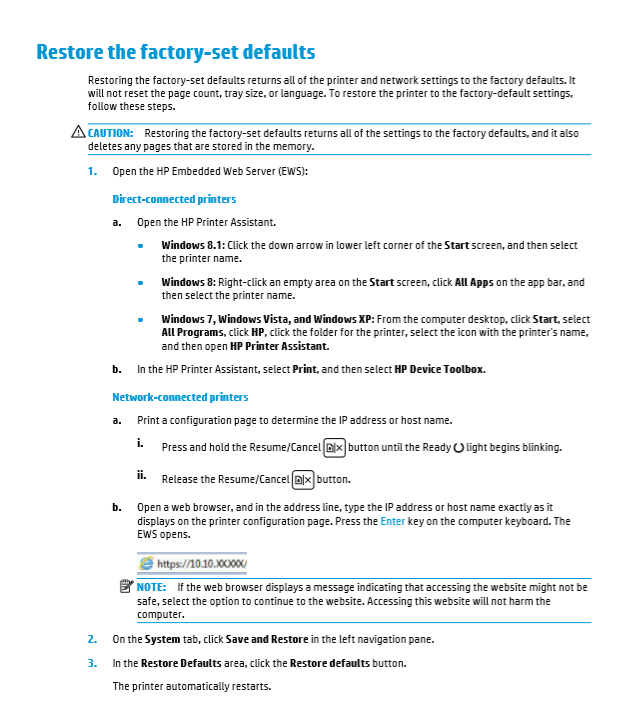
Now, reconfigure the printer and try printing.
If the issue persists, refer to the document Blinking Lights for further troubleshooting.
Hope this helps! Keep me posted.
Please click “Accepted Solution” if you feel my post solved your issue, it will help others find the solution. Click the “Kudos/Thumbs Up" on the bottom right to say “Thanks” for helping!
TEJ1602
I am an HP Employee
05-22-2020 01:10 PM
HP Recommended
Hi! Thanks for this, but I tried everything. The system doesn't see the printer anymore whatever I do. I tried to connect it to my Mac, then to my PC, tried to install the drivers again, tried to run the firmware update again, even connected it to my router through USB, but it didn't give me anything to reset it or print a test configuration page. I reset the printing system on the Mac in the preferences, reinstalled the printer again and nothing. The light just blinks all the time.
05-31-2020 10:26 AM
HP Recommended
Use the guided troubleshooter Troubleshooting | Wireless Printing Center for instruction to isolate and resolve the issue.
Hope this helps! Keep me posted.
Please click “Accepted Solution” if you feel my post solved your issue, it will help others find the solution. Click the “Kudos/Thumbs Up" on the bottom right to say “Thanks” for helping!
TEJ1602
I am an HP Employee
06-07-2020 12:34 PM
HP Recommended
Nothing worked. I don't want to spent my time on this **bleep** anymore. I will buy tomorrow another printer from another company.
Unbelievable! I have just updated the firmware downloaded from you website! And the printer became a brick. $100 and 2 months of working. Now in the trash. Minus one loyal customer, who was using your products for 15 years or so.
06-08-2020 02:28 AM
HP Recommended
We shall escalate this issue to the concerned team.
Please look for a private message from me requesting additional information. Keep in mind not to publicly post personal information (serial numbers and case details).
If you are unfamiliar with how the Community's private message capability works, you can learn about that here.
Thank you for visiting the HP Support Community.
Please click “Accepted Solution” if you feel my post solved your issue, it will help others find the solution. Click the “Kudos/Thumbs Up" on the bottom right to say “Thanks” for helping!
TEJ1602
I am an HP Employee

Be alert for scammers posting fake support phone numbers and/or email addresses on the community.
If you think you have received a fake HP Support message, please report it to us by clicking on "Flag Post".
† The opinions expressed above are the personal opinions of the authors, not of HP. By using this site, you accept the Terms of Use and Rules of Participation.


Didn't find what you were looking for?
Ask the community
† The opinions expressed above are the personal opinions of the authors, not of HP. By using this site, you accept the <a href="https://www8.hp.com/us/en/terms-of-use.html" class="udrlinesmall">Terms of Use</a> and <a href="/t5/custom/page/page-id/hp.rulespage" class="udrlinesmall"> Rules of Participation</a>.