
-
×InformationNeed Windows 11 help?Check documents on compatibility, FAQs, upgrade information and available fixes.
Windows 11 Support Center. -
-
×InformationNeed Windows 11 help?Check documents on compatibility, FAQs, upgrade information and available fixes.
Windows 11 Support Center. -
- HP Community
- Printers
- Printer Setup, Software & Drivers
- Re: HP 1536dnf and HP 427 laserjet printer not supporting on...

Create an account on the HP Community to personalize your profile and ask a question
Your account also allows you to connect with HP support faster, access a personal dashboard to manage all of your devices in one place, view warranty information, case status and more.
Check some of the most frequent questions about Instant Ink: HP INSTANT INK, HP+ PLANS: INK AND TONER.
Check out our WINDOWS 11 Support Center info about: OPTIMIZATION, KNOWN ISSUES, FAQs AND MORE.

It has been a while since anyone has replied. Simply ask a new question if you would like to start the discussion again.

09-15-2021 02:19 AM
 HP Recommended
Product: HP 1536dnf and HP 427 laserjet printer
Operating System: macOS 11.0 Big Sur
Installed HP Easy Start but it cannot installed driver then HP Easy Start guided me to HP Smart app install from Apple store that to cannot find installed the drivers for both HP 1536dnf and HP 427 laser jet printers. Why there is no offline file present on the Hp website like earlier for easy installation.
Both HP Easy Start app and HP Smart app cannot installed the drivers in Macos Big Sur 11.3.2 which can be solved easily if HP make drivers file available like earlier.
Solved! Go to Solution.
1 ACCEPTED SOLUTION
Accepted Solutions
09-16-2021 11:42 PM - edited 09-18-2021 01:53 AM
HP Recommended
As there was no reply and solution I found solution myself
Solution for those who have same question about Drivers for printer.
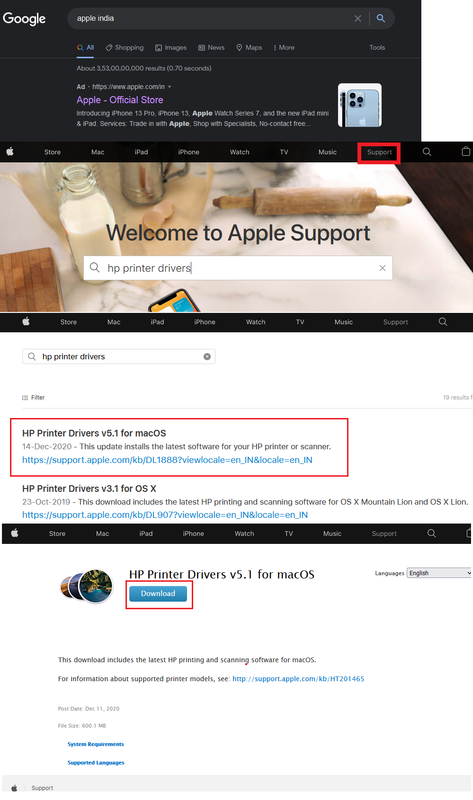
Step1. Go to Apple official website say for example I am for India https://www.apple.com/in/
Step2. Go to Support menu and type Hp Printer drivers.
Step3. It will open list of drivers for HP printers. Select latest one for in this case mine was HP Printer Drivers v5.1 for macOS Post Date: Dec 11, 2020 File Size: 600.1 MB
Step4. Installed it on macos Bigsur 11.3.2. It detected the printer automatically and installed the printer successfully.
7 REPLIES 7


09-15-2021 05:04 AM
HP Recommended
Hi,
Please follow below version of HP Easy Start, as soon as it launches open the top HP Easy Start menu and select Uninstall HP Software.
Follow the steps on screen and then click on Set Up New Device and follow the steps to reinstall the printer:
https://ftp.hp.com/pub/softlib/software12/HP_Quick_Start/osx/Applications/HP_Easy_Start.app.zip
As soon as HP Easy start prompts to install HP Smart, close HP Easy Start and press the Skip to Software Download button, then follow the steps on screen to complete the installation and check for any difference.
Shlomi


Click the Yes button to reply that the response was helpful or to say thanks.
If my post resolve your problem please mark it as an Accepted Solution 🙂

09-15-2021 06:58 AM
HP Recommended
To make sure, the printer is detected and listed prior to this screen, right?
What appears following this screen? what exact error message or behavior occurs following the shown screen?
Click the Yes button to reply that the response was helpful or to say thanks.
If my post resolve your problem please mark it as an Accepted Solution 🙂
09-16-2021 01:14 AM
HP Recommended
As guide by you I have cancel at hp smart app then the setup detected the printer . Image posted earlier show up and was there for 1 hour and it was showing same thing today. Can you please provide the offline driver installation file instead for both printers.
09-16-2021 01:44 AM
HP Recommended
Thanks for clarifying.
Let's try downloading the software for both printers using HP Easy Admin instead, be sure to download and install the HP Essential Software of both printers and HP Easy Scan as well, make sure the correct operating system is selected and if no results are given ensure that English is selected as the language as well:
https://support.hp.com/my-en/document/c06164609
Once completing the installation go to System Preferences > Printers and add the printer, within the Use drop-down menu be sure to select your printer model from the list.
Shlomi
Click the Yes button to reply that the response was helpful or to say thanks.
If my post resolve your problem please mark it as an Accepted Solution 🙂
09-16-2021 03:08 AM - edited 09-16-2021 03:09 AM
HP Recommended
HP EASY ADMIN is aslo stuck at this screen for last half an hour. Can you please send direct link for the driver file as is not working .Facing problem in both methods you have provided

It is showing the driver for the printer but not able to download it .
09-16-2021 11:42 PM - edited 09-18-2021 01:53 AM
HP Recommended
As there was no reply and solution I found solution myself
Solution for those who have same question about Drivers for printer.
Step1. Go to Apple official website say for example I am for India https://www.apple.com/in/
Step2. Go to Support menu and type Hp Printer drivers.
Step3. It will open list of drivers for HP printers. Select latest one for in this case mine was HP Printer Drivers v5.1 for macOS Post Date: Dec 11, 2020 File Size: 600.1 MB
Step4. Installed it on macos Bigsur 11.3.2. It detected the printer automatically and installed the printer successfully.

Be alert for scammers posting fake support phone numbers and/or email addresses on the community.
If you think you have received a fake HP Support message, please report it to us by clicking on "Flag Post".
† The opinions expressed above are the personal opinions of the authors, not of HP. By using this site, you accept the Terms of Use and Rules of Participation.


Didn't find what you were looking for?
Ask the community
† The opinions expressed above are the personal opinions of the authors, not of HP. By using this site, you accept the <a href="https://www8.hp.com/us/en/terms-of-use.html" class="udrlinesmall">Terms of Use</a> and <a href="/t5/custom/page/page-id/hp.rulespage" class="udrlinesmall"> Rules of Participation</a>.