-
×InformationNeed Windows 11 help?Check documents on compatibility, FAQs, upgrade information and available fixes.
Windows 11 Support Center. -

-
×InformationNeed Windows 11 help?Check documents on compatibility, FAQs, upgrade information and available fixes.
Windows 11 Support Center. -
- HP Community
- Printers
- Printer Ink Cartridges & Print Quality
- HP DeskJet 2130 Cartridge Regionalization

Create an account on the HP Community to personalize your profile and ask a question
10-24-2026 09:44 AM
Hi @turksss
Welcome to the HP Support Community!
Thanks for reaching out!
I understand how it can be when your HP DeskJet 2130 is not recognizing the cartridges and the black and color lights keep blinking. Dont worry I'll be glad to help.
A cartridge regionalization issue can occur when cartridges purchased in one country or region are installed in a printer that was originally set up in a different country or region. The printer will accept cartridges that match its current regional settings.
To better assist you, could you please let us know:
- Which country was the printer originally purchased and set up in?
- Which country are you currently using the printer in?
- Are you using genuine HP cartridges or compatible cartridges?
- What are the cartridge numbers you are trying to install?
Once we have this information, we can check whether a regionalization reset may be required and guide you through the next steps.
I'm an HP Employee.
If this reply helped resolve your issue, please select the Accept as Solution as it helps others in the community quickly find the answer they’re looking for.
And if you found this reply helpful, clicking Yes below is a great way to let us know we’re providing the support you need, as it encourages us to keep improving and sharing helpful guidance.
10-28-2026 06:57 AM
Thank you so much for your response @turksss
Could you please confirm if you have moved from Ghana to Germany so that we can assist you accordingly?
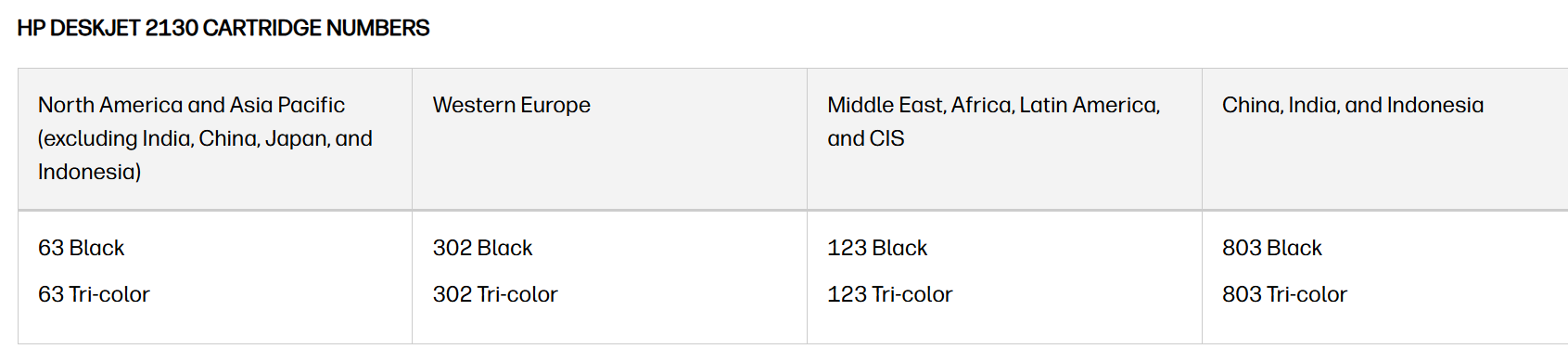
Also, please check the image below for the right cartridge number according to the country.
Have a great day!
I'm an HP Employee.
If this reply helped resolve your issue, please select the Accept as Solution as it helps others in the community quickly find the answer they’re looking for.
And if you found this reply helpful, clicking Yes below is a great way to let us know we’re providing the support you need, as it encourages us to keep improving and sharing helpful guidance.