• ×
    Information
    Need Windows 11 help?
    Check documents on compatibility, FAQs, upgrade information and available fixes.
    Windows 11 Support Center.
  • post a message
  • ×
    Information
    Need Windows 11 help?
    Check documents on compatibility, FAQs, upgrade information and available fixes.
    Windows 11 Support Center.
  • post a message
Guidelines
Join the HP Community Solve‑a‑thon | Help Others & Share Your Solutions | Live on Zoom | 2:30 PM to 2:30 AM IST | Every Wednesday Click here to know more
Check some of the most frequent questions about Instant Ink: HP INSTANT INK, HP+ PLANS: INK AND TONER.


Check out our WINDOWS 11 Support Center info about: OPTIMIZATION, KNOWN ISSUES, FAQs AND MORE.
HP Recommended
OfficeJet 5230
Microsoft Windows 10 (64-bit)

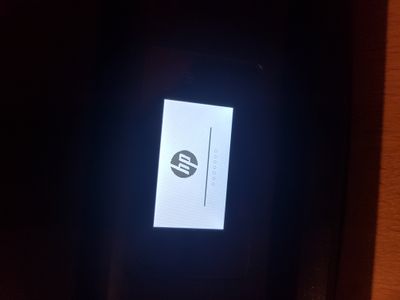
When trying to boot up my printer, it always gets stuck on the startup phase (shown in the picture). I have tried rebooting it by unplugging, waiting 60 seconds and replugging and it still ends up on that same screen. Sometimes there are 2 dots, 4 dots or zero dots. It all seems quite inconsistent. Im plugging it directly into a wall outlet, by the way


20201102_181052.jpg

This has been going on for a week now and now I do have the need to print something out. It is especially frustrating that this printer is only just a bit older than a year. 


I hope someone can help,


Elouen

1 REPLY 1
HP Recommended

@Elouen_Corvest, Welcome to the HP Support Community!


Leave the printer unplugged for a couple of hours and then try powering it on and check if that helps.


If the issue persists, Unplug the power cable, hold the power button down for 10-15 seconds and release it.

Connect the power cable and power ON the printer.


If the issue persists, I'm afraid this is a hardware failure. Please reach out to the HP Technical Support team in your region regarding the service options for your printer. 

You may create a case on the website to obtain a case number if required. Kindly watch this video to know how.


Keep me posted for any other assistance.


Please click “Accept as Solution” if you feel my post solved your issue, it will help others find the solution.

Click the “Kudos, Thumbs Up" on the bottom right to say “Thanks” for helping!

Have a great day! 

KUMAR0307
I am an HP Employee

† The opinions expressed above are the personal opinions of the authors, not of HP. By using this site, you accept the <a href="https://www8.hp.com/us/en/terms-of-use.html" class="udrlinesmall">Terms of Use</a> and <a href="/t5/custom/page/page-id/hp.rulespage" class="udrlinesmall"> Rules of Participation</a>.