
-
×InformationNeed Windows 11 help?Check documents on compatibility, FAQs, upgrade information and available fixes.
Windows 11 Support Center. -
-
×InformationNeed Windows 11 help?Check documents on compatibility, FAQs, upgrade information and available fixes.
Windows 11 Support Center. -
- HP Community
- Printers
- Printer Setup, Software & Drivers
- Re: Scan - No computer found

Create an account on the HP Community to personalize your profile and ask a question
Your account also allows you to connect with HP support faster, access a personal dashboard to manage all of your devices in one place, view warranty information, case status and more.
Check some of the most frequent questions about Instant Ink: HP INSTANT INK, HP+ PLANS: INK AND TONER.
Check out our WINDOWS 11 Support Center info about: OPTIMIZATION, KNOWN ISSUES, FAQs AND MORE.

It has been a while since anyone has replied. Simply ask a new question if you would like to start the discussion again.



09-25-2021 08:17 AM
 HP Recommended
Hi @Sharphin,
Welcome to the HP Support Community. I'd be happy to assist you.
Do you have an anti-virus program installed on the MAC?
For now, let us try these steps to resolve this issue:
Update the printer firmware
On the printer, go to Setup > Tools > Update the printer > Check now
Click here to know different methods of updating printer firmware.
Also, check for any software updates on MAC
Click the Apple icon > About This Mac > Software Update and install any available update.
Let us check the connectivity by performing a PING test
- Obtain the IP address of the printer by clicking on the Wireless icon on the printer
- On the MAC Go to Spotlight > search for Network utility > select Ping tab > enter the IP address of the printer in the box
- Check the second box that says Send only > 10 pings
- Click on ping > Check the results at the end if any packets are lost
- Note: There should be 0% packet loss, share the results in your next post.
If 0% loss, then proceed to the next step.
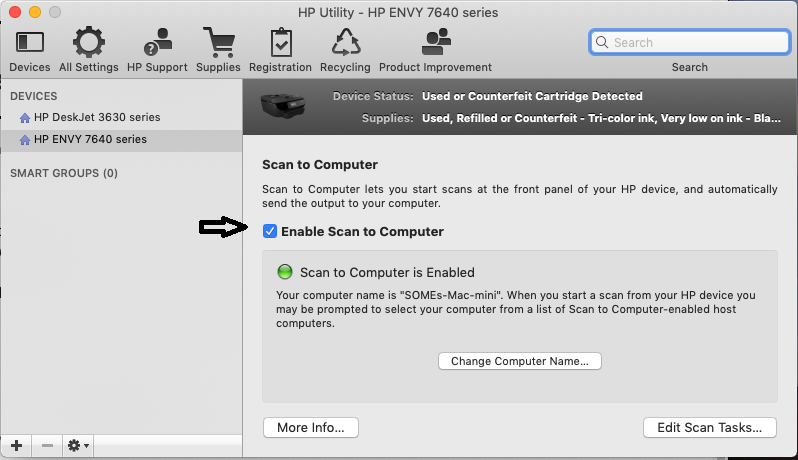
1.) On your Mac, click Finder, click Applications, click the Hewlett-Packard or HP folder, then double-click HP Utility. (If HP Utility is not available, download and install the printer essential software from here)
2.) Under Scan Settings, click Scan to Computer, then make sure the Enable Scan to Computer check box is selected.
 Hope this helps! Keep me posted.
Please click “Accept as Solution” if you feel my post solved your issue, it will help others find the solution.
Click the “Kudos, Thumbs Up" on the bottom right to say “Thanks” for helping!
Have a great day!
09-25-2021 04:47 PM - edited 09-25-2021 04:49 PM
HP Recommended
Firmwares are up to date.
I don't have the HP Utility as this is not available for download. I used the HP smart as instructed by one of your colleagues.
Ping is fine (0% loss) as I can print anything using the wireless connection. I can scan remotely using HP Easy Scan, but it's from the computer. What does not work is scanning from the printer panel. I have another MAC running Mac OS High Sierra and it works perfectly fine.
As I tried before, I found not install the HP Essentials. I downloaded it but got an error when installing it. See below. Sometimes I get this error message, sometimes nothing happens! I double click on the file and nothing happens. There is an error with the package.


Also, I'm waiting for months for an HP call.
Thanks.
09-26-2021 09:56 AM
HP Recommended
Hi@Sharphin,
Let me know if you need any other assistance and I'd be happy to help 🙂
Please click “Accept as Solution” if you feel my post solved your issue, it will help others find the solution.
Click the “Kudos, Thumbs Up" on the bottom right to say “Thanks” for helping!
Have a great day!
09-27-2021 12:33 PM
HP Recommended
Hi@Sharphin,
If the issue persists, please reach out to the HP Support in your region regarding the service options for your printer.
If the printer is out of warranty, I suggest you upgrade the printer. You may visit Hp Store to check the available printers.
Keep me posted for any other assistance.
- « Previous
- Next »

Be alert for scammers posting fake support phone numbers and/or email addresses on the community.
If you think you have received a fake HP Support message, please report it to us by clicking on "Flag Post".
† The opinions expressed above are the personal opinions of the authors, not of HP. By using this site, you accept the Terms of Use and Rules of Participation.


Didn't find what you were looking for?
Ask the community
† The opinions expressed above are the personal opinions of the authors, not of HP. By using this site, you accept the <a href="https://www8.hp.com/us/en/terms-of-use.html" class="udrlinesmall">Terms of Use</a> and <a href="/t5/custom/page/page-id/hp.rulespage" class="udrlinesmall"> Rules of Participation</a>.