• ×
    Information
    Need Windows 11 help?
    Check documents on compatibility, FAQs, upgrade information and available fixes.
    Windows 11 Support Center.
  • post a message
  • ×
    Information
    Need Windows 11 help?
    Check documents on compatibility, FAQs, upgrade information and available fixes.
    Windows 11 Support Center.
  • post a message
Guidelines
Join the HP Community Solve‑a‑thon | Help Others & Share Your Solutions | Live on Zoom | 2:30 PM to 2:30 AM IST | Every Wednesday Click here to know more
Check some of the most frequent questions about Instant Ink: HP INSTANT INK, HP+ PLANS: INK AND TONER.


Check out our WINDOWS 11 Support Center info about: OPTIMIZATION, KNOWN ISSUES, FAQs AND MORE.

HP Recommended

How can I change the printer language on my deckjet ink advantage 2800 all in one printer series 

1 REPLY 1
HP Recommended

Hi @Dre61,


Welcome to the HP Support Community!


Thanks for reaching out!


Change the language through the Embedded Web Server (network only)


If your printer is connected to your computer with a USB cable, skip to the next step to change the language through the control panel

Use an Internet browser to open the Embedded Web Server (EWS), and then change the language setting. The EWS is available only for printers that are set up on a wired (Ethernet) or wireless network.

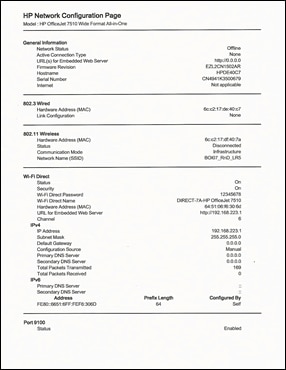
Print a Network Configuration Page.

On the printer control panel, swipe the display to the left, and then touch Setup.

Touch Tools.

Swipe up on the display, and then touch Network Configuration Report.

A Network Configuration Page prints.

Figure : Example of a Network Configuration Page

  1. Image: Example of a Network Configuration Page

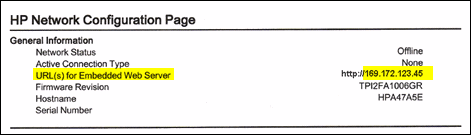
On the Network Configuration Page, find URL for the embedded web server.

Figure : Example of the EWS URL on the Network Configuration Page

  1. Image: EWS URL on the Network Configuration Page

From a computer connected to your network, type the entire URL into an Internet browser. If the webpage remains blank, try a different Internet browser.

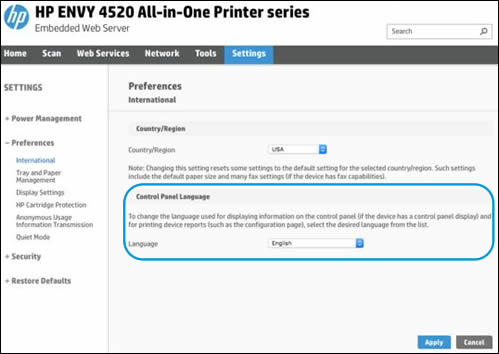
In the EWS, click the Settings tab.

Click Preferences, and then click International.

Under Control Panel Language, select the desired control panel language.

Figure : Example of the Control Panel Language Selection

  1. Image: Example of the Control Panel Language Selection

Click Apply, wait until the changes are confirmed, and then close the EWS.

Turn your printer off and then on.

Keep me posted, how it goes! 

Please refer to one of our previous posts made by @Raj1788  that has assisted other customers with the same issue.

https://h30434.www3.hp.com/t5/Notebook-Video-Display-and-Touch/Change-language-on-HP-printer-to-Engl...


I hope this helps


Take care and have an amazing day ahead! 🚀


Best regards,

Kuroi_Kenshi

I'm an HP Employee.


If this reply helped resolve your issue, please select the Accept as Solution as it helps others in the community quickly find the answer they’re looking for.


And if you found this reply helpful, clicking Yes below is a great way to let us know we’re providing the support you need, as it encourages us to keep improving and sharing helpful guidance.

† The opinions expressed above are the personal opinions of the authors, not of HP. By using this site, you accept the <a href="https://www8.hp.com/us/en/terms-of-use.html" class="udrlinesmall">Terms of Use</a> and <a href="/t5/custom/page/page-id/hp.rulespage" class="udrlinesmall"> Rules of Participation</a>.