• ×
    Information
    Need Windows 11 help?
    Check documents on compatibility, FAQs, upgrade information and available fixes.
    Windows 11 Support Center.
  • post a message
  • ×
    Information
    Need Windows 11 help?
    Check documents on compatibility, FAQs, upgrade information and available fixes.
    Windows 11 Support Center.
  • post a message
Guidelines
Seize the moment! nominate yourself or a tech enthusiast you admire & join the HP Community Experts!
Common problems for Connectivity Issues
We would like to share some of the most frequently asked questions about Printer Wi-Fi, Connectivity Issues and Offline Status. Check out this link: HP printer is offline or unavailable.
HP Recommended
MFP M277dw
Microsoft Windows 10 (64-bit)

My laptop have recently got a problem connecting with wifi to the printer. The printer is ready, and the message is "printing". After a while I get an error message. I then uninstalled the printer using instructions from another post. I downloaded software and tried to install. Installation looks ok a while. Printer is found and I select it and start installation. After a minute or two the installation program ask if I want to set the printer as default printer and print a test page.

KjellG1_0-1596879476460.png

Then everything looks ok when installaton program is configuring the product, document is in queue, byt after  a while i get the error message that there is some kind of communication error from the installation program.

KjellG1_1-1596879585791.png

I have tried most of the solutions, but now I do not know what to try to do.

-add printer cannot find any printers

- printer works ok on wifi with iPad

- installation with USB is ok, printer works well connected with wire, but I need wifi.

- HP Print and scan doctor presents this page, installed recommended updates and solved port problem

KjellG1_2-1596880548618.png

Any suggestions? Laptop is HP Pro

Kjell G.


Kjell G.
1 ACCEPTED SOLUTION

Accepted Solutions
HP Recommended

@KjellG1


Welcome to the HP support community.


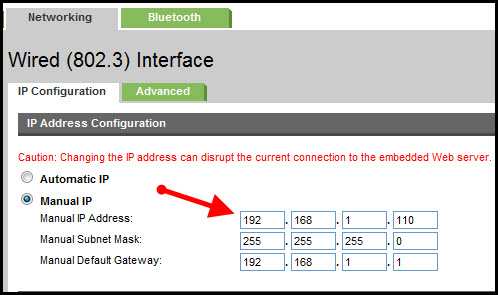
Assign a manual IP address and that should fix the issue.

a. On the product control panel, press or touch the Setup button.

b. Open the Reports menu.

c. Select configuration Report.


Setting a Static IP Address

Once you know your printer’s IP address from the page you printed, entering it is pretty easy. Here’s what you do:

HP Printer Static IP Address

  1. Run your Web browser.
  2. In the Web browser’s address bar, type the IP address of your printer and press Enter. Assuming you entered the right address, the HP printer control panel should appear.
  3. Click the Networking tab.
  4. Under Connections, click Wireless.
  5. Under IP Address Configuration, click Manual IP.
  6. Enter the IP address, subnet mask, and default gateway in the appropriate boxes.
  7. Click Apply.

You can refer this HP document for more assistance:- Click here


Let me know how it goes.

To thank me for my efforts to help you, please mark my post as an accepted solution so that it benefits several others.

Cheers.

Sandytechy20
I am an HP Employee

View solution in original post

1 REPLY 1
HP Recommended

@KjellG1


Welcome to the HP support community.


Assign a manual IP address and that should fix the issue.

a. On the product control panel, press or touch the Setup button.

b. Open the Reports menu.

c. Select configuration Report.


Setting a Static IP Address

Once you know your printer’s IP address from the page you printed, entering it is pretty easy. Here’s what you do:

HP Printer Static IP Address

  1. Run your Web browser.
  2. In the Web browser’s address bar, type the IP address of your printer and press Enter. Assuming you entered the right address, the HP printer control panel should appear.
  3. Click the Networking tab.
  4. Under Connections, click Wireless.
  5. Under IP Address Configuration, click Manual IP.
  6. Enter the IP address, subnet mask, and default gateway in the appropriate boxes.
  7. Click Apply.

You can refer this HP document for more assistance:- Click here


Let me know how it goes.

To thank me for my efforts to help you, please mark my post as an accepted solution so that it benefits several others.

Cheers.

Sandytechy20
I am an HP Employee

† The opinions expressed above are the personal opinions of the authors, not of HP. By using this site, you accept the <a href="https://www8.hp.com/us/en/terms-of-use.html" class="udrlinesmall">Terms of Use</a> and <a href="/t5/custom/page/page-id/hp.rulespage" class="udrlinesmall"> Rules of Participation</a>.