• ×
    Information
    Need Windows 11 help?
    Check documents on compatibility, FAQs, upgrade information and available fixes.
    Windows 11 Support Center.
  • post a message
  • ×
    Information
    Need Windows 11 help?
    Check documents on compatibility, FAQs, upgrade information and available fixes.
    Windows 11 Support Center.
  • post a message
Guidelines
Seize the moment! nominate yourself or a tech enthusiast you admire & join the HP Community Experts!
Common problems for Connectivity Issues
We would like to share some of the most frequently asked questions about Printer Wi-Fi, Connectivity Issues and Offline Status. Check out this link: HP printer is offline or unavailable.
HP Recommended
LaserJet P1102w
Microsoft Windows 10 (64-bit)

Recently Cox Communications swapped out my Netgear router for a Cox Panasonic modem/router combination.  Since they did that my HP printer is failing to connect to or recognize the PC - also an HP - or even the network.  I removed it from the devices and tried to add it back in but it gets as far as establishing the wireless connection and returns the message "The printer was unable to connect with any wireless router".  There's no manual way to establish the connection other than through the downloaded .exe file on my PC.  I can enter the Network name manually during the install but still the same result.


The interesting thing is that on the app for the new modem/router on my iPad shows the device but reports the status as Offline.


It's an older printer (7 Years) but the perfect size as I have two printers on my desk and it's the printer I use most and because of the size don't want to give up on it.  


Any suggestions?

3 REPLIES 3
HP Recommended

Hi@Julia41,


Welcome to the HP Support Community!


Don't worry I'll try to help you out.


Check the printer status

  • Make sure the printer is selected as the Default
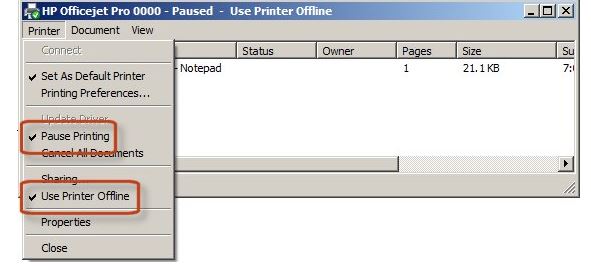
  • Check if the ‘Pause Printing’ or ‘Use Printer Offline sections have been selected
  • undefined

If you’re using Windows 10, it’s worth checking for the latest Microsoft update. On 12th April they released an update to improve the discoverability of printers when they resume from sleep mode. This update can help prevent occurrences of your printer going offline, especially for wireless connections

https://support.microsoft.com/en-us/kb/3147458


Try resetting the printer & checking the connection status (details in Step3 of the link below)

http://support.hp.com/us-en/document/c04249080


The HP Print and Scan Doctor is a useful tool to diagnose and resolve printing problems


There are other tips in the link below (such as making sure the correct port is selected and creating a manual IP address connection)


http://support.hp.com/us-en/document/c04249080


Hope this helps! Keep me posted.


Please click “Accept as Solution” if you feel my post solved your issue, it will help others find the solution.

Click the “Kudos, Thumbs Up" on the bottom right to say “Thanks” for helping!

Have a great day! 

HP Recommended

The update you provided the link for is way out of date - that particular update is not available. I use Windows 10 and my system is updated continuously, so Microsoft is not the issue, but HP may be.  I've done or explored all of the suggestions to no avail.  The printer recognizes the wireless connection, but is not communicating with the PC, even though they are on the same network and have the same password as the other devices which are functioning fine - for example, an Epson XP7100 wireless printer.

HP Recommended

Hi@Julia41,


II suggest you contact HP Smart Friend if you are facing issues with other printer 


Link: https://www8.hp.com/us/en/services/consumer/smartfriend-overview.html


Thank you


If the information I've provided was helpful, give us some reinforcement by clicking the "Solution Accepted" on this Post and it will also help other community members wit


† The opinions expressed above are the personal opinions of the authors, not of HP. By using this site, you accept the <a href="https://www8.hp.com/us/en/terms-of-use.html" class="udrlinesmall">Terms of Use</a> and <a href="/t5/custom/page/page-id/hp.rulespage" class="udrlinesmall"> Rules of Participation</a>.