-
×InformationNeed Windows 11 help?Check documents on compatibility, FAQs, upgrade information and available fixes.
Windows 11 Support Center. -

-
×InformationNeed Windows 11 help?Check documents on compatibility, FAQs, upgrade information and available fixes.
Windows 11 Support Center. -
- HP Community
- Printers
- Printer Wireless, Networking & Internet
- Re: Printer doesn't reliably print

Create an account on the HP Community to personalize your profile and ask a question
12-08-2020
07:42 PM
- last edited on
12-09-2020
08:55 AM
by
MatheusH
I am actually on Big Sur Mac OS. My printer doesn't reliably print. I have tried every possible update and re-install on this forum. I often have turn the printer on and off, to get it to print. This problem started to be intermittent when I moved but is now even worse. Essentially rendering this nice printer unusable.
I have downloaded the latest HP software and reinstalled. Reset the printing system on my mac etc.
I need help. Printer seems to be in OK status and ready to go, just nothing. Printer queue stops and just says ready to print and goes into pause mode. It is really bad on PDFs.
I will also add the web services page, is intermittent at best also. ****** for example. 80% of the time nothing happens.
R
12-22-2020 09:24 AM - edited 12-22-2020 09:24 AM
@kruegra1, Welcome to HP Support Community!
Ensure that the printer is up to date with its firmware and Mac is up to date with its software. If you are unsure you may use the links below to update the printer firmware and Mac software:
Remove and add the printer
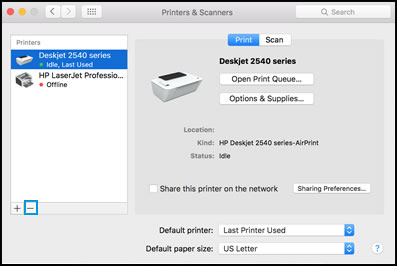
Click the Apple menu, and then select System Preferences.
Depending on your operating system version, click Print & Fax, Print & Scan, or Printers & Scanners.
Click the name of your printer, click the Minus sign
, and then delete the printer.

Click the Plus sign
, and then click Add Printer or Scanner.
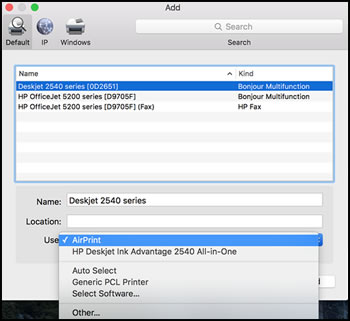
Click the Use or Print Using box, and then select AirPrint

Click Add to add the printer to the list.
Try to print.
Keep me posted for further assistance.
Please click “Accepted Solution” if you feel my post solved your issue, it will help others find the solution. Click the “Kudos/Thumbs Up" on the bottom right to say “Thanks” for helping!
TEJ1602
I am an HP Employee
12-22-2020 01:01 PM
I don't see a firmware update on the website.
https://support.hp.com/in-en/drivers/selfservice/hp-laserjet-pro-mfp-m125-series/5396664
The Firmware version currently on the printer is "2015-08-08".
The driver version is "HP ePCL Driver 1.6.0"
I did reinstall the HP Easy Start software version "2.10.0.201112" via wireless not wired connection on my mac, it found the printer but was intermittent. My question is, is the printer actually updated with the latest driver and firmware?
Randall
12-29-2020 12:02 AM
For OS X 10.9 and newer, download HP Easy Start, and then use the software application to uninstall your HP software.
-
Go to 123.hp.com/setup, and then click Download.
-
After the software downloads, open HP Easy Start.
-
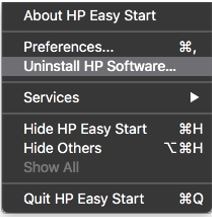
Click File, and then select Uninstall HP Software... from the menu.
Figure : Select Uninstall HP Software...

-
Read any warnings that display, and then click Continue.
-
When prompted, type your administrator user name and password.
-
HP Uninstaller removes all HP printer software previously installed.
-
If you are reinstalling the HP printer software, click Set Up New Device, and then follow the instructions to install the printer with HP EasyStart.
Now, try printing.
Hope this helps! Keep me posted.
Please click “Accepted Solution” if you feel my post solved your issue, it will help others find the solution. Click the “Kudos/Thumbs Up" on the bottom right to say “Thanks” for helping!
TEJ1602
I am an HP Employee