
-
×InformationNeed Windows 11 help?Check documents on compatibility, FAQs, upgrade information and available fixes.
Windows 11 Support Center. -
-
×InformationNeed Windows 11 help?Check documents on compatibility, FAQs, upgrade information and available fixes.
Windows 11 Support Center. -
- HP Community
- Printers
- Printer Wireless, Networking & Internet
- Re: printer offline

Create an account on the HP Community to personalize your profile and ask a question
Your account also allows you to connect with HP support faster, access a personal dashboard to manage all of your devices in one place, view warranty information, case status and more.
Common problems for Connectivity Issues
We would like to share some of the most frequently asked questions about Printer Wi-Fi, Connectivity Issues and Offline Status. Check out this link: HP printer is offline or unavailable.

It has been a while since anyone has replied. Simply ask a new question if you would like to start the discussion again.

12-12-2020 06:08 PM
 HP Recommended
Product: dell
Operating System: Microsoft Windows 10 (64-bit)
every couple of weeks my printer has started to go offline and now it has gotten difficult to get it back online. it is connected to the wireless network
7 REPLIES 7


12-24-2020 03:56 PM
HP Recommended
Hi, my printer is doing the same thing. It's offline & the blue wifi light keeps blinking. The wifi direct light is a steady white light. I've unplugged it and reinstalled the software so it can connect to my wifi. I can't get it to connect to my wifi and it still says offline. I don't know what else to do.

01-28-2021 08:27 AM
HP Recommended
Welcome to the HP support community.
Provide the printer model number or product number for more assistance.
Cheers.
Sandytechy20
I am an HP Employee
01-29-2021 09:24 AM
HP Recommended
Welcome to the HP support community.
Use HP Print and Scan Doctor to fix connectivity and printing issues.
Download HP Print and Scan Doctor.
-
Run HPPSdr.exe from the download location on your computer.
-
Once HP Print and Scan Doctor opens, click Start, and then select your printer.
-
If your printer is not in the list, turn it off and on, and then click Retry.
-
If there is a connection problem, follow the instructions in HP Print and Scan Doctor.
-
-
If a screen prompts you to turn on printer updates, click Yes.
-
If a screen prompts you to make your printer the default printer, click Yes.
-
Try to print.
Assign a manual IP address and that should fix the issue.
- On the printer's control panel, press the Wireless button
 and the Information button
  at the same time.
Setting a Static IP Address
Once you know your printer’s IP address from the page you printed, entering it is pretty easy. Here’s what you do:
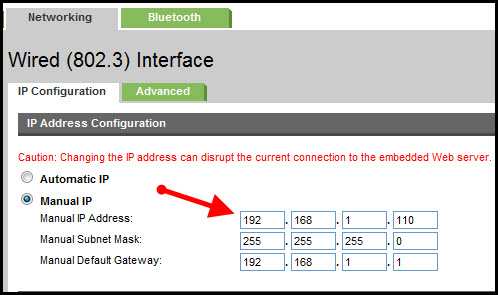
- Run your Web browser.
- In the Web browser’s address bar, type the IP address of your printer and press Enter. Assuming you entered the right address, the HP printer control panel should appear.
- Click the Networking tab.
- Under Connections, click Wireless.
- Under IP Address Configuration, click Manual IP.
- Enter the IP address, subnet mask, and default gateway in the appropriate boxes.
- Click Apply.
You can refer this HP document for more assistance:- Click here
Let me know how it goes.
To thank me for my efforts to help you, please mark my post as an accepted solution so that it benefits several others.
Cheers.
Sandytechy20
I am an HP Employee
01-29-2021 05:27 PM
HP Recommended
These steps did not work & my printer still says it's offline. The 'earth' icon button has an orange light that is still blinking, but the icon next to it is a white blinking light. This is hard to troubleshoot when HP doesn't have a number to call & walk someone through. Nothing is working at all and I've already went through ALL of the steps provided with the Virtual Agent and at the very end, there's no more 'My printer is still offline, continue to the next step' buttons to select. Can anybody resolve this issue for me?
01-31-2021 03:32 PM
HP Recommended
This might require one on one interaction to fix the issue.
I request you to talk to HP support.
They might have multiple options to help you with this.
- Click on this link - https://support.hp.com/us-en/contact-hp?openCLC=true
- Select the country.
- Enter the serial of your device.
- Select the country from the drop-down.
- Click on "Show Options".
- Fill the web-form. A case number and phone number will now populate for you.
I hope that helps.
To thank me for my efforts to help you, please mark my post as an accepted solution so that it benefits several others.
Cheers.
Sandytechy20
I am an HP Employee

Be alert for scammers posting fake support phone numbers and/or email addresses on the community.
If you think you have received a fake HP Support message, please report it to us by clicking on "Flag Post".
† The opinions expressed above are the personal opinions of the authors, not of HP. By using this site, you accept the Terms of Use and Rules of Participation.


Didn't find what you were looking for?
Ask the community
† The opinions expressed above are the personal opinions of the authors, not of HP. By using this site, you accept the <a href="https://www8.hp.com/us/en/terms-of-use.html" class="udrlinesmall">Terms of Use</a> and <a href="/t5/custom/page/page-id/hp.rulespage" class="udrlinesmall"> Rules of Participation</a>.