-
×InformationNeed Windows 11 help?Check documents on compatibility, FAQs, upgrade information and available fixes.
Windows 11 Support Center. -

-
×InformationNeed Windows 11 help?Check documents on compatibility, FAQs, upgrade information and available fixes.
Windows 11 Support Center. -
- HP Community
- Archived Topics
- Printers Archive
- Re: Instant ink

Create an account on the HP Community to personalize your profile and ask a question
02-26-2017 02:19 PM
02-26-2017 05:28 PM - edited 02-26-2017 05:31 PM
The troubleshooting steps in the document here may help track the status of your Instant Ink shipment. It can take ten days for standard shipments, there are also options to expidite shipments if needed.
I am not an employee of HP, I am a volunteer posting here on my own time.
If your problem is solved please click the "Accept as Solution" button
If my answer was helpful please click "Yes" to the "Was this post helpful" question.
02-27-2017 08:58 AM
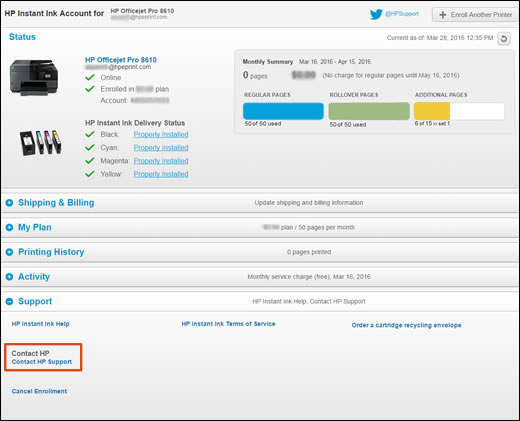
See step 6 and later in the document I referenced above:
- On your HP Instant Ink account page, click Support, and then click Contact HP Support.Figure : Clicking Contact HP Support

- On the HP Customer Support - Contact page, scroll down, and then fill out the contact form.
- Click Show options.
- HP contact options display on the screen.
- Select Chat Now or Get Phone Number.
I am not an employee of HP, I am a volunteer posting here on my own time.
If your problem is solved please click the "Accept as Solution" button
If my answer was helpful please click "Yes" to the "Was this post helpful" question.
02-27-2017 01:25 PM - edited 02-27-2017 01:25 PM
Hello @Shonashoe,
Thanks for contacting the HP Support Forums!
I see that your printer is low on ink and was not connected to the internet for awhile. I will certainly do my best to help you and please remember to return to this thread and mark 'Accept as Solution', if I have successfully helped you resolve the issue. If you wish to say 'thanks' for my effort to help, click the 'thumbs up' to give me a Kudos.
Have you resolved the connection problem? To ensure that you receive your replacement cartridges in a timely manner, we strongly recommend that you leave your printer powered on at all times. If your printer is powered off for days at a time it may not send information correctly to our servers which may cause a delay in ink shipments.
If you require more ink cartridges, please send me a private message with your account number or email address and I would be happy to look into sending you more ink if needed. Also, confirm that the address on your account is correct.
I look forward to hearing back from you. 🙂
Drakster
I work on behalf of HP
If you found this post helpful, you can let others know by clicking the “Accept as Solution” button. You can also show your appreciation, with a kudos, by clicking the “thumbs up" button!