• ×
    Information
    Need Windows 11 help?
    Check documents on compatibility, FAQs, upgrade information and available fixes.
    Windows 11 Support Center.
  • post a message
  • ×
    Information
    Need Windows 11 help?
    Check documents on compatibility, FAQs, upgrade information and available fixes.
    Windows 11 Support Center.
  • post a message
Guidelines
Seize the moment! nominate yourself or a tech enthusiast you admire & join the HP Community Experts!
Check some of the most frequent questions about Instant Ink: HP INSTANT INK, HP+ PLANS: INK AND TONER.


Check out our Black or Color Ink Not Printing, Other Print Quality Issues info about: Print quality and Cartridge Issues.
HP Recommended
HP Envy 5540

I am just trying to adjust the dark/light level to copy something on my HP Envy 5540 printer.  Why am I finding it so difficult?

2 REPLIES 2
HP Recommended

@MsChris66


@MsChris66 wrote:

I am just trying to adjust the dark/light level to copy something on my HP Envy 5540 printer.  Why am I finding it so difficult?


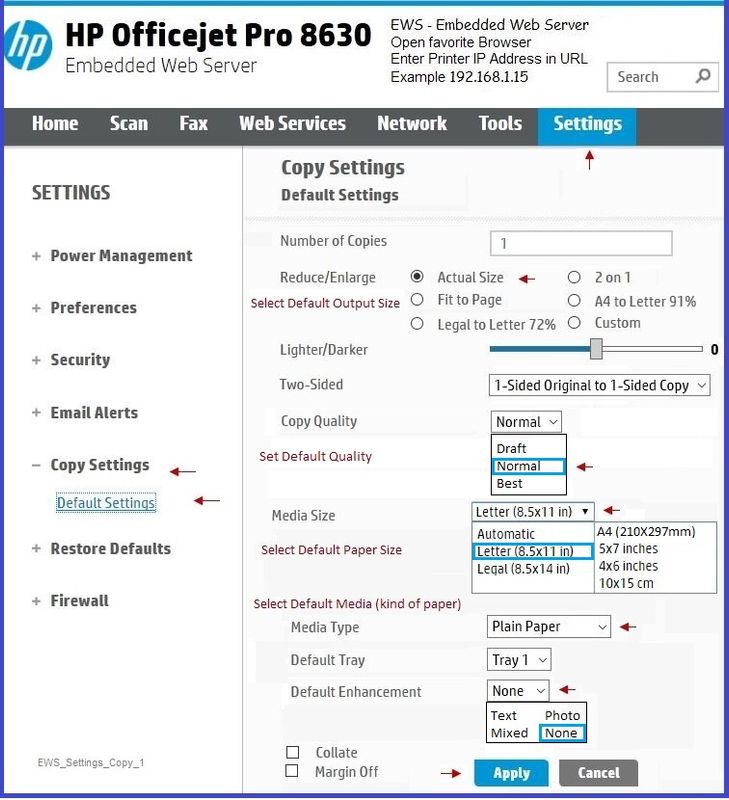
If the printer in on the network, use the Embedded Web Server (EWS) to set the defaults / adjust the settings for Copy


If the printer Copy supports the features shown in the example

then

Open your favorite browser > enter the printer IP address in the URL / Address bar >

Settings > Copy Settings > Default Settings

Next to Lighter/Darker, slide the bar to the left for lighter or right for darker

Click Apply


General Example - Copy Defaults

EWS_Settings_Copy_1EWS_Settings_Copy_1


Click Thumbs Up to say Thank You!

Answered? Click my post "Accept as Solution" to help others find it.


Dragon-Fur

HP Recommended

Hello MsChris,

Dragon-fur's solution is intriguing; hope to hear that is solved the problem  for your 5540.   Your 5540 may be like mine.


I investigated on my 5660.  The EWS page looks nothing like the 8630  and found nothing under Settings; however under Scan is a lighter/darker sliding bar.


Find the IP address, by touching the wireless icon on the front display panel (looks like a radio tower with radiating waves), for wireless summary.  Enter the IP address in the browsers address line, which will open the EWS page.


I am not an HP employee.

† The opinions expressed above are the personal opinions of the authors, not of HP. By using this site, you accept the <a href="https://www8.hp.com/us/en/terms-of-use.html" class="udrlinesmall">Terms of Use</a> and <a href="/t5/custom/page/page-id/hp.rulespage" class="udrlinesmall"> Rules of Participation</a>.