• ×
    Information
    Need Windows 11 help?
    Check documents on compatibility, FAQs, upgrade information and available fixes.
    Windows 11 Support Center.
  • post a message
  • ×
    Information
    Need Windows 11 help?
    Check documents on compatibility, FAQs, upgrade information and available fixes.
    Windows 11 Support Center.
  • post a message
Guidelines
Seize the moment! nominate yourself or a tech enthusiast you admire & join the HP Community Experts!
Check some of the most frequent questions about Instant Ink: HP INSTANT INK, HP+ PLANS: INK AND TONER.


Check out our Black or Color Ink Not Printing, Other Print Quality Issues info about: Print quality and Cartridge Issues.
HP Recommended
Officejet Pro 8625
Microsoft Windows 10 (64-bit)

Red x with printer failure.

1 REPLY 1
HP Recommended

@Stu1942


Welcome to the HP support community.


Check for obstructions in the carriage path

  1. With the printer on, disconnect the power cord from the rear of the printer.

  2. Open the door to access the carriage inside of the printer.

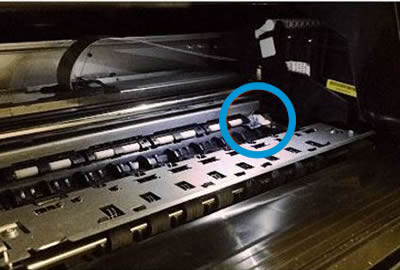
  3. Look in the carriage path for debris such as crumpled paper or dislodged labels, and then remove any that you find.

    Obstruction inside the printer

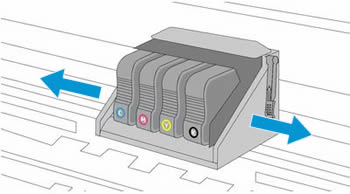
  4. Use your hand to move the carriage to each side, making sure it moves freely. If the carriage is stalled or docked to one side of the printer and you cannot move it, continue with these steps.

    Moving the carriage from side to side

  5. Close the carriage access door.

  6. Reconnect the power cord to the rear of the printer, and then turn the printer on.

You can refer this HP support document for more assistance:- Click here


I hope that helps.

To thank me for my efforts to help you, please mark my post as an accepted solution so that it benefits several others.

Cheers.

Sandytechy20
I am an HP Employee

† The opinions expressed above are the personal opinions of the authors, not of HP. By using this site, you accept the <a href="https://www8.hp.com/us/en/terms-of-use.html" class="udrlinesmall">Terms of Use</a> and <a href="/t5/custom/page/page-id/hp.rulespage" class="udrlinesmall"> Rules of Participation</a>.