• ×
    Information
    Need Windows 11 help?
    Check documents on compatibility, FAQs, upgrade information and available fixes.
    Windows 11 Support Center.
  • post a message
  • ×
    Information
    Need Windows 11 help?
    Check documents on compatibility, FAQs, upgrade information and available fixes.
    Windows 11 Support Center.
  • post a message
Guidelines
Join the HP Community Solve‑a‑thon | Help Others & Share Your Solutions | Live on Zoom | 2:30 PM to 2:30 AM IST | Every Wednesday Click here to know more
Check some of the most frequent questions about Instant Ink: HP INSTANT INK, HP+ PLANS: INK AND TONER.


Check out our Black or Color Ink Not Printing, Other Print Quality Issues info about: Print quality and Cartridge Issues.
HP Recommended
HP OfficeJet 3835
Microsoft Windows 7 (32-bit)

For 3 months my printer was working without charge, but yesterday, when i tried to print my work to school, a problem appeared. The panel with the level of inks, shows that there is no the colour one. The problem is that when I try to print only in black&white it also doesn't work. Additionally there also an information that this colour ink doesn't match to my printer (I think that they system thinks that it is fake, but it isn't, because i bought it in an official HP shop). If it were the fake one, this information should appear immediately when I inserted them at the beggining. I don't know if I should just buy new ink or make a complaint to the shop or something else.

Printer: HP OfficeJet 3835

Product No. F5S02B

Ink Cartridge: 302

3 REPLIES 3
HP Recommended

@Zwojtek, Welcome to the HP Support Community!


Let us try these steps to resolve this issue:


Reset the printer

  1. With the printer turned on, disconnect the power cord from the rear of the printer.
  2. Wait at least 60 seconds.
  3. Reconnect the power cord to the rear of the printer.
  4. Turn ON the printer, if it does not automatically turn on.
  5. Wait until the printer is idle and silent before you proceed.

Note: HP recommends connecting the printer directly to a wall outlet rather than a surge protector or a power strip.


Update the printer firmware

Click here to download and install the latest firmware from your computer.

Click here to know different methods of updating printer firmware.


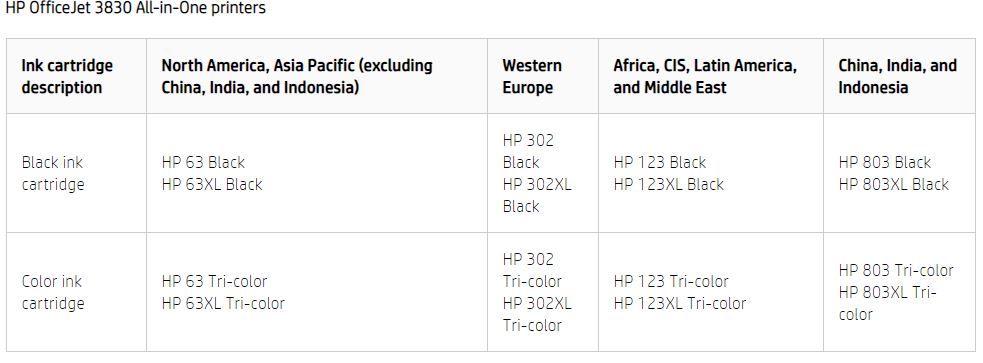
Make sure that the ink cartridges are compatible


Perform steps 2 and 3 mentioned in this document.


Let me know how this goes.


If you feel my post solved your issue, please click “Accept as Solution”, it will help others find the solution. Click the “Kudos/Thumbs Up" on the bottom right to say “Thanks” for helping!

KUMAR0307
I am an HP Employee

HP Recommended

I've restarted the printer, when it didn't help, I tried the second method.  It turned out that the latest firmware is already installed. The inks are also compatible. I've also cleaned the contacts.  None of your advices didn't help, so if you have any more, I'd appreciate it.

HP Recommended

@Zwojtek


If the issue persists, please contact our HP Support team for Service Options as it could be a possible hardware issue:

1) Click on this link - www.hp.com/contacthp/

2) Select your product type below.

3) Enter the serial of your device.

4) Select the country from the drop-down.

5) Select the appropriate option based on your preference.

6) Fill the web-form and proceed further.


Keep me posted for any other assistance.


If you feel my post solved your issue, please click “Accept as Solution”, it will help others find the solution. Click the “Kudos/Thumbs Up" on the bottom right to say “Thanks” for helping!

KUMAR0307
I am an HP Employee

† The opinions expressed above are the personal opinions of the authors, not of HP. By using this site, you accept the <a href="https://www8.hp.com/us/en/terms-of-use.html" class="udrlinesmall">Terms of Use</a> and <a href="/t5/custom/page/page-id/hp.rulespage" class="udrlinesmall"> Rules of Participation</a>.