
-
×InformationNeed Windows 11 help?Check documents on compatibility, FAQs, upgrade information and available fixes.
Windows 11 Support Center. -
-
×InformationNeed Windows 11 help?Check documents on compatibility, FAQs, upgrade information and available fixes.
Windows 11 Support Center. -
- HP Community
- Printers
- Printing Errors or Lights & Stuck Print Jobs
- Re: Ink replacement

Create an account on the HP Community to personalize your profile and ask a question
Your account also allows you to connect with HP support faster, access a personal dashboard to manage all of your devices in one place, view warranty information, case status and more.
Check some of the most frequent questions about Instant Ink: HP INSTANT INK, HP+ PLANS: INK AND TONER.
Check out our Black or Color Ink Not Printing, Other Print Quality Issues info about: Print quality and Cartridge Issues.

It has been a while since anyone has replied. Simply ask a new question if you would like to start the discussion again.

06-07-2017 08:47 PM
 HP Recommended
Product: HP Envy 4501
Operating System: Microsoft Windows 7 (64-bit)
My HP printer goes through black and color ink every 3 weeks. Is this normal? I've printed several pictures lately but only in a 5x7 size.
Solved! Go to Solution.
1 ACCEPTED SOLUTION
Accepted Solutions

06-10-2017 06:06 AM - edited 06-10-2017 06:07 AM
HP Recommended
I beleive your printer uses a HP 61 Tri-color cartridge. This yields 100 pages at 5% coverage. Since you are doing full color photo's that means you are using 100% coverage.
So with the above math... 100/20 = 5 pages. Better than expected.
Hoever if using the XL Color cartridge... This cartridge yields 330 pages.
So now that math is... 330/20 = 16 pages. You are still getting better than that.
5 REPLIES 5

06-08-2017 03:35 AM
HP Recommended
Hi,
Your ink usege is completely dependant on the type and frequency of your printing. To help use less ink you could switch to draft mode although this wil result is less vibrant photos.
Another option if you feel you are printing alot is HP's instant ink program provided you are in an eligible country and have an eligible printer -see the link below.
https://instantink.hpconnected.com/ca/en/r
"
"Say "Thanks" by clicking the Kudos Star in the post that helped you.
--Please mark the post that solves your problem as "Accepted Solution"
"Say "Thanks" by clicking the Kudos Star in the post that helped you.
--Please mark the post that solves your problem as "Accepted Solution"
06-08-2017 05:32 AM
HP Recommended
I'm sure the Instant Ink is a great idea. However I'm not sure it would benefit me. The last 2 months I've used my printer a lot. I say a lot, probably 50 or less sheets. Some months I don't use but a couple of sheets the entire month. I print colored greeting cards and some occasional photos. On my photos I am always on best quality. It just seems to use more Ink than my old HP did.
06-08-2017 05:53 AM
HP Recommended
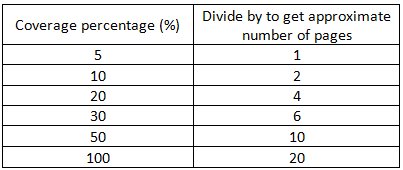
Here is a chart to help with Ink Cartridge Page Estimation. All cartridges are based on a 5% coverage when new.
Note: A 5% coverage is about 6 single spaced lines of text on a page. No bold, graphics or pictures. A full color photo would be 100% coverage.
A ‘regular’ page of text would be about 72 lines and give us 30% coverage (more realistic). Don’t forget the font type and size you use will use more ink too.
Example: 564XL Black = 550 pages at 5% coverage.
Your average page coverage you estimate is 30%. So…550/6 = 91.
Therefore the number of pages expected (30% coverage) out of your cartridge would be about 90.
06-10-2017 06:06 AM - edited 06-10-2017 06:07 AM
HP Recommended
I beleive your printer uses a HP 61 Tri-color cartridge. This yields 100 pages at 5% coverage. Since you are doing full color photo's that means you are using 100% coverage.
So with the above math... 100/20 = 5 pages. Better than expected.
Hoever if using the XL Color cartridge... This cartridge yields 330 pages.
So now that math is... 330/20 = 16 pages. You are still getting better than that.

Be alert for scammers posting fake support phone numbers and/or email addresses on the community.
If you think you have received a fake HP Support message, please report it to us by clicking on "Flag Post".
† The opinions expressed above are the personal opinions of the authors, not of HP. By using this site, you accept the Terms of Use and Rules of Participation.


Didn't find what you were looking for?
Ask the community
† The opinions expressed above are the personal opinions of the authors, not of HP. By using this site, you accept the <a href="https://www8.hp.com/us/en/terms-of-use.html" class="udrlinesmall">Terms of Use</a> and <a href="/t5/custom/page/page-id/hp.rulespage" class="udrlinesmall"> Rules of Participation</a>.