-
×InformationNeed Windows 11 help?Check documents on compatibility, FAQs, upgrade information and available fixes.
Windows 11 Support Center. -

-
×InformationNeed Windows 11 help?Check documents on compatibility, FAQs, upgrade information and available fixes.
Windows 11 Support Center. -
- HP Community
- Printers
- Printing Errors or Lights & Stuck Print Jobs
- Issue printing PDF Forms

Create an account on the HP Community to personalize your profile and ask a question
03-29-2021 01:12 PM
Hi, I'm having trouble printing PDF forms that I have downloaded from HMRC, although the text prints OK the boxes that I have to add details to don't print at all. I've tried various things, printing in black & white, colour and converted the PDF to Word but they still doesn't print as I'd like. No doubt it's something simple and I'll be made to look a fool however I've spent enough time and used enough ink without making any progress, any help really appreciated
Solved! Go to Solution.
Accepted Solutions
04-01-2021 10:33 AM
Hi @Markie661,
I'd like to help!
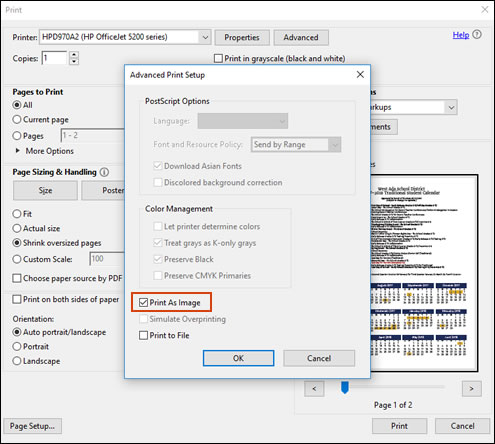
Try and Print the PDF as an image
You can print a PDF file as an image.
NOTE:Printing a PDF file as an image can result in blurry images or fonts, especially along the edges of the print.
-
Open the original PDF file.
-
Click File, and then select Print from the list.
The Print window opens.
-
Click Advanced.
The Advanced Print Setup window opens.
-
Click the Print As Image checkbox, change any other settings as desired, and then click OK.

Hope this helps! Keep me posted.
And, Welcome to the HP Support Community.
Please click “Accept as Solution” if you feel my post solved your issue, it will help others find the solution.
Click the “Kudos, Thumbs Up" on the bottom right to say “Thanks” for helping
04-01-2021 10:33 AM
Hi @Markie661,
I'd like to help!
Try and Print the PDF as an image
You can print a PDF file as an image.
NOTE:Printing a PDF file as an image can result in blurry images or fonts, especially along the edges of the print.
-
Open the original PDF file.
-
Click File, and then select Print from the list.
The Print window opens.
-
Click Advanced.
The Advanced Print Setup window opens.
-
Click the Print As Image checkbox, change any other settings as desired, and then click OK.

Hope this helps! Keep me posted.
And, Welcome to the HP Support Community.
Please click “Accept as Solution” if you feel my post solved your issue, it will help others find the solution.
Click the “Kudos, Thumbs Up" on the bottom right to say “Thanks” for helping
04-06-2021 06:44 AM
You're welcome 🙂
If you need further assistance feel free to reach out to us.
Have a great day ahead!
Please click “Accepted Solution” on my public post if you feel my post solved your issue, it will help others find the solution. Click the “Kudos/Thumbs Up" on the bottom right to say “Thanks” for helping!