-
×InformationNeed Windows 11 help?Check documents on compatibility, FAQs, upgrade information and available fixes.
Windows 11 Support Center. -

-
×InformationNeed Windows 11 help?Check documents on compatibility, FAQs, upgrade information and available fixes.
Windows 11 Support Center. -
- HP Community
- Printers
- Printing Errors or Lights & Stuck Print Jobs
- Not Print In Red

Create an account on the HP Community to personalize your profile and ask a question
01-30-2020 10:09 PM
My printer detected half the tank of ink in cartridge but not printing out the red. I ran the cleaning the print head and the test page show every color but the red. I replaced the cartridge and it shows in full but still the same result, no red printing.
Does anyone know the answer to this?
02-03-2020 04:26 PM
@JakeOC
Thank you for posting on the HP Support Community.
Don't worry as I'll be glad to help, I have a few troubleshooting steps we could try to fix the issue:
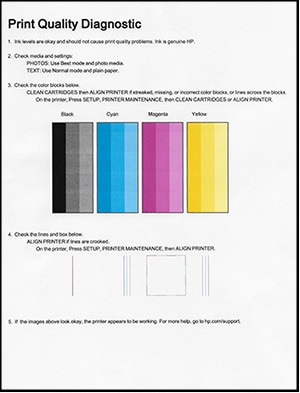
Follow these steps to print a Print Quality Diagnostic report.
-
Load U.S. letter or A4 size, unused, plain white paper into the input tray.
-
On the printer control panel, swipe the display to the left, and then touch Setup
.The Setup menu displays.
-
Touch Reports, and then touch Print Quality Report.
A Print Quality Diagnostic page prints.
Example of a Print Quality Diagnostic report without defects

Example of a Print Quality Diagnostic report with defects

Hope this helps! Keep me posted for further assistance.
Please click “Accept as Solution” if you feel my post solved your issue, it will help others find the solution.
ECHO_LAKE
I am an HP Employee
02-03-2020 10:59 PM
I did run the cleaning process couple of times and also replace both cartridges. The P Q D shown ink level are okay and ink is genuine HP. However, the color block does not show the red color in its block (not even a dot) and the alignment is okay. And for the final shot, I reset the printer but no luck not improve. I am just wondering if there is any option in the software I can check.
02-04-2020 06:46 PM
@JakeOC
Thank you for posting back.
I would request you to reach out to our Support and our Support Engineers should be able to sort this out. HP Support can be reached by clicking on the following link: www.hp.com/contacthp/
Please feel free to contact us here anytime you need any further assistance. Please click “Accept as Solution” if you feel my post solved your issue, it will help others find the solution.
ECHO_LAKE
I am an HP Employee