• ×
    Information
    Need Windows 11 help?
    Check documents on compatibility, FAQs, upgrade information and available fixes.
    Windows 11 Support Center.
  • post a message
  • ×
    Information
    Need Windows 11 help?
    Check documents on compatibility, FAQs, upgrade information and available fixes.
    Windows 11 Support Center.
  • post a message
Guidelines
Seize the moment! nominate yourself or a tech enthusiast you admire & join the HP Community Experts!
Check some of the most frequent questions about Instant Ink: HP INSTANT INK, HP+ PLANS: INK AND TONER.


Check out our Black or Color Ink Not Printing, Other Print Quality Issues info about: Print quality and Cartridge Issues.
HP Recommended
HP DeskJet 3636 All-in-One Printer
iOS

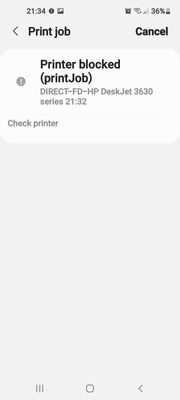
Received this printer 2nd hand and unable to print.   This is the error message on my mobile.  Can anybody help, so.frustrated.  

I

Screenshot_20220522-213446_Settings.jpg

1 REPLY 1
HP Recommended

@Aa9-_, Welcome to the HP Support Community! I’m here to help.


I understand you are not able to print from your iOS device. First, let us check the hardware functionality of the printer.


Try making a standalone copy in black and color from the flatbed glass and check if that works. By this, we can conclude if this is a hardware or a driver issue.


If the copy works, check the connectivity. I see that you are using Wifi-Direct on the printer. This is used if you do not have access to a personal wireless router.

For more info, refer to - HP printer setup (Wi-Fi Direct)

Note: There will be no internet connection on the iOS device while using this option.


To connect the printer to your wireless network, refer to - Connecting an HP Printer Using Wi-Fi Protected Setup (WPS)

  • Make sure the printer and the iOS device are connected to the same wireless network. This model printer only connects to a 2.4GHz network.
  • If you have a Dual-band router and both 2.4GHz and 5GHz networks share the same name/SSID, the printer will not be able to connect to the network. In this case, contact your Internet service provider to assign different names to both networks.
  • Also, check with your Internet service provider if your router is able to forward 'Bonjour packets'.

Bonjour locates devices such as printers, other computers, and the services that those devices offer on a local network using multicast Domain Name System (mDNS) service records. The software comes built-in with Apple's macOS and iOS operating systems.


  • This printer supports WPA encryption, check if the router is on the same encryption method. If using WEP or WPA-PSK+FT change it to WPA-PSK

You may also refer to - HP printer setup (Wi-Fi network) and HP printer setup (HP Smart app)

Use the HP Smart app to print.


Hope this helps! Let me know how it goes. 


Please click “Accept as Solution” if you feel my post solved your issue, it will help others find the solution.

Click on the YES button to reply that the response was helpful and/or to say “Thank You”.

KUMAR0307
I am an HP Employee

† The opinions expressed above are the personal opinions of the authors, not of HP. By using this site, you accept the <a href="https://www8.hp.com/us/en/terms-of-use.html" class="udrlinesmall">Terms of Use</a> and <a href="/t5/custom/page/page-id/hp.rulespage" class="udrlinesmall"> Rules of Participation</a>.